
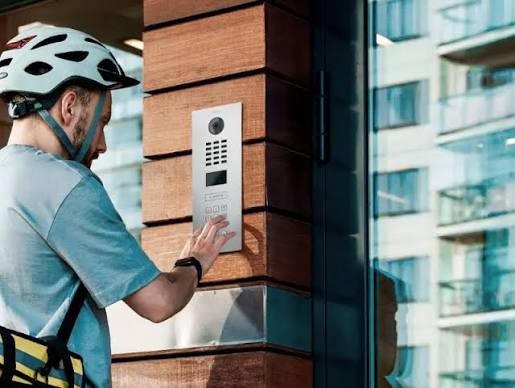
Controlling who enters your property is an important part of maintaining safety, privacy and convenience. Whether you own a family home, manage an apartment block, operate an office or oversee a commercial building, you need a reliable way to communicate with visitors before allowing them inside. Intercom and video door phone systems provide a practical solution by allowing occupants, receptionists and security personnel to communicate with people at the entrance and, depending on the system, see and verify visitors before granting access.
Across Uganda, residential estates, apartment buildings, offices, schools, hotels, hospitals and commercial premises increasingly need more organised visitor communication and entry management. Traditional doorbells and manual communication may not provide sufficient visibility or control, particularly where entrances are shared or security personnel must screen visitors.
Modern intercom systems make it possible to communicate between rooms, floors, gates, reception areas and individual apartments. Video door phone systems add a camera and display, allowing occupants to see who is at the door. More advanced solutions can integrate with electronic locks, access control systems, CCTV cameras and automatic gates.
At Daltrevco, we recognise the importance of selecting security and communication solutions that match the design, size and requirements of each property. This guide explains how intercom and video door phone systems work, the different types available, their benefits, installation requirements and the factors to consider when choosing a suitable system in Uganda.
What Are Intercom and Video Door Phone Systems?
An intercom system is an electronic communication solution that allows people at different locations within or around a building to communicate without meeting physically. It can connect an entrance gate to a house, a reception desk to offices, security personnel to tenants or different rooms within a property.
A video door phone is a type of intercom system that includes a camera and video display. It allows the person inside the building to see a visitor standing at the entrance while communicating through a speaker and microphone.
Depending on the equipment and configuration, an intercom or video door phone system may allow users to:
- Speak to visitors before opening the door or gate.
- View visitors through a built-in camera.
- Communicate between rooms, offices or apartments.
- Notify occupants when someone arrives.
- Remotely release an electronic door lock or compatible gate.
- Screen visitors before allowing them into restricted areas.
- Connect with access control and other security systems.
The main difference is that a basic audio intercom provides voice communication, while a video door phone adds visual identification. Some modern systems combine both functions with mobile applications and remote access features.
How Do Intercom and Video Door Phone Systems Work?
An intercom system works by connecting an entrance communication unit to one or more indoor communication devices. When a visitor arrives, they press a call button or select the intended apartment, office or department. The indoor unit receives the call, allowing the occupant or receptionist to communicate with the visitor.
A video door phone follows a similar process but also transmits video from a camera positioned at the entrance.
A typical operating process involves the following steps:
- Visitor arrives: A visitor approaches the main entrance, gate or apartment door.
- Call is initiated: The visitor presses a call button or selects the required apartment or department.
- Notification is received: The indoor monitor, handset or connected mobile device receives an alert.
- Communication begins: The occupant or security officer speaks to the visitor.
- Visual verification takes place: If the system has a camera, the user views the visitor on the indoor screen or supported mobile application.
- Entry is approved or denied: The occupant decides whether to admit the visitor.
- Door or gate is released: If integrated with a compatible electronic lock or gate controller, the user can unlock the entrance remotely.
The exact functions depend on the equipment, wiring, network connection and access control integration. Not every intercom system supports remote unlocking or smartphone access.
Types of Intercom and Video Door Phone Systems
Choosing the right system begins with understanding the available technologies. Different buildings require different communication arrangements depending on the number of users, entrances, security requirements and installation conditions.
1. Audio Intercom Systems
Audio intercom systems provide two-way voice communication between an entrance station and an indoor handset or master station.
When a visitor presses the call button, the occupant receives the call and can speak to the person outside. The occupant can then decide whether to open the door or arrange for someone to receive the visitor.
Common applications include:
- Private residential homes.
- Small office buildings.
- Staff entrances.
- Reception areas.
- Residential gates.
- Internal communication between rooms.
Audio intercoms are generally suitable where voice communication is sufficient and visual visitor identification is not a major requirement.
2. Video Door Phone Systems
Video door phones combine audio communication with a camera and indoor display. They allow occupants to see visitors before opening the entrance.
A typical video door phone includes an outdoor camera station, microphone, speaker, call button and indoor monitor. Depending on the model, the system may also include night vision, motion detection, image capture and remote unlocking.
Common applications include:
- Residential houses.
- Apartment entrances.
- Gated communities.
- Office entrances.
- Private clinics.
- Small commercial buildings.
Video door phones are particularly useful where occupants want visual confirmation of visitors before granting access.
3. Wired Intercom Systems
Wired intercom systems use physical cables to connect entrance stations, indoor monitors and other communication devices.
They are commonly considered during new building construction, major renovations or security upgrades where suitable cable routes are available.
Advantages include:
- Stable communication when properly installed.
- Reduced dependence on wireless signal strength.
- Suitable connections for multi-unit buildings.
- Reliable integration with compatible entrance equipment.
- Centralised communication for larger properties.
However, installation may require additional wiring, conduits and building work, particularly in completed properties.
4. Wireless Intercom Systems
Wireless intercom systems communicate using supported radio or wireless network technologies rather than relying entirely on dedicated communication cables between units.
They can be useful in existing buildings where running new cables would be difficult or disruptive.
Potential advantages include:
- Flexible installation options.
- Reduced need for extensive cable routing.
- Convenient expansion in suitable environments.
- Compatibility with selected mobile and smart-home solutions.
Wireless performance depends on building materials, distance, interference, network quality and the technology used. A site assessment is important before selecting a wireless system.
5. IP and Network-Based Intercom Systems
IP intercom systems use an internet protocol network to transmit audio, video and control signals between compatible devices.
They can connect entrance stations, indoor monitors, reception computers and supported mobile applications through a local network or approved remote-access service.
Common features may include:
- High-quality audio and video.
- Communication across different building areas.
- Mobile application support.
- Centralised administration.
- Integration with compatible access control systems.
- Remote communication where the network and service support it.
IP intercom systems are useful for offices, apartment complexes, hotels, hospitals and larger commercial properties that need communication across multiple locations.
6. Multi-Apartment Intercom Systems
Multi-apartment intercom systems are designed for buildings with several residential units. Visitors can select a specific apartment from the entrance panel and communicate with the relevant tenant.
A typical system may include:
- A shared entrance panel.
- Individual apartment handsets or monitors.
- Apartment directory and call buttons.
- A central power supply or network connection.
- Electric door release integration, where required.
These systems help apartment managers organise visitor communication without requiring every tenant to manage the main entrance independently.
7. Smart Video Door Phones
Smart video door phones connect compatible entrance devices to smartphones or tablets through a dedicated application or network service.
Depending on the product, users may be able to receive visitor calls, view live video, communicate remotely and release a compatible door lock while away from the property.
Before purchasing, confirm whether the system requires an internet connection, a subscription, a cloud account or a compatible mobile application. Also check what functions remain available during internet or power interruptions.
Key Components of an Intercom and Video Door Phone System
Understanding the main components helps property owners choose equipment that will work together properly.
Outdoor Entrance Station
The outdoor station is installed near the entrance, gate or door. It may contain a call button, speaker, microphone, camera, keypad or apartment directory.
For outdoor installations in Uganda, the equipment should be suitable for the expected weather exposure, dust and physical conditions.
Indoor Monitor or Handset
The indoor unit allows occupants, receptionists or security officers to receive calls and communicate with visitors. Video systems use a screen to display the camera feed.
Larger buildings may require multiple indoor monitors or a central reception station.
Camera
The camera captures video of visitors at the entrance. Camera quality, viewing angle, lighting performance and positioning all influence how clearly a visitor can be identified.
A wide viewing angle can help cover the entrance area, but the camera should be positioned to show faces clearly rather than relying only on a broad image.
Microphone and Speaker
The microphone captures the visitor’s voice while the speaker allows the occupant to respond. Clear two-way communication is important, especially at noisy gates or busy commercial entrances.
Power Supply and Backup
Intercom equipment requires an appropriate power source. Some systems use dedicated power supplies, while others use network-based power technologies such as Power over Ethernet (PoE).
Where continuous operation is important, suitable backup power should be considered. The backup arrangement must match the equipment’s power requirements and expected operating time.
Electric Lock or Gate Release Interface
Some systems can connect to compatible electronic locks, magnetic locks, electric strikes or automatic gate controllers. This allows an authorised user to release an entrance from an indoor monitor or supported application.
The correct release hardware and safe exit arrangements depend on the door type, building layout and applicable safety requirements.
Network and Cabling
Wired systems require suitable communication and power cables. IP systems require an appropriately designed network, while wireless systems need sufficient signal coverage.
Cable protection, correct termination, network security and professional configuration all contribute to reliable operation.
Benefits of Installing Intercom and Video Door Phone Systems
Installing an intercom or video door phone system can improve the way people communicate with visitors and manage building entrances.
1. Improved Visitor Screening
Intercom systems allow occupants or reception staff to communicate with visitors before granting entry. Video door phones provide an additional visual check, helping users make more informed access decisions.
2. Better Residential Security
Homeowners can respond to visitors without immediately opening the door or walking to the gate. This is especially useful for homes with perimeter gates, separate entrances or visitors arriving when occupants are inside the house.
3. Convenient Remote Communication
Compatible smart systems allow users to receive calls and communicate through supported mobile applications. This can be helpful when a homeowner or authorised staff member is away from the indoor monitor.
Remote operation depends on the product, application, network availability and configuration.
4. Improved Apartment Management
In apartment buildings, a multi-unit intercom allows visitors to contact specific tenants. This reduces unnecessary movement around the property and provides a more organised entrance communication process.
5. Better Office Reception Management
Businesses can use intercoms to connect the main entrance with reception desks, departments and restricted areas. Reception staff can contact the relevant employee before allowing a visitor to proceed.
6. Reduced Unnecessary Movement
Employees, tenants and homeowners do not need to physically approach every entrance to establish who is visiting. They can communicate from an indoor station or compatible device.
7. Integration with Access Control Systems
Compatible intercom systems can work alongside card readers, biometric access control, electronic locks and gate controllers. This creates a more coordinated approach to visitor communication and entry management.
8. Improved Communication Across Large Buildings
Multi-station systems can connect different floors, offices, security posts and reception areas. This is useful in commercial buildings where staff need to communicate across separate locations.
9. Better Visitor Experience
A properly configured video door phone or reception intercom makes it easier for visitors to identify the correct entrance and contact the person they intend to see.
10. Flexible Security Upgrades
Property owners can select a basic audio intercom, a video door phone or an IP-based solution and expand the arrangement where the chosen equipment supports additional stations and integrations.
Applications of Intercom Systems in Residential Buildings
Intercom systems are suitable for different residential property types, from private homes to large apartment developments.
Private Homes
A video door phone can be installed at the main entrance or perimeter gate to help homeowners communicate with visitors before opening the entrance.
Apartment Buildings
Multi-apartment systems allow visitors to contact individual tenants through a shared entrance panel. This is particularly useful in buildings with several floors and multiple residential units.
Gated Residential Estates
An intercom at the main gate can connect visitors with security personnel, estate management or residents. Larger estates may require multiple communication points and integration with vehicle access control.
Duplexes and Multi-Storey Houses
Intercom stations can connect different floors or rooms, making internal communication easier and allowing occupants to respond to visitors from convenient locations.
Rental Properties
Landlords and property managers can use intercom systems to improve visitor communication and organise access to shared entrances.
Applications in Commercial and Institutional Buildings
Commercial premises often need more than a simple doorbell because they receive employees, suppliers, contractors, customers and other visitors throughout the day.
Offices and Corporate Buildings
Intercoms can connect external entrances to reception desks, individual departments and restricted office areas. Receptionists can confirm appointments or contact staff before directing visitors.
Hotels and Hospitality Facilities
Hotels can use intercom systems for communication between reception, service areas, staff entrances and selected operational departments. The system should be planned around guest privacy and the hotel’s operating procedures.
Hospitals and Healthcare Facilities
Intercoms can support communication at staff-only entrances, reception points, controlled departments and service areas. Access decisions should remain consistent with patient privacy and emergency procedures.
Schools and Universities
Educational institutions can use entrance intercoms to help reception and security teams communicate with visitors, parents, suppliers and contractors before admitting them.
Warehouses and Industrial Facilities
Intercom systems can connect gatehouses, loading areas, security offices and administrative departments. They are useful where entrances are spread across a large site.
Shopping Centres and Retail Buildings
Intercoms can support communication between security control rooms, service entrances, management offices and selected restricted areas.
Intercom Systems vs Video Door Phone Systems: What Is the Difference?
Although the terms are sometimes used interchangeably, they do not always refer to exactly the same equipment.
| Feature | Audio Intercom | Video Door Phone |
|---|---|---|
| Voice communication | Yes | Yes |
| Visitor video | No | Yes |
| Indoor handset or monitor | Usually handset or station | Usually screen or monitor |
| Visitor identification | Voice-based | Voice and visual |
| Remote unlocking | Depends on configuration | Depends on configuration |
| Mobile application | Available on selected models | Available on selected smart models |
| Typical use | Internal and entrance communication | Visual visitor screening |
An audio intercom may be sufficient for internal communication or simple entrance screening. A video door phone is generally more suitable when occupants want to see visitors before granting access.
The best option depends on the building layout, budget, privacy requirements and the level of visitor verification needed.
How to Choose the Best Intercom or Video Door Phone System in Uganda
Choosing a suitable system requires more than comparing screen sizes or product prices. The equipment must match the building’s communication needs, entrance design and security arrangements.
1. Identify the Type of Property
Start by determining whether the system is intended for a private house, apartment block, office, hotel, school, hospital or industrial property.
A private home may require one entrance station and one indoor monitor. A multi-apartment building may need a central directory and individual stations for every unit.
2. Determine the Number of Users and Stations
Consider how many people need to receive calls and how many entrances require communication equipment.
For a commercial building, establish whether calls should go to reception, security, individual departments or multiple authorised users.
3. Decide Between Audio and Video
If voice communication is sufficient, an audio intercom may meet the requirement. If visual visitor identification is important, consider a video door phone with a suitable camera and display.
4. Choose Wired, Wireless or IP Technology
Wired systems may be appropriate where cables can be installed easily. Wireless systems can offer flexibility in existing buildings, while IP systems can support network-based communication and integration.
The choice should account for building construction, cable routes, network infrastructure and expected system expansion.
5. Check Camera Quality and Night Performance
For video door phones, assess image clarity, viewing angle, low-light performance and camera placement.
A camera that produces a clear image during the day may perform differently at night. Confirm the actual night-vision capability and lighting requirements.
6. Consider Remote Access Requirements
If users need to answer calls while away from the property, select a compatible system with the required mobile application and remote-access functionality.
Check internet requirements, user permissions, subscription fees and how the system behaves when connectivity is unavailable.
7. Check Compatibility with Electronic Locks and Gates
If the system must release a door or gate, confirm compatibility with the lock, power supply and gate controller. Not every video door phone can operate every type of electric lock or automatic gate.
8. Evaluate Weather and Environmental Protection
Outdoor entrance stations should have suitable protection against rain, dust, heat and physical exposure. The required protection level depends on the installation location.
9. Consider Privacy and Cybersecurity
Video and audio systems can collect personal information. Choose equipment with appropriate user authentication, secure network configuration, controlled access to recordings and suitable data-retention settings.
For IP-based systems, change default passwords, update supported firmware and restrict remote access to authorised users.
10. Plan for Maintenance and Future Expansion
Consider whether the system can accommodate additional indoor monitors, entrances, apartments or departments. Also check the availability of replacement components and technical support.
Intercom and Video Door Phone Installation Process
Professional installation is important because poor wiring, incorrect positioning and incompatible equipment can affect communication quality and system reliability.
A typical installation project involves the following stages.
Step 1: Site Assessment
The installation team assesses the property, entrance locations, number of users, communication requirements, power availability and existing security equipment.
Step 2: System Design and Equipment Selection
The appropriate system is selected based on the building layout. This includes entrance stations, indoor monitors, cameras, power supplies, cables, network equipment and compatible door-release components.
Step 3: Cable Routing and Infrastructure Preparation
For wired installations, suitable cable routes are identified and prepared. IP installations may require network cabling and switching equipment. Wireless systems need an assessment of signal coverage and interference.
Step 4: Outdoor Station Installation
The entrance panel is positioned at a practical height and location where visitors can reach it easily. Video cameras should be positioned to capture visitors’ faces clearly while avoiding unnecessary views of neighbouring private areas.
Step 5: Indoor Monitor Installation
Indoor monitors or handsets are installed at convenient locations such as living rooms, reception desks, security offices or apartment interiors.
Step 6: Power and Network Connections
The equipment is connected to the appropriate power source and, where required, the building network. Any backup power arrangement is installed according to the system’s requirements.
Step 7: Electronic Lock or Gate Integration
Where remote release is required, the intercom is connected to a compatible electronic lock or automatic gate controller. Emergency exit arrangements and safe operation must be maintained.
Step 8: Configuration and Programming
The installer configures call buttons, apartment numbers, user permissions, network settings, mobile applications and other supported functions.
Step 9: Testing and Handover
The system is tested for call quality, video clarity, door-release operation, network connectivity and performance across all stations. Users should receive guidance on normal operation, access permissions and basic troubleshooting.
How Much Does an Intercom or Video Door Phone System Cost in Uganda?
The cost of installing an intercom or video door phone system in Uganda depends on the equipment selected and the complexity of the building.
A simple audio intercom for a private home will generally have different requirements from an IP video intercom system serving dozens of apartments or several departments in a commercial building.
The main factors that influence installation costs include:
1. Type of system: Audio, video, wireless, wired and IP systems have different equipment and installation requirements.
2. Number of entrance stations: A building with several gates or entrances may require additional outdoor units and supporting equipment.
3. Number of indoor monitors: More apartments, offices or rooms may require additional handsets, monitors or network devices.
4. Camera specifications: Camera resolution, night vision, viewing angle and environmental protection can affect equipment selection and cost.
5. Wiring and installation work: Cable length, conduit installation, wall finishing and the accessibility of installation routes can influence labour and material requirements.
6. Door lock and gate integration: Connecting the intercom to electric locks, magnetic locks, electric strikes or automatic gates may require additional hardware and configuration.
7. Network infrastructure: IP systems may need network switches, structured cabling, PoE equipment and suitable network configuration.
8. Mobile and remote-access features: Some systems require application services, cloud subscriptions or additional network equipment.
9. Backup power: Where continued operation during power interruptions is important, the project may need a suitable backup power solution.
10. Maintenance and support: Ongoing servicing, software updates and replacement parts should be considered when evaluating the total cost of ownership.
For an accurate quotation, property owners should arrange a site assessment and provide details about the number of entrances, users, indoor stations and required integrations. Daltrevco can discuss suitable intercom and video door phone options based on the project’s requirements.
Common Intercom and Video Door Phone Problems
Like other electronic security systems, intercoms may experience technical problems if equipment is damaged, incorrectly configured or poorly maintained.
No Sound During a Call
Possible causes include faulty microphones or speakers, loose connections, incorrect volume settings or communication faults.
Recommended response: Check volume settings and power connections first. If the problem continues, have the equipment and wiring inspected.
Video Screen Is Blank
A blank display may result from a power supply problem, damaged cable, faulty camera, network issue or incorrect configuration.
Recommended response: Check the power supply and connections, then inspect the camera and communication link.
Poor Audio or Video Quality
Distorted sound, delayed video or unclear images may be caused by interference, poor network performance, incorrect camera positioning or damaged cables.
Recommended response: Inspect the network or wiring, adjust camera placement and check whether the equipment meets the installation requirements.
Intercom Does Not Ring
The call button, indoor monitor, power supply, user directory or configuration may be faulty.
Recommended response: Test the call button and confirm that the correct indoor station or apartment is assigned.
Remote Door Release Is Not Working
This may be caused by incompatible lock hardware, a wiring fault, incorrect relay settings or insufficient power.
Recommended response: Have the lock-release circuit and controller checked by a qualified installer. Do not bypass safety devices or emergency exit arrangements.
Mobile Application Cannot Connect
Possible causes include internet interruptions, router problems, incorrect account settings or a service outage.
Recommended response: Check the internet connection and application settings, and confirm whether the system supports local operation when internet access is unavailable.
Maintenance Tips for Intercom and Video Door Phone Systems
Regular maintenance helps keep communication equipment working properly and can reduce unexpected failures.
Recommended practices include:
- Clean outdoor camera lenses and entrance panels using suitable methods.
- Check that call buttons, microphones and speakers work correctly.
- Inspect exposed cables and connections for damage.
- Confirm that indoor monitors display clear images.
- Test door-release functions and connected gate controls.
- Check backup power equipment where installed.
- Review user accounts and remove access for people who no longer require it.
- Update supported software and firmware.
- Change default passwords on network-connected equipment.
- Check that camera views respect privacy.
- Arrange periodic professional inspections for larger installations.
For commercial and multi-apartment systems, maintenance should include testing all entrance stations and indoor units rather than checking only the main reception panel.
Integrating Intercom Systems with CCTV and Access Control
An intercom system can provide greater value when it forms part of a coordinated building security arrangement.
Intercom and CCTV Integration
CCTV cameras can provide wider surveillance coverage around entrances, parking areas, gates and other important locations. The intercom handles direct visitor communication, while CCTV supports broader monitoring.
Depending on equipment compatibility, operators may be able to view relevant camera feeds alongside visitor calls.
Intercom and Access Control Integration
Access control systems manage who is authorised to enter through doors, gates and restricted areas. An intercom allows occupants or security staff to communicate with visitors before deciding whether to grant entry.
A combined arrangement may include:
- Video door phone at the entrance.
- Card or RFID reader for authorised users.
- Biometric reader for selected restricted areas.
- Electronic door lock or gate controller.
- Central access control management.
- CCTV cameras covering the entrance.
Intercom and Automatic Gate Integration
For homes and gated estates, a compatible intercom can be connected to an automatic gate controller. An authorised occupant or security officer can communicate with visitors and release the gate where the system supports that function.
The gate must still have appropriate safety devices and a suitable operating arrangement.
Why Professional Intercom Installation Matters
Selecting the right equipment is only one part of a successful installation. The system must also be designed and configured to suit the building.
Professional installation helps address:
- Correct equipment selection for the property.
- Suitable positioning of cameras and entrance stations.
- Reliable cable routing and network connections.
- Compatibility with electronic locks and automatic gates.
- Appropriate power supply and backup arrangements.
- Secure user and network configuration.
- Proper testing of all indoor and outdoor stations.
- Clear handover and user guidance.
For larger buildings, planning is especially important because a poorly designed system can create communication gaps between entrances, reception areas, security offices and individual apartments.
Intercom and Video Door Phone Solutions from Daltrevco
Daltrevco provides building-related and security-system solutions for property owners and organisations seeking practical ways to improve their premises. When planning an intercom or video door phone installation, it is important to select equipment that suits the building’s layout, number of users, entrance arrangements and wider security requirements.
Whether you are considering a video door phone for a private home, a multi-apartment intercom for a residential development or a network-based communication system for commercial premises, the first step is to identify the functions the property needs.
Contact Daltrevco to discuss your intercom and video door phone requirements in Uganda. A properly planned system can make visitor communication more convenient and help coordinate entrance management with compatible CCTV, electronic locks and access control equipment.
Frequently Asked Questions About Intercom and Video Door Phone Systems in Uganda
1. What is the difference between an intercom and a video door phone?
An intercom provides communication between different locations, usually through voice. A video door phone adds a camera and display, allowing occupants to see visitors while communicating with them.
2. How much does a video door phone cost in Uganda?
The cost depends on the brand, camera specifications, indoor monitor, wiring, installation complexity and any required door-lock integration. A site assessment is the best way to establish the total project cost.
3. Can I open my gate using a video door phone?
Yes, some video door phone systems can release compatible electric locks or automatic gate controllers. The required hardware and wiring must be installed and configured correctly.
4. Can an intercom work without the internet?
Many wired intercom systems operate locally without an internet connection. Some IP and smart systems can also communicate over a local network, but remote mobile access may require internet connectivity. Confirm the specific model’s capabilities before purchase.
5. Can I answer my video door phone using a smartphone?
Selected smart video door phones support mobile applications that allow users to receive calls, view visitors and communicate remotely. These functions depend on the equipment, application and network connection.
6. Are wireless intercom systems reliable?
Wireless systems can work reliably when installed within suitable signal coverage. Building materials, distance, interference and network conditions can affect performance, so the installation environment should be assessed.
7. Can one intercom system serve multiple apartments?
Yes. Multi-apartment intercom systems are designed to connect a shared entrance panel to individual apartment handsets or monitors. The system should be sized according to the number of units and entrances.
8. Can intercom systems be connected to CCTV cameras?
Some systems support integration with compatible CCTV equipment or video management platforms. The exact integration depends on the brands, communication protocols and software involved.
9. Do video door phones work at night?
Many models include infrared night vision or other low-light features. Performance varies by camera specifications, lighting conditions and installation position.
10. Can I install an intercom in an existing building?
Yes. Wired, wireless and IP-based options may be suitable for existing properties. The best choice depends on available cable routes, building structure, power and network infrastructure.
11. What is an IP intercom system?
An IP intercom uses a network connection to transmit audio, video and control signals. It can support communication between networked entrance stations, indoor monitors and compatible devices.
12. Can an intercom system control an electronic door lock?
Some intercoms include a relay or compatible control interface for releasing electronic locks. The lock type, power requirements and safe exit arrangements must be considered during installation.
13. What should I consider when buying an intercom system in Uganda?
Consider the property type, number of users, number of entrances, audio or video requirements, wired or wireless technology, power backup, remote access, lock compatibility, weather protection and maintenance support.
14. How long does intercom installation take?
Installation time depends on the number of stations, cable routes, building condition, network requirements and integration work. A simple residential installation may take less time than a multi-apartment or commercial project.
15. Why should I choose professional intercom installation?
Professional installation helps ensure that the equipment is suitable, cameras are correctly positioned, connections are secure, door-release functions are compatible and all stations are properly tested.
Conclusion
Intercom and video door phone systems provide an effective way to improve visitor communication and manage building entrances. From simple audio intercoms for private homes to IP-based video systems for apartment complexes and commercial buildings, there are solutions for different property sizes and security requirements.
For Ugandan homeowners, developers, businesses and property managers, choosing the right system means considering the number of users, entrance layout, camera performance, wiring, network connectivity, power backup and compatibility with access control equipment.
With proper planning, professional installation and regular maintenance, an intercom or video door phone system can become an important part of a property’s overall security and communication infrastructure.
Looking for intercom and video door phone systems in Uganda? Contact Daltrevco to discuss a suitable solution for your residential or commercial building.

