
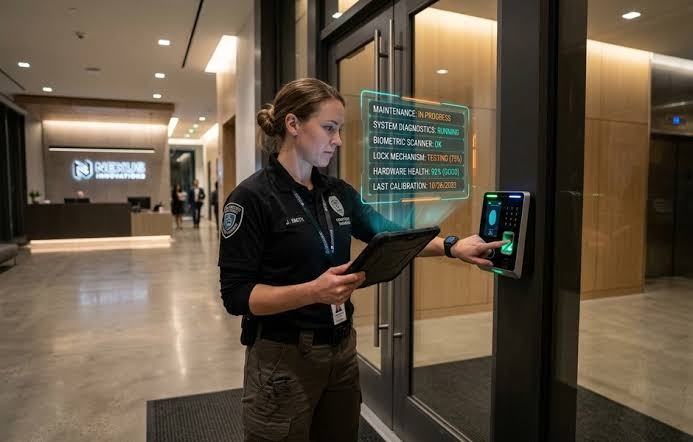
Access control systems play an important role in protecting homes, offices, commercial buildings, factories, schools, hospitals and other facilities. By controlling who can enter specific areas, these systems help organisations manage security, restrict unauthorised access and monitor movement within their premises.
However, installing an access control system is only the first step towards maintaining effective building security. Like other electronic security installations, access control equipment requires regular inspection, testing, cleaning and servicing to ensure it continues operating correctly.
Without proper maintenance, card readers may fail to recognise credentials, fingerprint scanners may become unreliable, electronic locks may stop responding and access control software may develop configuration problems. These faults can inconvenience authorised users, interrupt business operations and create security weaknesses.
Access control system maintenance in Uganda is therefore essential for businesses and property owners who depend on electronic entry systems to protect their premises and manage access efficiently.
At Daltrevco, we recognise the importance of reliable building security solutions. This guide explains how access control systems should be maintained, common problems to watch for, recommended maintenance practices and when professional inspection may be necessary.
What Is Access Control System Maintenance?
Access control system maintenance refers to the regular inspection, testing, cleaning, adjustment and servicing of electronic equipment used to manage entry into buildings and restricted areas.
An access control system consists of several interconnected components. These may include card readers, biometric scanners, electronic locks, access control panels, exit buttons, door contacts, power supplies, communication cables and management software.
Maintenance ensures that these components work together correctly and that authorised users can enter designated areas without unnecessary delays.
Depending on the system installed, maintenance may involve:
- Cleaning fingerprint scanners, card readers and other identification devices.
- Testing electronic locks and door release mechanisms.
- Inspecting access control panels and power supplies.
- Checking cables, network connections and communication links.
- Testing exit buttons and emergency release arrangements.
- Reviewing access permissions and user credentials.
- Checking software settings and system updates.
- Inspecting backup batteries and power protection equipment.
- Testing access logs, alarms and reporting functions.
The maintenance requirements will depend on the system design, equipment specifications, frequency of use and operating environment.
Why Is Regular Access Control System Maintenance Important?
An access control system may appear to work normally while developing faults that affect its long-term reliability. Regular maintenance helps identify these problems before they cause significant disruption.
1. Maintains Reliable Entry and Exit
One of the main purposes of an access control system is to allow authorised people to enter and leave a building through approved access points.
If a card reader stops responding or an electronic lock develops a fault, employees, visitors and other authorised users may experience delays.
Regular servicing helps identify worn components, loose connections, damaged cables and other issues that can interfere with normal operation.
2. Helps Prevent Unauthorised Access
Access control systems are designed to restrict entry to approved users. However, damaged locks, incorrectly configured permissions and malfunctioning door sensors can weaken security.
Routine inspections help confirm that doors lock correctly, credentials are recognised appropriately and access permissions reflect current security requirements.
Maintenance cannot guarantee that unauthorised entry will never occur, but it helps reduce avoidable weaknesses.
3. Extends Equipment Lifespan
Access control equipment operates regularly, sometimes throughout the entire day. Card readers, electronic locks, door closers, power supplies and other components can experience wear over time.
Regular cleaning, testing and timely replacement of worn components can help prevent unnecessary equipment deterioration.
4. Reduces Unexpected Repair Costs
Minor faults can become more expensive when ignored. For example, a loose electrical connection may initially cause intermittent reader problems but could eventually interrupt communication between system components.
Preventive maintenance helps identify developing faults early, allowing property owners to plan repairs before a complete system failure occurs.
5. Protects Business Operations
Access control systems are particularly important in organisations where entry restrictions are necessary for daily operations.
Examples include:
- Offices with restricted departments.
- Hospitals with controlled staff-only areas.
- Schools and educational institutions.
- Factories with restricted production zones.
- Warehouses with controlled inventory areas.
- Commercial buildings with multiple tenants.
When entry systems fail, employees may struggle to access workspaces, security personnel may need to manage doors manually and normal business activities may be interrupted.
6. Improves Accountability and Access Monitoring
Many electronic access control systems record entry events, including the credential used, the access point and the recorded time.
Maintenance helps ensure that these records are being generated correctly and that system clocks, network connections and software settings remain properly configured.
This is particularly important for organisations that use access records for security reviews and operational monitoring.
Main Components That Require Regular Maintenance
An access control system is made up of several components, each with different maintenance requirements.
1. Card and RFID Readers
Card-based and RFID access control systems use electronic readers to identify authorised credentials.
Readers may be installed at office entrances, staff doors, parking areas, residential gates and restricted rooms.
Maintenance should include:
- Cleaning reader surfaces.
- Checking for physical damage.
- Inspecting mounting brackets and protective covers.
- Testing authorised access cards and tags.
- Checking communication with the access control panel.
- Inspecting power and data connections.
Readers installed outdoors may require additional inspection because dust, rain, moisture and temperature changes can affect their condition.
2. Fingerprint and Biometric Scanners
Fingerprint access control systems identify users through biometric characteristics. Other systems may use facial recognition or additional biometric technologies.
These devices require clean scanning surfaces and properly configured identification settings.
Maintenance activities may include:
- Cleaning scanner surfaces according to manufacturer instructions.
- Inspecting the device for scratches or physical damage.
- Testing identification using authorised users.
- Checking connectivity to the access control panel.
- Reviewing repeated rejection or recognition errors.
- Confirming that authorised user records remain accurate.
If fingerprint recognition becomes unreliable, possible causes include dirty sensors, worn scanning surfaces, incorrect positioning, environmental conditions or configuration problems.
Biometric systems should also be reviewed to ensure that stored biometric information is handled securely and only accessed by authorised personnel.
3. Electronic Door Locks
Electronic locks control the physical opening and closing of secured doors.
Depending on the installation, these may include electromagnetic locks, electric strikes, electric bolts and electronic cabinet locks.
Maintenance should involve:
- Inspecting the lock housing and mounting points.
- Checking door alignment.
- Testing locking and unlocking functions.
- Inspecting electrical connections.
- Checking for unusual noise or excessive vibration.
- Testing the associated release mechanisms.
- Confirming that the lock operates correctly with the access controller.
Door alignment is particularly important. A door that does not close properly may prevent an electronic lock from securing the entrance reliably.
4. Access Control Panels
The access control panel acts as the central controller in many electronic access systems.
It receives information from readers, checks access permissions and sends commands to connected locking devices.
Maintenance should include checking:
- Panel condition and enclosure security.
- Power supply connections.
- Communication with connected readers.
- Controller status indicators.
- Network connectivity where applicable.
- Input and output connections.
- Event logs and fault notifications.
- Backup battery condition where fitted.
Any internal electrical inspection should be carried out by appropriately qualified personnel.
5. Exit Buttons and Door Sensors
Exit buttons allow authorised occupants to release controlled doors from inside. Door contacts help the system determine whether a door is open or closed.
Maintenance should verify that:
- Exit buttons respond correctly.
- Door contacts detect opening and closing.
- Connections remain secure.
- Door status is displayed correctly in the management software.
- Emergency release arrangements operate as designed.
These components are especially important because an access control system must support safe and appropriate exit arrangements.
6. Power Supplies and Backup Batteries
Access control systems depend on a reliable electrical supply. Power interruptions can affect readers, controllers, electronic locks and communication equipment.
Maintenance should include:
- Inspecting power supply units.
- Checking for damaged cables and loose connections.
- Reviewing power indicators and fault alerts.
- Testing backup batteries where installed.
- Checking battery condition and replacement requirements.
- Confirming that backup capacity is suitable for connected equipment.
A backup battery does not provide unlimited operation. Its performance depends on battery condition, capacity, equipment load and system configuration.
7. Access Control Software
Modern access control systems often use computer-based software or cloud-connected platforms to manage users, permissions and entry records.
Software maintenance may involve:
- Reviewing user permissions.
- Removing or disabling outdated credentials.
- Checking access schedules.
- Reviewing system logs.
- Installing appropriate software and security updates.
- Confirming communication between software and controllers.
- Checking data backups and recovery arrangements.
Software changes should be planned carefully to avoid accidentally locking out authorised users or changing important security settings.
Essential Access Control System Maintenance Practices
Maintaining an access control system requires a structured approach. The following practices can help businesses and property owners keep their entry systems operating reliably.
1. Clean Readers and Identification Devices
Dust, fingerprints, grease and other contaminants can affect reader surfaces and biometric scanners.
Use cleaning materials recommended by the equipment manufacturer. Avoid harsh chemicals, excessive moisture or abrasive materials that could damage sensitive components.
Outdoor readers should be inspected more frequently where they are exposed to dust, rain or other environmental conditions.
2. Test All Access Points
Every controlled entrance should be tested periodically.
Check whether authorised credentials are accepted, whether unauthorised credentials are rejected and whether doors lock and unlock as expected.
Testing should cover all important entry points rather than concentrating only on the main entrance.
3. Inspect Electronic Locks
Check that electronic locks engage properly when doors close and release correctly when authorised access is granted.
For electromagnetic locks, inspect the contact surfaces and mounting arrangements. For electric strikes and bolts, check alignment and mechanical operation.
Any adjustment should follow the equipment manufacturer’s instructions.
4. Review Access Permissions
Employee responsibilities and building access requirements change over time.
An employee may leave an organisation, move to another department or no longer require access to a restricted room.
Regular permission reviews help ensure that:
- Former employees no longer retain active credentials.
- Temporary visitor credentials expire when intended.
- Contractors have access only to approved areas.
- Staff permissions reflect current job responsibilities.
- Restricted areas remain accessible only to approved users.
This is one of the most important maintenance activities because a technically functional system can still create security risks if user permissions are outdated.
5. Inspect Cables and Network Connections
Worn cables, loose terminals and unstable network connections can cause intermittent communication problems.
Inspect visible wiring, cable routes, connectors and network equipment for damage.
Where network-based controllers or readers are installed, verify that the relevant communication links are stable.
6. Check Backup Power Arrangements
Where backup batteries or uninterruptible power supplies are installed, inspect their condition and test them according to manufacturer guidance.
Confirm which components remain operational during an outage. Some installations may maintain door control while other functions, such as remote monitoring, become unavailable.
The backup arrangement should match the building’s security and life-safety requirements.
7. Update Software and Firmware
Manufacturers may release updates to address software faults, improve compatibility or correct security weaknesses.
Before installing updates:
- Confirm that the update is suitable for the installed equipment.
- Review the manufacturer’s release information.
- Back up relevant system configurations.
- Schedule changes to minimise disruption.
- Test the system after installation.
Updates should not be installed without considering compatibility between controllers, readers and management software.
8. Inspect Door Alignment and Hardware
Access control reliability depends on the physical door as well as the electronic equipment.
Inspect hinges, door closers, frames, handles and locking points.
A door that remains slightly open, closes too slowly or does not align with its locking mechanism can create repeated access problems.
9. Review Access Logs and System Alerts
Access logs can help identify unusual patterns and recurring technical faults.
Review available records for:
- Repeated failed access attempts.
- Unexpected door-open events.
- Communication failures.
- Reader faults.
- Controller offline notifications.
- Unusual access activity.
Investigate unexplained events rather than assuming they are harmless technical errors.
10. Maintain Accurate Service Records
Record inspections, repairs, component replacements, software updates and system changes.
A maintenance record helps building managers understand the system’s condition, identify recurring problems and plan future servicing.
It should include the date of inspection, equipment checked, faults identified, corrective work and any outstanding recommendations.
Recommended Access Control Maintenance Schedule
The correct maintenance frequency depends on the equipment manufacturer’s instructions, the operating environment, security requirements and the number of people using the system.
The following schedule provides a practical starting point for many commercial installations.
| Maintenance frequency | Recommended activities |
|---|---|
| Daily or during routine operations | Observe unusual reader or lock behaviour and report access failures |
| Monthly | Inspect and clean readers, test selected access points, review visible damage and check system alerts |
| Quarterly | Test all important entry points, inspect locks and door hardware, review user permissions and examine power arrangements |
| Every six months | Review system performance, communication links, backup power and software configuration |
| Annually | Conduct a comprehensive inspection, review system security, assess equipment condition and plan necessary upgrades |
High-traffic entrances, outdoor readers and critical facilities may need more frequent inspections.
The schedule should also be adjusted where manufacturers specify different servicing intervals.
Common Access Control System Problems and Their Causes
Even well-installed systems can develop faults over time. Recognising common symptoms makes it easier to arrange appropriate maintenance.
1. Access Cards Are Not Being Recognised
Possible causes:
- Damaged or incompatible access cards.
- Dirty or faulty readers.
- Incorrect credential programming.
- Reader communication problems.
- Expired or disabled user permissions.
Recommended action: Test with another authorised credential, inspect the reader and check the user’s access status in the management system.
2. Fingerprint Scanner Rejects Authorised Users
Possible causes:
- Dirty scanning surface.
- Incorrect finger placement.
- Damaged sensor.
- Poor-quality enrolment.
- Changed or worn fingerprint characteristics.
- Incorrect identification settings.
Recommended action: Clean the scanner according to manufacturer instructions, test other authorised users and review the enrolment process and device settings.
3. Electronic Door Lock Fails to Release
Possible causes:
- Power supply failure.
- Faulty lock wiring.
- Damaged electronic lock.
- Access controller malfunction.
- Incorrect configuration.
- Mechanical door alignment problems.
Recommended action: Check the system’s power and fault indicators and arrange a technical inspection. Do not bypass locking or emergency-release arrangements as a routine workaround.
4. Door Does Not Lock Properly
Possible causes:
- Misaligned door.
- Loose lock mounting.
- Faulty door closer.
- Damaged locking components.
- Incorrect lock configuration.
Recommended action: Inspect the physical door and locking hardware, then test the electronic locking function.
5. Access Control System Goes Offline
Possible causes:
- Network interruption.
- Power failure.
- Damaged communication cables.
- Controller malfunction.
- Software or configuration problems.
Recommended action: Check the relevant network and power indicators, inspect communication connections and review system fault messages.
6. Exit Button Does Not Work
Possible causes:
- Damaged button.
- Loose wiring.
- Faulty input connection.
- Controller configuration problems.
Recommended action: Arrange prompt inspection and verify that the approved emergency exit arrangements remain functional.
7. Access Records Are Missing or Incomplete
Possible causes:
- Incorrect system time.
- Communication failure.
- Software configuration problems.
- Storage limitations.
- Controller or database faults.
Recommended action: Review time settings, communication status, storage condition and system event logs.
8. Repeated False Door Alerts
Possible causes:
- Misaligned door contacts.
- Loose sensors.
- Incorrect alarm settings.
- Doors that do not close fully.
- Faulty wiring.
Recommended action: Inspect the door hardware and sensor positioning, then verify the alarm configuration.
Access Control Maintenance in Uganda: Important Environmental Considerations
Access control systems installed in Uganda may operate in different environmental and building conditions. These factors should be considered when planning maintenance.
Dust and Construction Activity
Dust can accumulate on card readers, biometric scanners, electrical enclosures and door hardware.
Buildings undergoing construction or renovation may require more frequent cleaning and inspection.
Rainfall and Moisture
Outdoor readers and gate access equipment can be exposed to rain and humidity.
Inspect protective housings, cable entry points, mounting arrangements and other areas where moisture could enter.
Use equipment with suitable environmental protection ratings for the installation location.
Heat and Direct Sunlight
Equipment installed in exposed outdoor locations may experience high temperatures and direct sunlight.
Check manufacturer operating-temperature limits and ensure that equipment is installed in suitable positions.
Power Interruptions
Electricity interruptions can affect electronic locks, access panels and network equipment.
A properly designed backup power arrangement can help maintain essential functions during an outage, subject to its capacity and condition.
High-Traffic Commercial Buildings
Offices, schools, hospitals, factories and shopping facilities may experience frequent use of controlled entrances.
High-traffic doors and readers should be inspected regularly because repeated use can accelerate wear.
Maintenance Requirements for Different Types of Access Control Systems
Different access control technologies have different servicing requirements.
Biometric Access Control Systems
Biometric systems require regular inspection of fingerprint or facial recognition devices.
Maintenance focuses on scanner cleanliness, identification accuracy, device condition, software configuration and secure management of biometric records.
RFID and Card-Based Access Control Systems
These systems require inspection of card readers, credential compatibility, reader communication and access permissions.
Damaged cards and outdated credentials should be replaced or deactivated as appropriate.
Electronic Door Lock Systems
Electronic locks require inspection of the locking mechanism, electrical connections, door alignment and release functions.
The type of lock determines the specific mechanical and electrical maintenance requirements.
Automatic Gate Access Control Systems
Automatic gate systems may include card readers, controllers, motors, safety sensors and remote-control devices.
Maintenance should consider both access control and the mechanical operation of the gate. Moving parts and safety devices should be inspected according to manufacturer guidance.
Visitor Management Systems
Visitor management platforms may integrate with access control equipment to issue temporary credentials and record visitor activity.
Maintenance should include software updates, user permissions, credential expiry settings, data backups and communication with connected entry points.
Professional Access Control System Maintenance vs Basic In-House Checks
Some maintenance activities can be handled by trained building personnel, while others require specialist technical knowledge.
| Basic in-house checks | Professional maintenance |
|---|---|
| Reporting reader or lock problems | Diagnosing controller and communication faults |
| Keeping reader surfaces clean | Inspecting internal electrical connections |
| Checking whether doors close properly | Adjusting or repairing electronic locking equipment |
| Reporting unusual system alerts | Reviewing system configuration and fault logs |
| Updating authorised user lists under approved procedures | Testing complex integrations and system performance |
| Monitoring visible equipment condition | Assessing backup power and technical compatibility |
Building staff should not open electrical equipment, modify wiring or bypass security devices unless they are authorised and appropriately trained.
Professional servicing is especially important when faults affect multiple doors, access permissions, electronic locks, system communication or emergency-release functions.
How Much Does Access Control System Maintenance Cost in Uganda?
The cost of maintaining an access control system in Uganda depends on the installation’s size, equipment type, condition and maintenance requirements.
A small office with one controlled entrance will generally have different servicing requirements from a factory, hospital or multi-storey commercial building with numerous access points.
Important cost factors include:
1. Number of Controlled Doors
The number of readers, locks, controllers and exit devices affects the time and resources required for inspection.
2. Type of Access Control Technology
Biometric, RFID, card-based and network-connected access control systems have different maintenance requirements.
3. System Size and Complexity
Installations with multiple buildings, restricted departments, centralised management software and integrated security systems may require more extensive servicing.
4. Condition of Existing Equipment
A system requiring only cleaning and testing may need less work than one with damaged readers, faulty locks, deteriorated cables or outdated controllers.
5. Replacement Parts
The cost of replacement components depends on equipment compatibility, manufacturer specifications and availability.
6. Software and System Updates
Some systems require additional technical work for software updates, database maintenance, configuration changes or integration testing.
7. Maintenance Frequency
A one-time inspection, scheduled preventive maintenance and a comprehensive maintenance agreement involve different levels of service.
For an accurate maintenance estimate, a site assessment is recommended. It allows the technician to review the existing installation, identify faults and determine the work required.
Property owners should avoid selecting a maintenance provider based on price alone. The quality of inspection, technical compatibility and safety of the work are equally important.
Signs Your Access Control System Needs Professional Maintenance
Do not wait for a complete system failure before arranging an inspection.
Consider professional maintenance when you notice:
- Card readers frequently reject authorised cards.
- Fingerprint scanners have become unreliable.
- Electronic doors fail to lock or unlock consistently.
- Access control panels display repeated fault alerts.
- Some doors are not communicating with the central system.
- Exit buttons or door sensors behave unexpectedly.
- Access records are missing or inaccurate.
- Backup batteries show warning indicators.
- Employees experience repeated delays when entering the building.
- The system has not been inspected for an extended period.
If a fault affects emergency exit arrangements, arrange an immediate assessment and maintain safe, approved exit procedures while the issue is being addressed.
How to Choose an Access Control System Maintenance Company in Uganda
Choosing the right maintenance provider is important for protecting your investment and maintaining reliable building security.
Before engaging a company, consider the following factors.
1. Relevant Technical Experience
Look for a provider with experience working with the type of access control equipment installed at your property.
Different systems may use different controllers, communication protocols, software platforms and electronic locking technologies.
2. Understanding of Different Access Technologies
A suitable maintenance provider should understand the relevant technologies, including:
- Fingerprint access control.
- Facial recognition systems.
- RFID and card readers.
- Electronic door locks.
- Automatic gate access control.
- Network-based access control.
- Visitor management systems.
3. Proper Fault Diagnosis
A good maintenance process should identify the actual cause of a problem rather than repeatedly resetting equipment or replacing components without investigation.
4. Compatible Replacement Components
Replacement readers, locks, controllers and power supplies must be compatible with the existing installation.
Using unsuitable components may create further faults or prevent connected equipment from operating correctly.
5. Clear Maintenance Reports
Ask for a report explaining the equipment inspected, faults identified, repairs completed and recommended follow-up actions.
6. Attention to Safety and Data Protection
Maintenance should preserve safe emergency exit arrangements and protect sensitive information, including access credentials, biometric records and entry logs.
7. Preventive Maintenance Planning
A reliable provider should be able to recommend a maintenance schedule based on equipment specifications, usage levels and the property’s security requirements.
How Daltrevco Can Help with Access Control Solutions
Reliable access control is an important part of effective building security. Whether an organisation uses fingerprint readers, RFID cards, electronic door locks or integrated entry management systems, the equipment must be properly configured and maintained.
Daltrevco provides a point of contact for businesses and property owners exploring building security and electronic access control solutions.
If your existing access control system is experiencing operational problems, requires inspection or needs improvement, contact Daltrevco to discuss your requirements and identify suitable next steps.
When planning an access control maintenance programme, it is important to consider the number of controlled doors, installed equipment, access requirements, power arrangements and the overall security objectives of the property.
A well-maintained system can support more reliable entry management, reduce avoidable interruptions and help maintain appropriate access restrictions.
Frequently Asked Questions About Access Control System Maintenance
1. What is access control system maintenance?
Access control system maintenance involves inspecting, cleaning, testing and servicing electronic equipment used to manage entry into buildings. It helps keep readers, electronic locks, controllers and software operating correctly.
2. Why is access control maintenance important?
It helps maintain reliable entry and exit, identify faults early, protect access permissions, reduce unexpected downtime and extend the useful life of equipment.
3. How often should an access control system be maintained?
Maintenance frequency depends on equipment specifications, usage and environmental conditions. Many commercial installations benefit from routine monthly checks and more comprehensive quarterly or periodic inspections.
4. What components require access control maintenance?
Important components include card readers, RFID devices, fingerprint scanners, electronic locks, access control panels, power supplies, backup batteries, exit buttons, door sensors and management software.
5. How do I know when my access control system needs servicing?
Common warning signs include repeated card rejection, unreliable fingerprint recognition, doors failing to lock, communication errors, missing access records and frequent system alerts.
6. Can dirty card readers cause access problems?
Yes. Dust, dirt and physical contamination can interfere with reader operation. Cleaning should follow the equipment manufacturer’s instructions.
7. Why is my fingerprint access control system not recognising users?
Possible causes include a dirty scanner, damaged sensor, poor enrolment, incorrect finger placement or configuration problems. The device should be inspected before assuming that it needs replacement.
8. Why is my electronic door lock not working?
Possible causes include power supply faults, damaged wiring, incorrect door alignment, a faulty locking mechanism or problems with the access controller.
9. Can access control systems operate during a power outage?
Some systems can continue operating for a limited period when connected to suitable backup batteries or an uninterruptible power supply. Actual performance depends on system design, battery condition and equipment load.
10. Do access control systems need software updates?
Where manufacturers provide relevant updates, they may be necessary to address faults, improve compatibility or correct security weaknesses. Updates should be checked for compatibility before installation.
11. What causes access control readers to stop communicating?
Possible causes include damaged cables, power interruptions, network problems, controller faults and incorrect configuration.
12. Should access permissions be reviewed regularly?
Yes. Organisations should review user permissions whenever staff roles change, employees leave or temporary access is no longer required. Periodic reviews also help identify outdated credentials.
13. Can access control systems be integrated with CCTV?
Yes, compatible access control and CCTV systems can be integrated. Depending on the equipment and software, access events may be associated with relevant camera footage or alerts.
14. What is the difference between preventive and corrective maintenance?
Preventive maintenance involves scheduled inspections and servicing to reduce the likelihood of faults. Corrective maintenance involves diagnosing and repairing problems after they occur.
15. Do biometric access control systems require special maintenance?
Yes. Biometric readers require suitable cleaning, sensor inspection, recognition testing, software checks and secure handling of biometric information.
16. Can an access control system be upgraded instead of replaced?
In some cases, existing equipment can be upgraded by replacing selected components, updating software or adding compatible readers and controllers. The feasibility depends on the system’s age, condition and compatibility.
17. How can I reduce access control system failures?
Use compatible equipment, follow manufacturer maintenance instructions, keep readers clean, inspect locks, review user permissions, maintain backup power and investigate recurring fault alerts.
18. Is access control system maintenance necessary for small offices?
Yes. Even a small office may depend on electronic locks and readers to protect staff areas, records, equipment and restricted rooms.
19. What should be included in an access control maintenance report?
A maintenance report should identify the equipment inspected, tests performed, faults discovered, repairs completed, components replaced and recommended follow-up work.
20. Where can I get access control system maintenance in Uganda?
Businesses and property owners can contact Daltrevco to discuss their building security and access control requirements and determine suitable maintenance or technical support arrangements.
Conclusion
Access control systems are essential for managing entry, protecting restricted areas and improving security in modern buildings. However, their effectiveness depends on the condition of the equipment, correct configuration and consistent maintenance.
Regular inspection of readers, electronic locks, access control panels, power supplies, door sensors and software helps identify faults before they cause major operational problems.
For businesses, schools, hospitals, factories, warehouses and commercial properties in Uganda, establishing a suitable maintenance programme is an important step towards keeping electronic entry systems reliable.
If your building requires access control solutions or you want to discuss the maintenance needs of an existing installation, contact Daltrevco to explore suitable options for your property.

