
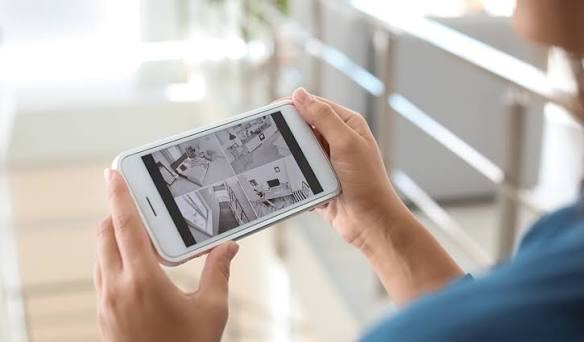
Being able to monitor your property when you are away is one of the most useful features of modern CCTV security systems. Whether you manage a business, own a home, supervise a warehouse or operate several commercial properties, smartphone CCTV viewing allows you to check your security cameras without being physically present.
With a compatible CCTV system and a properly configured internet connection, authorised users can view live camera footage, review recorded videos and receive security notifications directly on their smartphones.
For property owners and businesses in Uganda, CCTV mobile viewing provides a convenient way to maintain visibility over important locations, including offices, shops, warehouses, factories, residential properties and commercial buildings. It can also help managers supervise different premises while travelling or working away from their offices.
However, accessing CCTV cameras on a smartphone requires more than simply installing an application. The cameras, DVR or NVR, network connection, mobile application and security settings must work together correctly.
This guide explains how CCTV mobile viewing works, how to connect security cameras to a smartphone, the equipment required, the benefits, common problems and the important security considerations when using remote CCTV access in Uganda.
Daltrevco understands the importance of reliable security infrastructure for homes and businesses. Choosing the right CCTV system and configuring it properly can make mobile surveillance more convenient, secure and effective.
What Is CCTV Mobile Viewing?
CCTV mobile viewing is a feature that allows authorised users to access their security cameras through a smartphone or tablet.
Instead of monitoring cameras only through a screen connected to a DVR or NVR, users can access compatible surveillance equipment through a mobile application or supported web platform.
Depending on the system, mobile viewing may provide access to:
- Live CCTV camera footage.
- Recorded video playback.
- Multiple cameras from one application.
- Motion detection notifications.
- Camera status information.
- Selected video download or export features.
- Supported camera controls, including PTZ movement.
- Security alerts and event notifications.
For example, a business owner in Kampala can use a smartphone to check cameras installed at an office, shop or warehouse in Wakiso, provided the CCTV equipment supports remote access and has a suitable internet connection.
CCTV mobile viewing is especially useful for property owners who need convenient access to surveillance footage while away from their premises.
How Does CCTV Mobile Viewing Work?
Mobile CCTV viewing works by connecting compatible security cameras and recording equipment to a network that allows authorised smartphones to communicate with the system.
Most modern remote viewing arrangements use IP-based communication and a manufacturer’s supported mobile application or secure remote access platform.
The general process involves several components working together.
1. CCTV Cameras Capture Video
Security cameras capture footage from selected locations around a property.
These may include entrances, offices, parking areas, warehouses, reception areas, corridors and external access points.
The cameras send video streams to a compatible recorder or network infrastructure.
2. The DVR or NVR Processes and Records Footage
The recording equipment receives camera feeds and manages video recording.
A DVR is commonly used with compatible analogue CCTV cameras, while an NVR is designed for network-based IP cameras.
The recorder may also provide the connection required for remote viewing, depending on the equipment and configuration.
Some IP camera systems can also support mobile access directly through a manufacturer’s platform without a separate recorder.
3. The CCTV System Connects to the Internet
For remote viewing from outside the property, the recorder or supported camera needs an appropriate network connection.
This is usually provided through a router connected to an internet service.
The quality and reliability of the connection influence how smoothly video footage can be viewed remotely.
The upload capacity at the property where the cameras are installed is particularly important because video must be transmitted from that location to the smartphone.
4. The Mobile Application Connects to the CCTV System
The user installs a compatible application on a smartphone.
Depending on the manufacturer, the application may connect through a secure cloud-assisted service, a supported device registration process or another approved remote access method.
The user then adds the CCTV recorder or camera using the required device information and authentication details.
5. Live Footage Appears on the Smartphone
Once the connection has been established, the user can select a camera and view its live feed.
Many applications also allow users to switch between cameras, review recordings and adjust supported settings.
The available features depend on the camera model, recorder, application and system configuration.
What Equipment Do You Need to View CCTV Cameras on Your Smartphone?
Before setting up mobile CCTV viewing, it is important to ensure that your surveillance equipment supports remote access.
The following components are commonly required.
1. Compatible CCTV Cameras
The cameras must work with a system that supports mobile viewing.
Modern IP cameras commonly provide network-based access, while compatible analogue cameras can also support remote viewing when connected to a suitable DVR.
When selecting cameras, consider:
- Image resolution.
- Night vision performance.
- Viewing angle.
- Indoor or outdoor suitability.
- Network compatibility.
- Motion detection features.
- Manufacturer-supported mobile access.
2. DVR or NVR Recording System
Many CCTV installations use a DVR or NVR to manage camera feeds and recording.
A compatible recorder can provide a central connection point for remote monitoring.
Before purchasing a recorder, confirm that it supports mobile access and is compatible with the intended cameras and application.
3. Reliable Internet Connection
Remote viewing normally requires the CCTV system to have an active internet connection or another suitable communication link.
The connection should have sufficient upload capacity to transmit video from the premises.
A slow or unstable connection may result in:
- Delayed video.
- Frequent disconnections.
- Low-resolution streaming.
- Buffering.
- Difficulty viewing multiple cameras simultaneously.
The required bandwidth depends on camera resolution, compression, number of simultaneous streams and selected viewing quality.
4. Smartphone or Tablet
You need a compatible smartphone or tablet to access the CCTV application.
Most modern CCTV applications support Android or iOS devices, although compatibility should be confirmed before installation.
The phone should have a suitable internet connection through mobile data or Wi-Fi.
5. CCTV Mobile Viewing Application
The application allows the user to communicate with the compatible CCTV system.
Depending on the manufacturer, it may provide features such as live viewing, playback, notifications, camera selection and device management.
Always obtain the application from the official app store or the manufacturer’s verified source.
6. Secure Login Credentials
Remote CCTV access should be protected using unique login details.
Users should avoid default passwords and ensure that only authorised individuals can access the system.
Where supported, multi-factor authentication adds another layer of protection.
How to Connect CCTV Cameras to Your Smartphone
Connecting CCTV cameras to a smartphone involves configuring the recording equipment, network connection and mobile application.
The exact steps differ between manufacturers, but the following process provides a general guide.
Step 1: Confirm That Your CCTV System Supports Remote Viewing
Start by checking the camera or recorder specifications.
Look for features such as:
- Mobile application support.
- Remote viewing.
- Network connectivity.
- Compatible Android and iOS applications.
- Supported remote access services.
- Remote playback functionality.
If you already have an installed CCTV system, check the recorder’s model number and manufacturer’s documentation.
Older equipment may require a firmware update or additional configuration. Some older models may not support modern mobile access features.
Step 2: Connect the DVR or NVR to Your Router
Connect the recorder to the network using a suitable Ethernet cable or another supported network connection.
The router provides the communication link between the CCTV equipment and the internet.
Confirm that the recorder receives the correct network settings and can connect successfully.
For IP camera systems, also confirm that the cameras and recorder can communicate across the local network.
Step 3: Confirm Internet Connectivity
Check whether the DVR, NVR or supported IP camera can access the required remote viewing service.
Some systems provide network status information through their settings menu.
A working internet connection at the business or property is essential for normal remote viewing from outside the premises.
Step 4: Download the Correct CCTV Mobile Application
Find the official mobile application associated with your CCTV manufacturer.
The correct application may be identified in the recorder’s manual, device interface or manufacturer’s website.
Avoid downloading unofficial applications or installing unknown software that requests unnecessary permissions.
Step 5: Create an Account or Sign In
Some CCTV platforms require users to register an account before adding devices.
Other systems may support direct device access through approved connection methods.
Use a strong, unique password and enable additional authentication features where available.
Step 6: Add Your CCTV Recorder or Camera
The application may allow you to add the device using:
- A QR code.
- A device serial number.
- A supported device ID.
- A network address.
- Another manufacturer-approved registration method.
Follow the instructions for the specific equipment.
The application may request the recorder’s authentication details before establishing a connection.
Never share device registration information or passwords with unauthorised individuals.
Step 7: Select the Cameras You Want to View
Once the device has been added successfully, open the live-view section.
Select the required camera channels.
If the system supports multiple-camera viewing, you may be able to display several feeds on one screen.
Step 8: Test Remote Viewing Outside the Local Network
A CCTV system may work correctly when your smartphone and recorder are connected to the same Wi-Fi network but fail when you leave the premises.
To test remote access, disconnect your phone from the property’s Wi-Fi and use mobile data.
Confirm that live footage loads and that the application can connect to the recorder from another network.
Step 9: Test Playback and Notifications
Where supported, check that recorded footage can be accessed through the application.
You should also test motion or event notifications if they form part of your security requirements.
Confirm that alerts are configured for the correct cameras and that the application has the necessary notification permissions.
Benefits of Accessing CCTV Cameras on Your Smartphone
CCTV mobile viewing provides several advantages for homeowners, business managers and security personnel.
1. Monitor Your Property from Anywhere
One of the biggest advantages is the ability to view your security cameras while away from the property.
You do not need to remain inside a control room to check what is happening.
For example, a business owner travelling outside Kampala can use a compatible smartphone application to check activity at their business premises.
This provides greater convenience and visibility, provided the system and internet connection are available.
2. Improved Business Security Management
Business owners and managers can use mobile CCTV viewing to observe selected areas without being physically present.
This is particularly valuable for organisations with multiple branches, warehouses, shops or commercial properties.
Managers can check entrances, loading areas, reception spaces and other important locations remotely.
3. Quick Access to Recorded Footage
Many mobile CCTV applications support playback of recorded video.
This can help users review an incident without travelling to the premises or accessing the recorder directly.
Depending on the system, users may be able to search recordings by date, time or event.
4. Receive Security Notifications
Some CCTV systems support notifications when selected events are detected.
These may include motion detection, line crossing, intrusion detection or other supported analytics.
Notifications can help users become aware of events that may require attention.
However, alerts are not proof that a crime has occurred. Detection performance depends on camera placement, configuration, environmental conditions and the capabilities of the equipment.
5. Monitor Multiple Locations
Some CCTV platforms allow users to add several compatible recorders or cameras to one account.
This is useful for business owners who manage multiple properties.
For example, a company may monitor an office in Kampala, a warehouse in Wakiso and another commercial location through a supported centralised application.
The number of devices and simultaneous camera feeds supported varies by platform.
6. Convenient Monitoring During Travel
Property owners frequently travel for business, holidays and other commitments.
Remote CCTV viewing makes it easier to check important areas without being physically present.
It can be particularly useful for monitoring unattended properties, storage facilities and commercial buildings outside working hours.
7. Support for Security Investigations
Recorded footage can help authorised users review events and establish what happened during a particular period.
Where the mobile application supports it, relevant footage may be saved or exported for further review.
Important recordings should be preserved securely and handled according to the organisation’s policies and applicable privacy requirements.
8. Better Coordination with Other Security Systems
Compatible CCTV systems can be integrated with other security technologies, including:
- Intruder alarm systems.
- Access control systems.
- Smart door locks.
- Video intercoms.
- Perimeter intrusion detection systems.
- Automatic gate systems.
For example, an integrated system may allow an authorised user to review a camera feed associated with an access event or alarm activation.
The availability of these features depends on equipment compatibility and system configuration.
CCTV Mobile Viewing Applications for Different Properties
Mobile CCTV access is useful across a wide range of residential, commercial and industrial environments.
1. Homes and Residential Properties
Homeowners can use smartphone CCTV viewing to check selected areas around their properties.
These may include:
- Main entrances.
- Driveways.
- Compound gates.
- Parking spaces.
- External walkways.
- Garages.
- Garden approaches.
This can help homeowners maintain awareness of activities around their property while away.
Cameras should be positioned responsibly to avoid unnecessary recording of neighbouring private spaces.
2. Offices and Commercial Buildings
Office managers can remotely monitor reception areas, building entrances, parking facilities and selected shared spaces.
Mobile access may be particularly useful when managing offices outside normal working hours.
It can also support the supervision of several commercial buildings through a compatible centralised CCTV platform.
3. Shops and Supermarkets
Retail managers can use mobile CCTV viewing to check sales areas, entrances, checkout points and stockrooms.
This is useful when managers are away from the premises but still need visibility into selected business areas.
Camera placement should support useful coverage of important locations without unnecessarily recording private activities.
4. Warehouses and Storage Facilities
Warehouse owners may need to monitor valuable inventory, loading areas, storage aisles and delivery points.
Smartphone CCTV viewing provides convenient access to these areas from another location.
For large warehouses, reliable network infrastructure and suitable camera positioning are particularly important.
5. Factories and Industrial Facilities
Factory managers can use mobile CCTV viewing to observe selected production areas, equipment rooms, entrances and external operational spaces.
This can help maintain awareness of important activities when management personnel are not physically present.
Industrial cameras should be suitable for the site’s operating environment, including dust, moisture, heat and vibration where relevant.
6. Hotels and Hospitality Facilities
Hotel management can monitor selected shared areas such as entrances, reception spaces, parking areas and service access points.
Remote access may help managers check property security outside normal working hours.
CCTV should not be used in private guest spaces such as bedrooms or bathrooms.
7. Schools and Educational Institutions
School administrators may use smartphone CCTV access to view selected areas such as gates, reception spaces, corridors and external walkways.
Access to footage should be limited to authorised personnel, with special attention to student privacy and responsible surveillance practices.
8. Construction Sites
Construction companies can use mobile CCTV viewing to monitor site entrances, material storage areas, machinery yards and temporary offices.
This can be useful where managers need visibility into site activities while working at another location.
Solar-powered or wireless CCTV options may be considered where fixed infrastructure is limited, provided the equipment meets the site’s connectivity and recording requirements.
Which CCTV Cameras Are Best for Smartphone Viewing?
Not all CCTV cameras offer the same mobile viewing capabilities. The most suitable equipment depends on the type of installation and the features required.
IP CCTV Cameras
IP cameras are network-based devices that transmit video using Internet Protocol.
They are commonly used in modern CCTV installations and can support remote smartphone access through compatible software or applications.
Their features may include:
- High-definition video.
- Remote viewing.
- Network recording.
- Motion detection.
- Night vision.
- Smart event analytics.
- Integration with compatible NVR systems.
Wi-Fi CCTV Cameras
Wi-Fi cameras connect to a compatible wireless network.
They can be useful in locations where running network cables is difficult.
However, Wi-Fi cameras still require a suitable power source unless designed with battery or solar power.
Their performance depends on wireless signal strength, interference, network capacity and the manufacturer’s supported remote access features.
DVR-Based CCTV Systems
Analogue cameras connected to a compatible DVR can also be viewed through smartphones.
The DVR needs network connectivity and support for remote access.
This means businesses do not necessarily have to replace an existing analogue CCTV system simply because they want mobile viewing.
NVR-Based CCTV Systems
NVR systems manage compatible IP cameras and can provide mobile access through supported applications.
They are often suitable for commercial properties requiring multiple cameras, network-based recording and centralised surveillance management.
Solar-Powered CCTV Systems
Solar-powered cameras can be useful in locations where reliable mains electricity is unavailable or difficult to install.
Some models support mobile viewing through manufacturer applications.
However, solar panel capacity, battery storage, network coverage, sunlight availability and recording requirements must be considered carefully.
CCTV Mobile Viewing: Live View vs Recorded Playback
Understanding the difference between live viewing and recorded playback is important when choosing a mobile CCTV system.
| Feature | Live Viewing | Recorded Playback |
|---|---|---|
| Purpose | Observe current camera feeds | Review previously captured footage |
| Main use | Monitor current activity | Investigate past events |
| Internet requirement | Normally required for remote access | Normally required for remote access |
| Storage requirement | Not necessarily required for viewing alone | Recorded footage must be available |
| Availability | Depends on camera connectivity | Depends on recording and retention |
Live CCTV Viewing
Live viewing allows authorised users to see current camera footage through their smartphones.
It is useful when checking entrances, parking areas, workplaces and other monitored locations.
Recorded CCTV Playback
Playback allows users to review previously recorded footage.
This is useful when investigating incidents, checking earlier activity or reviewing a specific time period.
Some systems also support downloading selected recordings to a mobile device, although availability and file size limitations vary.
What Internet Speed Is Required for CCTV Mobile Viewing?
Internet speed is an important consideration when setting up remote CCTV access.
There is no single internet speed suitable for every CCTV installation because requirements vary according to camera resolution, compression, frame rate and the number of simultaneous streams.
The most important consideration at the property is often upload bandwidth.
This is because the CCTV system needs to transmit video from the premises to the remote smartphone.
Factors that influence internet requirements include:
- Number of cameras being viewed.
- Camera resolution.
- Video compression settings.
- Selected streaming quality.
- Number of simultaneous users.
- Network congestion.
- Manufacturer’s remote viewing technology.
For example, viewing one camera at a lower stream quality generally requires less bandwidth than viewing several high-resolution cameras simultaneously.
Many systems allow users to select a lower-quality substream for mobile viewing while retaining higher-quality recordings on the main recorder.
This can improve remote viewing performance and reduce data consumption.
Businesses should test their actual internet connection and CCTV configuration rather than relying only on the advertised download speed of an internet package.
How Much Mobile Data Does CCTV Viewing Use?
CCTV mobile viewing consumes data when video is streamed over mobile networks.
The amount depends on the camera’s bitrate, video quality, viewing duration and number of cameras.
For example, high-resolution video generally uses more data than a lower-resolution stream.
The following factors influence data consumption:
- Camera resolution.
- Frame rate.
- Video compression.
- Streaming bitrate.
- Number of cameras displayed.
- Time spent watching live footage.
- Whether the application downloads recordings.
To reduce mobile data consumption, users can:
- Select a lower-quality stream when appropriate.
- View only the cameras they need.
- Avoid leaving live feeds running unnecessarily.
- Use Wi-Fi when available.
- Adjust supported application streaming settings.
The exact data usage should be checked using the application’s statistics or the phone’s mobile data usage settings.
Common CCTV Mobile Viewing Problems and Their Solutions
Even correctly installed CCTV systems may occasionally experience remote viewing problems.
Understanding common causes can help users identify issues more quickly.
1. CCTV Cameras Are Offline
Possible causes:
- Power interruption.
- Disconnected network cable.
- Router failure.
- Network switch problem.
- Camera malfunction.
Solutions:
Check that the cameras and recorder have power. Inspect network connections and confirm that the internet router is functioning. If the issue continues, investigate the affected camera or network equipment.
2. CCTV Application Cannot Connect to the Recorder
Possible causes:
- Incorrect device details.
- Wrong login credentials.
- Internet connection failure.
- Remote access service unavailable.
- Outdated recorder firmware.
- Incorrect network configuration.
Solutions:
Confirm the device information and login details. Check the recorder’s network status and manufacturer’s remote access service. Update supported firmware where necessary.
3. CCTV Footage Keeps Buffering
Possible causes:
- Insufficient upload bandwidth.
- Weak mobile data signal.
- Network congestion.
- High-resolution streaming.
- Too many simultaneous camera feeds.
Solutions:
Switch to a lower-quality stream, test the internet connection and reduce the number of simultaneous feeds. Consider improving the internet connection if bandwidth is consistently insufficient.
4. Live Viewing Works on Wi-Fi but Not on Mobile Data
Possible causes:
- Remote access is not configured.
- The system only supports local network viewing.
- Router or firewall restrictions.
- Remote access service problems.
Solutions:
Confirm that the CCTV system supports remote viewing outside the local network. Check the manufacturer’s connection settings and test the system using a separate internet connection.
5. Recorded Footage Cannot Be Played on a Smartphone
Possible causes:
- Recording is disabled.
- Storage is full or faulty.
- The selected time period has no recordings.
- Remote playback is unsupported.
- Incorrect date and time settings.
Solutions:
Check recording schedules, storage status, system date and time, and mobile playback compatibility.
6. CCTV Notifications Are Not Appearing
Possible causes:
- Notifications are disabled.
- The application lacks notification permission.
- Motion detection is not configured.
- The selected camera has no alert rules.
- Battery optimisation is restricting the application.
Solutions:
Review application permissions, event settings and smartphone notification preferences. Test the alert system after configuration.
7. The CCTV Application Is Slow
Possible causes:
- Outdated application.
- Weak network connection.
- High device processing requirements.
- Recorder performance limitations.
- Too many active camera streams.
Solutions:
Update the application, check network performance, reduce the number of displayed feeds and review the recorder’s supported capacity.
How to Secure CCTV Mobile Viewing from Unauthorised Access
Remote CCTV viewing creates convenience, but it also means surveillance equipment must be protected against unauthorised access.
Weak passwords, outdated firmware and insecure remote access configurations can expose cameras and recordings to security threats.
Businesses and homeowners should follow these important practices.
Use Strong and Unique Passwords
Never leave CCTV equipment using default factory passwords.
Create strong, unique credentials for recorders, camera accounts and mobile applications.
Avoid sharing login details through unsecured messaging channels.
Enable Multi-Factor Authentication
Where the manufacturer’s platform supports multi-factor authentication, enable it.
This provides an additional verification step beyond the password.
Restrict Access to Authorised Users
Not everyone needs administrator access.
Create individual accounts where supported and assign permissions according to each user’s responsibilities.
For example, a security guard may need live viewing access without having permission to change system settings or delete recordings.
Update CCTV Firmware and Applications
Manufacturers may release updates that address security vulnerabilities, improve compatibility and correct software problems.
Install legitimate updates according to the manufacturer’s guidance.
Use Secure Remote Access Methods
Use the manufacturer’s supported secure remote access platform or an appropriately configured secure network connection.
Avoid exposing CCTV recorder interfaces directly to the public internet through unnecessary port forwarding.
Protect the Business Network
CCTV equipment should be configured as part of a properly managed network.
Where practical, use network segmentation to separate surveillance devices from ordinary employee devices and sensitive business systems.
Review Access Logs and User Permissions
Regularly check who has access to the CCTV platform.
Remove accounts belonging to former employees or service providers who no longer require access.
Protect Smartphones Used for CCTV Monitoring
Because the smartphone provides access to surveillance equipment, it should also be secured.
Use a screen lock, keep the operating system updated and avoid accessing CCTV accounts from untrusted devices.
CCTV Mobile Viewing vs Traditional CCTV Monitoring
Traditional CCTV monitoring usually involves viewing cameras through a monitor connected to the recording system.
Mobile CCTV viewing allows authorised users to access compatible cameras remotely through a smartphone or tablet.
| Feature | Traditional CCTV Monitoring | Mobile CCTV Viewing |
|---|---|---|
| Viewing device | Dedicated monitor | Smartphone or tablet |
| Location | Usually at the premises | Can be accessed remotely |
| Live footage | Yes | Yes, where supported |
| Recorded playback | Yes, where supported | Yes, where supported |
| Internet requirement | Not always required for local viewing | Normally required for remote access |
| Main advantage | Convenient local monitoring | Flexible remote monitoring |
These approaches can complement each other.
A business may have a dedicated security control room while allowing managers to access selected camera feeds remotely.
How to Choose the Best CCTV System for Smartphone Viewing in Uganda
Choosing the right CCTV system requires consideration of more than the mobile application.
The cameras, recorder, network infrastructure and security arrangements must all support the intended monitoring requirements.
Before purchasing or installing a system, consider the following factors.
1. Confirm Mobile Application Compatibility
Check whether the cameras or recorder support an official mobile application.
Confirm compatibility with the intended Android or iOS devices.
2. Choose Suitable Camera Resolution
Select camera resolution according to the required viewing distance and level of detail.
A camera monitoring a wide parking area may have different requirements from one monitoring a reception counter.
3. Consider the Number of Cameras
Determine how many cameras need to be viewed and whether the application can display the required number of feeds.
4. Check Remote Playback Features
If you need to review recordings from your phone, confirm that remote playback is supported.
Also consider how footage can be exported and preserved.
5. Evaluate Internet Connectivity
Check the internet connection available at the property.
Ensure that upload bandwidth is suitable for the expected number and quality of remote video streams.
6. Consider Storage Requirements
Determine how much footage needs to be retained and whether the recorder has adequate storage capacity.
7. Prioritise Cybersecurity
Choose equipment that supports secure user authentication, firmware updates and appropriate remote access controls.
8. Consider Future Expansion
If you expect to add cameras or monitor additional premises, select a system that can support future expansion.
9. Evaluate Installation and Technical Support
Professional installation helps ensure that camera connections, recorder settings, network configuration and mobile access are correctly established.
CCTV Mobile Viewing Installation Services for Businesses and Homes in Uganda
A CCTV system should be designed around the property’s security requirements, rather than selected solely because it offers smartphone access.
For businesses and property owners in Uganda, a suitable installation may include:
- CCTV camera selection and positioning.
- DVR or NVR configuration.
- Network and internet connectivity.
- Video storage setup.
- Smartphone application configuration.
- Remote viewing testing.
- User access and security settings.
- System testing and handover.
Daltrevco can be contacted to discuss your CCTV and wider security infrastructure requirements.
Whether you need mobile CCTV access for a residential property, office, retail shop, warehouse, factory or commercial building, it is important to choose equipment that supports reliable recording and secure remote viewing.
Why Choose Daltrevco for CCTV and Security System Solutions?
Selecting a suitable CCTV system involves understanding the property’s layout, surveillance priorities, available infrastructure and preferred monitoring arrangements.
Daltrevco provides a point of contact for organisations and property owners exploring security and building infrastructure solutions.
When planning a CCTV mobile viewing project, important considerations include:
- Selecting cameras suitable for the installation environment.
- Ensuring compatibility between cameras and recording equipment.
- Planning adequate video storage.
- Providing suitable network connectivity.
- Configuring smartphone access correctly.
- Protecting remote access against unauthorised users.
- Considering integration with other security technologies.
- Planning for future expansion.
A properly planned CCTV system can make it easier for authorised users to monitor important areas and access relevant security footage remotely.
Contact Daltrevco to discuss your CCTV monitoring requirements and explore a suitable smartphone-accessible security camera solution for your property in Uganda.
Frequently Asked Questions About CCTV Mobile Viewing
1. Can I view my CCTV cameras on my smartphone?
Yes. You can view compatible CCTV cameras on a smartphone using the manufacturer’s supported mobile application. The cameras or recording equipment must support remote access and be correctly configured.
2. How do I connect CCTV cameras to my phone?
Connect the compatible DVR, NVR or IP camera to the network, install the official mobile application, add the device using its supported registration method and enter the required authentication details. Follow the manufacturer’s instructions.
3. Can I view CCTV cameras when I am away from home?
Yes. If your CCTV system supports remote viewing and has a suitable internet connection, you can access live camera feeds from another location using your smartphone.
4. Do CCTV cameras need internet to work on a phone?
Remote viewing normally requires an internet connection or another suitable communication link. However, some CCTV systems can continue recording locally without internet if they remain powered and are correctly configured.
5. Can I view CCTV footage without Wi-Fi?
Yes. You can generally use mobile data to view compatible CCTV cameras remotely. The CCTV system itself must have an appropriate internet connection, and your phone must have mobile data connectivity.
6. Which app can I use to view CCTV cameras on my phone?
The correct application depends on the CCTV manufacturer and model. Always use the official application recommended by the equipment manufacturer.
7. Can I connect multiple CCTV cameras to one smartphone?
Yes. Many CCTV applications allow users to add several cameras or recording devices to one account. The number of supported cameras and simultaneous feeds depends on the application and equipment.
8. Can I watch CCTV cameras live on Android?
Yes. Many CCTV manufacturers provide Android applications that support live viewing, playback and other remote monitoring features.
9. Can I view CCTV cameras on an iPhone?
Yes. Many CCTV systems support iOS applications. Check the manufacturer’s compatibility information before purchasing equipment.
10. Can I watch recorded CCTV footage on my smartphone?
Yes, if the camera or recorder supports remote playback. You may be able to search recordings by date, time or event and view the relevant footage through the mobile application.
11. Why are my CCTV cameras not showing on my phone?
Possible causes include internet connection problems, incorrect login credentials, network configuration errors, recorder faults or an unavailable remote access service. Check the system’s network status and device settings.
12. Why does CCTV mobile viewing keep buffering?
Buffering may result from insufficient upload bandwidth, weak mobile network coverage, high video quality or too many simultaneous camera streams. Try a lower-quality stream and check the network connection.
13. Can CCTV cameras send alerts to my phone?
Some CCTV systems support mobile notifications for motion detection and other configured events. The available alerts depend on the camera, recorder, application and event settings.
14. How much data does CCTV mobile viewing consume?
Data consumption depends on the video bitrate, resolution, viewing duration and number of cameras. Higher-quality streams generally consume more mobile data than lower-quality streams.
15. Can I view CCTV cameras from different locations?
Yes. Some CCTV platforms allow users to add multiple compatible recording devices or cameras from different properties to one account. This is useful for businesses with several branches.
16. Can I view old analogue CCTV cameras on my phone?
Yes, provided the analogue cameras are connected to a compatible DVR that supports remote access. You may not need to replace the cameras if the existing equipment supports the required functionality.
17. Is CCTV mobile viewing secure?
It can be secure when properly configured. Use strong passwords, enable multi-factor authentication where available, update firmware, restrict access and avoid exposing recorder interfaces unnecessarily.
18. Can I use my phone to control PTZ CCTV cameras?
Yes, if the camera and mobile application support PTZ controls. You may be able to pan, tilt and zoom through the application.
19. Can CCTV mobile viewing work during a power outage?
It depends on the power backup arrangement. If the cameras, recorder, router and relevant network equipment lose power, remote viewing will normally stop. A suitably designed UPS or backup power system can maintain essential equipment for a limited period.
20. How much does CCTV mobile viewing installation cost in Uganda?
The cost depends on camera quantity, camera specifications, recorder compatibility, storage, network infrastructure, installation complexity and remote access requirements. A site assessment helps determine the appropriate system and project cost.
Conclusion: Access Your Security Cameras Anytime Through Your Smartphone
CCTV mobile viewing has made security monitoring more convenient for homeowners, businesses and organisations in Uganda. By connecting compatible security cameras to a properly configured network and mobile application, authorised users can view live footage, review recordings and monitor important areas from different locations.
Whether you are protecting a home in Kampala, supervising a warehouse in Wakiso, managing an office or overseeing multiple commercial properties, smartphone CCTV access can provide valuable visibility without requiring you to remain at the premises.
However, effective mobile surveillance depends on selecting compatible equipment, providing reliable internet connectivity, configuring remote access correctly and protecting the system against unauthorised access.
Daltrevco can help you explore the CCTV and security infrastructure considerations relevant to your project.
Contact Daltrevco today to discuss CCTV monitoring solutions that allow you to access your security cameras conveniently and securely from your smartphone.

