
Choosing the right CCTV recording system is one of the most important decisions when installing security cameras at a home, office, warehouse, factory, shop or commercial building. While cameras capture surveillance footage, the recording equipment determines how video is received, processed, stored and accessed for future review.
Two of the most widely used CCTV recording technologies are DVR (Digital Video Recorder) and NVR (Network Video Recorder) systems. Both are designed to record and manage security camera footage, but they use different technologies and have different installation requirements.
Understanding the difference between DVR and NVR CCTV systems can help property owners make informed decisions, avoid purchasing incompatible equipment and select a recording solution that meets their security requirements.
For businesses and property owners in Uganda, this decision is particularly important when planning CCTV installations for offices, retail shops, warehouses, hotels, schools, factories and residential properties. The right choice depends on the existing infrastructure, camera technology, recording quality, storage requirements, network availability and installation budget.
At Daltrevco, we recognise the importance of selecting suitable security infrastructure for different property requirements. This guide explains how DVR and NVR systems work, their advantages and disadvantages, their differences and how to choose the most appropriate CCTV recording system for your property.
What Is a CCTV Recording System?
A CCTV recording system is a combination of surveillance equipment used to capture, process, store and manage video footage from security cameras.
Instead of only displaying live camera feeds, a recording system allows users to save footage for later viewing and investigation.
A typical CCTV recording system includes:
- Security cameras.
- DVR or NVR recording equipment.
- Hard drives or other supported storage devices.
- Power supplies.
- Cables or network connections.
- Monitors or viewing devices.
- Network routers and switches where required.
- Compatible software or mobile applications.
The recorder acts as the central management point for the connected cameras. It receives video feeds, manages recording schedules, stores footage and provides access to live viewing and playback features.
Businesses use CCTV recording systems to monitor entrances, offices, parking facilities, stockrooms, warehouses, production areas and other important locations.
The two main recording technologies are DVR and NVR.
What Is a DVR CCTV Recording System?
<image_placeholder>
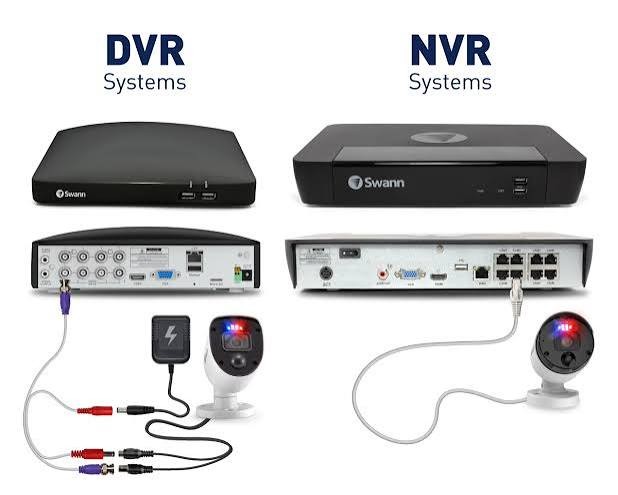
DVR stands for Digital Video Recorder. It is a recording device commonly used with compatible analogue CCTV cameras.
In a traditional DVR installation, cameras capture video and transmit it through physical coaxial cables to the recorder. The DVR then processes and stores the incoming footage digitally.
DVR systems are widely associated with traditional analogue CCTV installations, although modern analogue high-definition technologies can provide significantly improved image quality compared with older analogue systems.
How Does a DVR System Work?
A DVR system operates through a connection between compatible analogue cameras and the recording device.
The general process involves the following stages:
- Analogue CCTV cameras capture video footage.
- The cameras transmit video signals through coaxial cables.
- The DVR receives and processes the incoming signals.
- The recorder converts the video into digital files.
- The footage is stored on an internal hard drive.
- Users can view live feeds or review recorded footage through a connected monitor or supported remote access application.
Many DVR installations also require separate power connections for cameras, although some cable arrangements combine video and power transmission.
Main Components of a DVR System
1. Analogue CCTV Cameras
These cameras capture video and transmit compatible analogue video signals to the DVR.
2. Coaxial Cables
Coaxial cables carry video signals between the cameras and recording equipment. The required cable type depends on the camera technology and installation distance.
3. DVR Recorder
The DVR receives camera signals, processes video and manages recording.
4. Hard Drive Storage
The internal hard drive stores recorded footage for later playback.
5. Power Supply
The cameras and recorder require appropriate electrical power. Some installations use centralised camera power supplies.
6. Monitor and Network Connection
A monitor can display camera feeds locally, while a network connection may allow remote access through a compatible application.
Advantages of DVR CCTV Systems
DVR systems offer several advantages, particularly for installations using compatible existing analogue infrastructure.
1. Suitable for Existing Analogue CCTV Infrastructure
Businesses with existing coaxial cabling may be able to upgrade compatible cameras or recorders without replacing all the installed cabling.
This can make DVR technology practical for some renovation and CCTV upgrade projects.
2. Centralised Recording
A DVR provides a central point for receiving camera feeds, managing recordings and reviewing footage.
3. Straightforward System Architecture
Traditional DVR systems have a relatively direct connection between cameras and the recording device.
This can make them suitable for smaller installations with clearly defined camera locations.
4. Different Camera Resolution Options
Modern analogue high-definition technologies support a range of resolutions, depending on the camera and recorder.
This means DVR systems are not necessarily limited to the low image quality associated with older analogue CCTV equipment.
5. Potentially Lower Upgrade Costs
Where compatible coaxial cabling already exists, reusing that infrastructure may reduce some installation costs.
However, the actual savings depend on cable condition, equipment compatibility and the required system performance.
Disadvantages of DVR CCTV Systems
Despite their advantages, DVR systems have limitations that should be considered before installation.
1. More Dependence on Physical Camera Cabling
Traditional DVR installations generally require each camera to have a suitable video connection to the recorder.
Large properties may require substantial cable routing.
2. Separate Camera Power Requirements
Many DVR camera installations require separate power arrangements, increasing the number of cables and connections.
3. Limited Flexibility in Some Installations
Adding cameras may require additional coaxial cabling and compatible recorder channels.
4. Less Advanced Network-Based Camera Management
Traditional DVR systems may offer fewer network-based features than some modern IP camera and NVR solutions. However, capabilities vary significantly between models.
5. Compatibility Considerations
Different analogue camera technologies may not be compatible with every DVR. Businesses should confirm supported video formats and resolutions before purchasing equipment.
What Is an NVR CCTV Recording System?
<image_placeholder>
NVR stands for Network Video Recorder. It is a recording device designed to work with compatible IP cameras.
Unlike traditional DVR systems, NVR systems receive video through a network connection. The cameras capture and digitally encode video before transmitting it to the recorder.
An NVR can manage multiple network cameras, record footage and provide access to live viewing and playback.
NVR technology is widely used in modern commercial CCTV installations because it supports network-based camera management and flexible system configurations.
How Does an NVR System Work?
An NVR system uses IP cameras connected through an Ethernet network, wireless network or another supported network arrangement.
The general process works as follows:
- IP cameras capture video.
- The cameras encode the footage digitally.
- The video streams are transmitted over the network.
- The NVR receives the streams from compatible cameras.
- The recorder stores the footage on its internal storage.
- Authorised users can view live feeds or recorded footage through connected monitors and supported applications.
Some NVR systems use Power over Ethernet (PoE), allowing compatible cameras to receive electrical power and transmit data through one Ethernet cable.
Other installations may use separate power supplies, network switches or wireless connections.
Main Components of an NVR System
1. IP CCTV Cameras
These cameras capture and digitally encode video before transmitting it over a network.
2. Ethernet Cables
Network cables connect cameras to switches or directly to PoE-enabled NVR ports.
3. Network Video Recorder
The NVR receives network video streams and manages recording and storage.
4. Network Switches
Network switches connect cameras and other network devices. PoE switches can supply power to compatible cameras.
5. Hard Drive Storage
The NVR stores recorded video on compatible internal hard drives.
6. Router and Network Infrastructure
Network equipment supports communication between the CCTV devices and authorised viewing systems.
7. Monitoring Devices
Users can access live footage and recordings through monitors, computers or supported smartphone applications.
Advantages of NVR CCTV Systems
NVR systems offer several benefits for businesses and property owners seeking modern network-based surveillance.
1. High-Quality Network Video
NVR systems support compatible IP cameras with a wide range of video resolutions.
Depending on the equipment, they can support high-resolution surveillance for areas where detailed images are important.
2. Flexible Camera Placement
IP cameras can be connected through suitable network infrastructure.
This provides flexibility when designing surveillance systems across larger buildings and multiple operational areas.
3. Simplified Cabling with PoE
Compatible PoE cameras can receive both data and electrical power through a single Ethernet cable.
This can reduce separate camera power cabling and simplify some installations.
4. Advanced Camera Features
Many IP cameras support features such as:
- Motion detection.
- Human and vehicle detection.
- Line crossing.
- Intrusion detection.
- Wide dynamic range.
- Advanced low-light performance.
- Remote configuration.
These features depend on the camera, recorder, software and licence requirements where applicable.
5. Easier Network-Based Expansion
A properly designed network can make it easier to add compatible cameras and recording devices as business requirements change.
The number of supported cameras depends on NVR channels, network capacity, processing performance and storage.
6. Remote Monitoring Capabilities
Many NVR systems support remote access through compatible applications and platforms.
This allows authorised users to monitor their premises through smartphones, tablets and computers when the necessary network connection is available.
Disadvantages of NVR CCTV Systems
NVR systems also have considerations that businesses should evaluate before installation.
1. Higher Initial Equipment Costs in Some Projects
IP cameras, PoE switches and compatible recording equipment may increase the initial investment compared with some basic DVR configurations.
However, costs vary according to equipment quality, camera quantity and project requirements.
2. Network Infrastructure Requirements
NVR systems depend on suitable network infrastructure.
Large installations may require network switches, structured cabling, bandwidth planning and network configuration.
3. Network Configuration Complexity
Some commercial NVR systems require technical configuration involving IP addresses, network security, camera registration and storage settings.
4. Compatibility Between Devices
Not every IP camera works with every NVR.
Although ONVIF and other interoperability standards can improve compatibility, supported profiles, features and firmware still need to be checked.
5. Network Bandwidth Requirements
Multiple high-resolution IP cameras can generate substantial network traffic.
The network must have enough capacity to support the camera streams and other connected devices.
DVR vs NVR: What Is the Difference?
The main difference between DVR and NVR CCTV systems is how they receive and process video footage.
DVR systems generally receive compatible analogue video signals through coaxial connections and process them at the recorder.
NVR systems receive digitally encoded video streams over a network from compatible IP cameras.
The following comparison explains the major differences.
| Feature | DVR CCTV System | NVR CCTV System |
|---|---|---|
| Full meaning | Digital Video Recorder | Network Video Recorder |
| Typical camera technology | Compatible analogue cameras | IP network cameras |
| Video transmission | Usually coaxial cable | Network connection |
| Video processing | Primarily handled by recorder | Primarily handled by IP cameras |
| Power arrangement | Often separate camera power | PoE or separate power |
| Network requirements | Mainly for remote access and network features | Required for camera communication and remote access |
| Video quality | Depends on analogue camera and DVR format | Depends on IP camera and NVR specifications |
| Expansion | Depends on DVR channels and cabling | Depends on NVR channels and network capacity |
| Remote viewing | Supported by compatible DVRs | Supported by compatible NVRs |
| Best suited for | Existing analogue installations and suitable smaller systems | Modern network-based surveillance installations |
1. Camera Technology
DVR systems generally work with compatible analogue cameras, while NVR systems are designed for IP cameras.
This is one of the most important differences when choosing equipment.
A business should not assume that an analogue camera can connect directly to an ordinary NVR or that an IP camera can connect to any DVR.
2. Video Transmission
DVR cameras typically transmit analogue video through coaxial cables.
NVR cameras transmit digital video streams over a network, commonly using Ethernet cabling.
The choice affects the installation layout and infrastructure requirements.
3. Video Processing
In a traditional DVR system, the recorder performs the main conversion and processing of incoming analogue video signals.
In an NVR system, compatible IP cameras encode video digitally before transmitting it to the recorder.
This difference affects the system architecture and equipment requirements.
4. Image Quality
Neither technology automatically guarantees better image quality.
DVR systems can support modern analogue high-definition cameras, while NVR systems can support high-resolution IP cameras.
The actual image quality depends on:
- Camera resolution.
- Image sensor quality.
- Lens specifications.
- Lighting conditions.
- Video compression.
- Recording settings.
- Network and recorder capabilities.
Businesses should compare the actual camera and recorder specifications rather than choosing based only on whether a system is DVR or NVR.
5. Installation and Cabling
Traditional DVR systems commonly use coaxial cabling between cameras and the recorder.
NVR installations commonly use Ethernet cabling and network switches.
PoE can simplify an NVR installation by carrying power and data through a single cable for compatible devices.
6. Storage and Recording
Both DVR and NVR systems can use internal hard drives to store recorded footage.
Storage requirements depend on the number of cameras, resolution, frame rate, compression settings and recording schedule.
Neither system automatically provides a longer recording period. Storage capacity and configuration determine how much footage can be retained.
7. Remote Viewing
Both DVR and NVR systems can support remote smartphone viewing when their hardware and software provide the required functionality.
A compatible mobile application and suitable network connection are necessary for remote access.
8. System Expansion
NVR systems can provide flexible expansion through network infrastructure, provided the recorder, switches and network have sufficient capacity.
DVR systems can also be expanded, but the available channels and physical cabling may limit the installation.
The best option depends on the size and future requirements of the property.
DVR vs NVR: Which CCTV Recording System Is Better?
There is no universal winner between DVR and NVR systems.
The best choice depends on the property’s infrastructure, camera requirements, budget, recording quality and expected future expansion.
However, some situations may make one technology more appropriate than the other.
When Should You Choose a DVR CCTV System?
A DVR system may be suitable when:
- You already have compatible analogue cameras.
- Your property has existing coaxial CCTV cabling.
- You want to upgrade an older compatible analogue installation.
- You need a straightforward recording arrangement.
- Your surveillance requirements can be met by the available DVR technology.
- Reusing existing infrastructure is a priority.
For example, a small business in Kampala with an existing analogue CCTV installation may find that upgrading to a compatible DVR provides a practical way to improve its recording equipment without replacing every camera cable.
When Should You Choose an NVR CCTV System?
An NVR system may be suitable when:
- You are installing a new IP-based CCTV system.
- You need network-based camera management.
- You want compatible PoE camera connections.
- You require high-resolution IP camera options.
- You plan to expand your surveillance network.
- You need advanced IP camera analytics.
- You are securing a large commercial or industrial property.
For example, a new warehouse in Wakiso may benefit from an NVR system designed to support cameras across storage areas, loading bays, offices and external access points.
When Is a Hybrid CCTV System Appropriate?
Some businesses have existing analogue cameras but want to introduce newer IP camera technology.
In these situations, a hybrid CCTV solution may be worth considering.
Hybrid DVR systems can support selected analogue formats and IP cameras, depending on their specifications and channel configuration.
There are also specialised architectures that combine different recorders or network systems.
Before selecting a hybrid arrangement, confirm camera compatibility, channel limitations, resolution support and recording functionality.
Which CCTV Recording System Is Best for Different Properties?
Different properties have different surveillance priorities. The following examples can help guide the selection process.
1. Homes and Residential Properties
For a home with a small number of cameras, either DVR or NVR may be suitable.
A DVR system may be practical where compatible analogue cameras and cabling already exist.
An NVR system may be preferable for a new IP camera installation requiring network-based features and remote viewing.
2. Offices and Commercial Buildings
Offices may require surveillance across entrances, reception areas, corridors, parking spaces and equipment rooms.
An NVR system can be suitable where the building requires several IP cameras and centralised network management.
A DVR system may remain appropriate for an office upgrading existing analogue infrastructure.
3. Retail Shops and Supermarkets
Retail businesses may need to monitor checkout counters, entrances, sales areas, stockrooms and delivery points.
Both DVR and NVR systems can support these requirements.
The choice should consider camera resolution, available cabling, storage capacity and the level of detail required for reviewing incidents.
4. Warehouses and Storage Facilities
Warehouses often have large floor areas, high ceilings and multiple loading points.
An NVR system may be suitable where network cameras, flexible camera placement and high-resolution surveillance are required.
The design should also consider network distances, switch locations, power availability and storage capacity.
5. Factories and Industrial Facilities
Factories may require CCTV coverage across production lines, machinery areas, external yards and restricted access points.
An NVR system can be useful for larger network-based installations, particularly when specialised IP cameras or advanced analytics are required.
However, suitable industrial camera protection and network design are essential.
6. Hotels and Hospitality Facilities
Hotels may require cameras across reception areas, entrances, corridors, parking spaces and service access points.
Both technologies can work, depending on the property’s size, existing infrastructure and monitoring needs.
Surveillance must respect guest privacy, especially in bedrooms and bathrooms, where cameras should not be installed.
7. Schools and Educational Institutions
Schools may need CCTV monitoring around entrances, corridors, administrative areas and external walkways.
An NVR system may suit a new installation requiring network-based camera management.
A DVR system may be suitable where an institution already has compatible analogue cameras and cabling.
How Much CCTV Storage Do You Need for DVR and NVR Systems?
Storage capacity is an important consideration when selecting a CCTV recording system.
Both DVR and NVR systems use storage devices to preserve video footage for future review.
The amount of storage required depends on several factors.
1. Number of Cameras
A system with more cameras generally generates more video data.
A business monitoring 32 camera locations will normally need more storage than a small office monitoring four locations, assuming similar recording settings.
2. Camera Resolution
Higher-resolution video generally requires more storage than lower-resolution footage when other recording settings are comparable.
3. Frame Rate
Frame rate determines how many video frames are recorded each second.
Higher frame rates can produce smoother video but may increase storage requirements.
4. Video Compression
Modern CCTV systems use compression technologies to reduce video file sizes.
The amount of storage saved depends on the codec, video content and camera configuration.
5. Recording Schedule
Continuous recording usually consumes more storage than event-based recording when the number of cameras and other settings are similar.
Some businesses use a combination of continuous and event-based recording.
6. Required Retention Period
The longer footage needs to remain available, the more storage capacity may be required.
Businesses should define their required retention period before purchasing a recording system.
Practical CCTV Storage Planning
Before choosing a DVR or NVR, determine:
- How many cameras will be installed?
- What resolution will the cameras use?
- What frame rate is required?
- Will recording be continuous or event-based?
- How long should footage be retained?
- Will multiple cameras be recorded simultaneously?
- Is additional storage expansion required?
The recording system should have sufficient supported storage capacity to meet these requirements.
Can DVR and NVR Systems Be Viewed on a Smartphone?
Yes. Both DVR and NVR systems can support smartphone viewing when the equipment includes compatible remote access functionality.
A compatible mobile application allows authorised users to access live footage and, where supported, recorded video.
The general process includes:
- Connecting the recorder to the network.
- Confirming internet connectivity.
- Enabling the manufacturer’s supported remote access feature.
- Installing the official mobile application.
- Adding the recorder using its approved registration method.
- Signing in with secure credentials.
- Selecting the required camera feeds.
Mobile viewing depends on the recorder’s compatibility, internet connection, mobile application and configuration.
A local recording system may continue operating without internet if it remains powered and is configured for local recording. However, remote viewing from outside the premises normally requires internet or another communication link.
For additional guidance, read Daltrevco’s related article on CCTV Mobile Viewing: How to Access Security Cameras on Your Smartphone.
Common Mistakes to Avoid When Choosing DVR or NVR CCTV Systems
Selecting an unsuitable recorder can lead to compatibility problems, unnecessary installation expenses and poor surveillance performance.
Avoid these common mistakes.
1. Buying Cameras Without Checking Recorder Compatibility
Not all cameras work with all recorders.
Before purchasing, confirm that the camera technology, video format, resolution and recorder specifications are compatible.
2. Choosing Only Based on Price
The cheapest recorder may not support the camera quantity, resolution, storage capacity or features required.
Consider the total system cost and long-term requirements.
3. Ignoring Storage Requirements
Insufficient storage can result in recordings being overwritten sooner than expected.
Calculate storage needs before installation.
4. Underestimating Network Requirements
NVR installations require adequate network infrastructure.
Insufficient bandwidth, poor cabling and unsuitable switches can affect camera communication and recording performance.
5. Ignoring Future Expansion
A recorder with too few channels may require replacement when additional cameras are needed.
Consider future camera additions when selecting the equipment.
6. Failing to Secure Remote Access
Poor password management and insecure network configurations can expose CCTV systems to unauthorised access.
Use strong credentials, supported security updates and restricted user permissions.
7. Neglecting Backup Power
Power interruptions can stop cameras and recorders from operating.
Consider an appropriately sized UPS or backup power arrangement for critical equipment.
8. Ignoring Camera Placement
Even a high-quality recording system cannot compensate for poorly positioned cameras.
Plan camera locations around the property’s security priorities, lighting and viewing requirements.
Professional CCTV DVR and NVR Installation in Uganda
Choosing the right recording technology is only one part of a successful CCTV project. The system must also be properly designed, installed, configured and tested.
A professional installation process should include the following stages.
Step 1: Site Inspection
The property is assessed to identify important monitoring areas, entrances, existing infrastructure and potential installation challenges.
Step 2: Security Requirements Assessment
The required number of cameras, image quality, recording period, monitoring arrangements and future expansion needs are established.
Step 3: DVR or NVR Selection
The appropriate recorder is selected according to the camera technology, available cabling, network infrastructure and required features.
Step 4: Camera and Equipment Selection
Compatible cameras, recording equipment, hard drives, cables, switches and power supplies are selected.
Step 5: Cabling and Network Installation
The required cabling and network infrastructure are installed.
For NVR systems, this may include Ethernet cabling, PoE switches and network configuration.
For DVR systems, this may include coaxial video cabling and appropriate camera power arrangements.
Step 6: Recorder Configuration
The DVR or NVR is configured to receive camera feeds, manage recording schedules and store footage.
Settings such as date, time, recording quality and user permissions should be checked.
Step 7: Testing and Commissioning
The system is tested to confirm:
- All cameras are connected.
- Video quality is acceptable.
- Recording is working.
- Playback is available.
- Storage is functioning.
- Remote viewing works where required.
- Camera coverage is appropriate.
- User access is correctly configured.
Step 8: Handover and User Training
The property owner or authorised personnel should be shown how to view live footage, search recordings, export relevant video and manage user accounts.
How Much Does DVR or NVR CCTV Installation Cost in Uganda?
The cost of installing a DVR or NVR CCTV recording system in Uganda varies according to the size of the property, equipment specifications and complexity of the installation.
There is no single price that applies to every CCTV project.
A small shop requiring a few cameras will have different requirements from a large factory, warehouse, hotel or multi-storey commercial building.
Factors That Affect DVR Installation Costs
DVR installation costs may depend on:
- Number of analogue cameras.
- DVR channel capacity.
- Camera resolution and technology.
- Coaxial cable requirements.
- Camera power supplies.
- Hard drive capacity.
- Monitor and accessories.
- Installation labour.
- Remote viewing configuration.
Factors That Affect NVR Installation Costs
NVR installation costs may depend on:
- Number and specifications of IP cameras.
- NVR channel capacity.
- Ethernet cabling.
- PoE switches and power requirements.
- Network infrastructure.
- Hard drive capacity.
- Camera analytics and additional features.
- Installation complexity.
- Remote viewing configuration.
Which Is Cheaper: DVR or NVR?
A basic DVR installation may be less expensive in some projects, especially where compatible analogue cameras and cabling already exist.
An NVR system may involve higher initial costs where new IP cameras, network switches and structured cabling are required.
However, NVR systems may offer advantages that justify the investment for certain commercial and industrial applications.
The most cost-effective solution is the one that meets the property’s security requirements without unnecessary equipment or future replacement expenses.
Businesses should request a site assessment and equipment specification before comparing quotations.
Why Choose Daltrevco for CCTV and Security Infrastructure Solutions?
Selecting a CCTV recording system requires more than deciding between a DVR and an NVR. Businesses need a solution that matches their property layout, security priorities, camera requirements and long-term plans.
Daltrevco provides a point of contact for organisations and property owners exploring suitable building and security infrastructure solutions.
When considering a CCTV project, important factors include:
- Assessing the property’s surveillance requirements.
- Selecting compatible cameras and recording equipment.
- Determining whether DVR or NVR technology is more appropriate.
- Planning video storage capacity.
- Considering network and cabling requirements.
- Configuring remote viewing where supported.
- Protecting the system against unauthorised access.
- Planning for future expansion.
Whether you are securing a home, office, retail shop, warehouse, factory, hotel or commercial property, choosing the right recording system is an important step towards establishing a reliable surveillance arrangement.
Contact Daltrevco to discuss your CCTV recording requirements and explore a suitable DVR or NVR security camera solution for your property in Uganda.
Frequently Asked Questions About DVR vs NVR CCTV Systems
1. What is the difference between DVR and NVR CCTV systems?
A DVR generally works with compatible analogue cameras and receives video through physical video connections such as coaxial cables. An NVR works with IP cameras and receives digitally encoded video over a network.
2. Which is better, DVR or NVR?
Neither is universally better. DVR systems may suit existing analogue installations, while NVR systems may be preferable for new IP-based installations requiring network features and flexible camera management.
3. Is NVR more expensive than DVR?
An NVR installation may cost more in some projects because of IP cameras and network infrastructure. However, actual costs depend on equipment specifications, camera quantity, existing cabling and installation complexity.
4. Can I use analogue cameras with an NVR?
Not directly in a typical NVR installation. Analogue cameras require suitable conversion or hybrid equipment if they are to work within a network-based recording arrangement.
5. Can I use IP cameras with a DVR?
Some hybrid DVRs support selected IP cameras in addition to analogue cameras. Ordinary analogue-only DVRs may not support IP camera connections. Always check the recorder’s specifications.
6. Does NVR provide better image quality than DVR?
Not automatically. Image quality depends on camera resolution, sensor quality, lens, lighting and recording settings. NVR systems support many high-resolution IP cameras, while modern analogue high-definition DVR systems can also deliver good image quality.
7. Does DVR require internet?
A DVR does not normally need internet for local recording and viewing. However, internet connectivity is generally required for remote viewing from outside the property.
8. Does NVR require internet to record footage?
An NVR generally requires a local network connection to communicate with its IP cameras, but it does not necessarily need an internet connection for local recording. Remote viewing from outside the premises normally requires internet or another suitable communication link.
9. Can DVR and NVR systems be viewed on smartphones?
Yes. Compatible recorders can provide mobile applications or supported remote access platforms for live viewing and recorded playback.
10. Which system is best for a warehouse?
An NVR system may be suitable for a new warehouse installation requiring network-based cameras and flexible coverage. A DVR system may also work where compatible analogue infrastructure already exists.
11. Which system is best for a small business?
Both can be suitable. The best choice depends on the number of cameras, existing cabling, desired image quality, budget and future expansion requirements.
12. Can I upgrade my existing DVR system to NVR?
Yes, but upgrading may require replacing analogue cameras with IP cameras and installing suitable network infrastructure. A phased or hybrid upgrade may be possible depending on equipment compatibility.
13. How many cameras can a DVR support?
The number depends on the recorder’s channel capacity. Common configurations include 4-channel, 8-channel, 16-channel and 32-channel devices, although other capacities are available.
14. How many cameras can an NVR support?
The number depends on its channel capacity, network bandwidth, processing capability and supported camera specifications.
15. Do DVR and NVR systems use hard drives?
Yes. Both commonly use internal hard drives to store recorded video. The required capacity depends on the number of cameras, recording quality and retention period.
16. Can an NVR use Wi-Fi cameras?
Some NVRs support compatible wireless IP cameras, but compatibility and network requirements must be checked. Wired Ethernet connections are often preferred for installations where reliable continuous recording is important.
17. What is a PoE NVR?
A PoE NVR is a network video recorder with built-in Power over Ethernet ports. Compatible IP cameras can receive electrical power and transmit video through Ethernet cables connected to the recorder.
18. What is a hybrid DVR?
A hybrid DVR supports selected analogue camera technologies and, depending on the model, additional IP camera channels. It can be useful when upgrading an existing analogue CCTV installation gradually.
19. How long can a DVR or NVR store footage?
The recording period depends on hard drive capacity, number of cameras, video resolution, compression settings and recording schedule. Larger storage capacity can support longer retention when other settings remain comparable.
20. How do I choose the right CCTV recorder in Uganda?
Assess your property’s size, camera requirements, existing infrastructure, recording needs, storage capacity, network availability and budget. Confirm equipment compatibility and consider future expansion before purchasing.
Conclusion: Choosing the Right CCTV Recording System for Your Property
Choosing between DVR and NVR CCTV recording systems is an important step when planning an effective security camera installation.
DVR systems remain useful for compatible analogue CCTV installations, particularly where existing coaxial cabling can be reused. NVR systems provide a network-based approach suited to IP cameras, modern commercial surveillance and installations requiring flexible network management.
The right option depends on your property’s layout, security objectives, equipment requirements, recording quality, storage needs and available infrastructure.
For homes, offices, retail shops, warehouses, factories and commercial buildings in Uganda, a properly planned CCTV recording system can provide valuable video surveillance and support security investigations.
Daltrevco can be your point of contact when exploring suitable CCTV and security infrastructure solutions.
Contact Daltrevco today to discuss your CCTV installation requirements and identify whether a DVR, NVR or hybrid recording system is the right choice for your property.

