
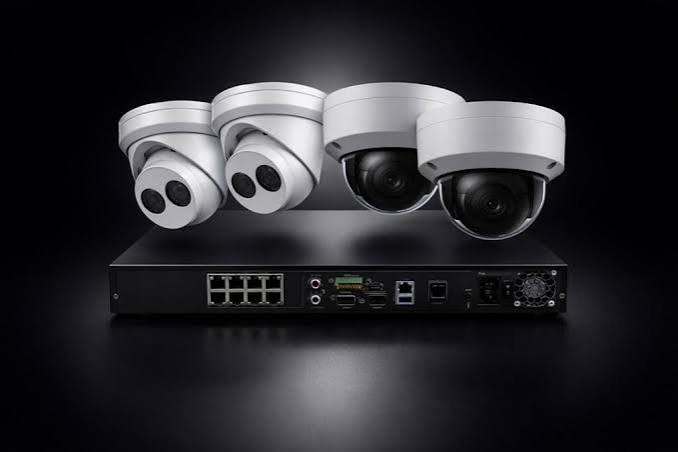
Installing CCTV cameras is an important step towards improving property security, but cameras alone do not provide a complete surveillance solution. A properly designed CCTV system must also have sufficient storage capacity to record, preserve and retrieve video footage whenever it is required.
Imagine a business in Kampala experiencing a break-in, theft or unauthorised access incident. The CCTV cameras captured the event, but when management attempts to review the footage, they discover that the recording has already been overwritten because the hard drive could not retain enough video.
This is one of the problems that can arise when CCTV storage is not properly planned.
Choosing the right CCTV storage solutions in Uganda requires understanding how much video data your cameras generate, how long recordings should be retained, which hard drive is suitable for continuous surveillance and whether your recording equipment can support the required storage capacity.
A small residential CCTV installation may operate effectively with a single surveillance hard drive. However, a hotel, shopping centre, warehouse, factory, school or large commercial building may require a multi-drive Network Video Recorder (NVR), dedicated storage server or a combination of local and off-site storage.
The correct solution depends on the property’s surveillance objectives, number of cameras, video quality, recording schedule, storage retention policy and future expansion requirements.
This guide explains how CCTV storage works, how to calculate recording capacity, how to select surveillance hard drives and how to plan a reliable CCTV recording system for residential, commercial and industrial properties in Uganda.
1. What Is CCTV Storage and Why Is It Important?
CCTV storage is the process of saving video footage captured by security cameras so that authorised users can review recordings later.
When a CCTV camera captures video, the recording is transmitted to a compatible recording device or storage platform. The system processes the video and saves it using a configured storage arrangement.
Depending on the CCTV equipment, recordings may be stored on:
- Internal surveillance hard drives.
- Digital Video Recorders (DVRs).
- Network Video Recorders (NVRs).
- Network Attached Storage (NAS).
- Dedicated video recording servers.
- Cloud-based surveillance platforms.
- Hybrid local and cloud storage systems.
The storage system determines how much footage can be retained, how long recordings remain available and how easily users can retrieve important security events.
Why proper CCTV storage planning matters
Preserving important security footage: Adequate capacity reduces the risk of important recordings being overwritten before an incident is discovered.
Supporting investigations: Businesses may need to review footage following theft, workplace incidents, property damage, disputes or unauthorised access.
Maintaining continuous surveillance: A correctly configured recording system can save video according to the required recording schedule.
Supporting multiple cameras: Larger installations need storage designed to handle simultaneous video streams.
Improving operational reliability: Suitable drives, compatible recorders and storage monitoring help reduce avoidable recording problems.
Supporting remote monitoring: Properly stored recordings can be accessed remotely where the recording platform and network configuration support remote playback.
CCTV storage should therefore be treated as a core part of the security system rather than an accessory selected after cameras have been installed.
2. How Does a CCTV Recording and Storage System Work?
Understanding the recording process makes it easier to select the right storage equipment.
A typical CCTV recording system follows this process:
- Security cameras capture video.
- The cameras transmit video to a DVR or NVR, depending on the system architecture.
- The recorder processes or manages the incoming video streams.
- The video is compressed according to the configured recording format.
- The recorder writes the footage to an internal or connected storage device.
- Authorised users can search, play back or export stored recordings.
In a typical analogue HD CCTV installation, cameras transmit video to a DVR over compatible coaxial cabling.
In an IP CCTV installation, network cameras send digital video streams to an NVR over an Ethernet network or another supported connection.
The recording device then manages video storage according to its configured settings.
<escape> </escape>
3. Types of CCTV Storage Solutions Available
There are several ways to store surveillance footage. The right option depends on the size of the installation, required retention period, available infrastructure and level of protection needed.
3.1 Surveillance Hard Drives
A surveillance hard drive is specifically designed for the recording workload associated with CCTV systems.
Unlike a typical desktop computer drive, a surveillance-rated drive is developed to handle sustained video recording and simultaneous video streams within its specified workload limits.
These drives are commonly installed in DVRs, NVRs and dedicated video recording equipment.
Key advantages:
- Designed for CCTV recording workloads.
- Suitable for continuous surveillance applications.
- Available in different storage capacities.
- Compatible with many surveillance recorders, subject to specifications.
- Support local video storage without depending on a cloud subscription.
Best applications: Homes, offices, retail outlets, hotels, schools, warehouses and factories.
For most conventional CCTV installations, a compatible surveillance hard drive is a practical starting point.
3.2 DVR Storage Systems
A Digital Video Recorder stores footage from compatible analogue and HD-over-coaxial security cameras.
The DVR receives the camera signals, processes them and records the video onto an installed hard drive.
DVR storage may be suitable for:
- Existing analogue CCTV systems.
- Small and medium-sized businesses.
- Residential properties.
- Retail premises.
- Facilities upgrading an older surveillance installation.
Before upgrading a DVR hard drive, check the recorder’s maximum supported capacity, interface and approved drive compatibility.
3.3 NVR Storage Systems
A Network Video Recorder stores footage from compatible IP cameras.
NVRs commonly use internal surveillance hard drives, although some models support external or network storage arrangements.
They are suitable for installations requiring multiple network cameras, centralised recording and flexible system expansion.
When selecting an NVR, evaluate:
- Number of supported cameras.
- Maximum incoming recording bandwidth.
- Number of internal hard drive bays.
- Maximum supported capacity per drive.
- Total supported storage capacity.
- Supported compression formats.
- RAID capabilities, where available.
- Compatibility with external storage.
An NVR should be selected according to the actual recording workload, not simply the number of camera channels advertised.
3.4 Network Attached Storage (NAS)
Network Attached Storage is a dedicated device connected to a network to provide centralised data storage.
Some CCTV platforms support NAS as additional recording or backup storage.
NAS may be useful for organisations that operate several cameras, recording systems or locations and require centralised storage management.
Its advantages can include:
- Expandable storage on supported devices.
- Centralised recording management.
- Network-based access for authorised users.
- Backup capabilities.
- Integration with compatible surveillance software.
However, not all DVRs, NVRs and cameras support NAS recording. Compatibility, recording software, licensing, network bandwidth and storage configuration must be verified.
3.5 Cloud CCTV Storage
Cloud CCTV storage saves recordings on remote infrastructure rather than relying exclusively on equipment installed at the property.
Depending on the platform, footage may be uploaded continuously, stored after motion events or transferred according to a configured backup schedule.
Cloud storage can be valuable for organisations that need remote access or protection against the loss of locally stored footage.
Advantages:
- Off-site recording storage.
- Remote access to supported recordings.
- Centralised management across multiple locations.
- Additional protection for footage copied outside the property.
Considerations:
- Reliable internet connectivity.
- Sufficient upload bandwidth.
- Subscription or storage charges.
- Retention limits.
- Provider security and data protection arrangements.
Cloud storage should be selected with an understanding of how much video data the cameras will upload.
3.6 Hybrid CCTV Storage
Hybrid storage combines local recording with off-site or cloud backup.
For example, a warehouse may record continuously on an NVR while uploading important event recordings to a remote storage platform.
This arrangement can help preserve selected recordings if the local recorder is damaged, stolen or inaccessible.
Hybrid storage is worth considering for businesses where losing important CCTV footage could create significant operational or security problems.
4. How to Choose the Best CCTV Hard Drive
Selecting the correct surveillance hard drive involves more than comparing advertised capacities.
A drive must support the recording workload and be compatible with the CCTV recorder.
4.1 Choose a Surveillance-Rated Hard Drive
A surveillance-rated drive is generally more suitable for continuous CCTV recording than an ordinary desktop hard drive.
It is designed for surveillance applications involving sustained recording, multiple video streams and extended operating periods.
When comparing drives, review the manufacturer’s intended application and workload specifications.
4.2 Select the Correct Storage Capacity
Common surveillance hard drive capacities include:
- 1TB.
- 2TB.
- 4TB.
- 6TB.
- 8TB.
- 10TB.
- 12TB and higher.
The capacity required depends on the number of cameras, their configured bitrates and the required recording duration.
A 4TB drive may be sufficient for one installation but inadequate for another with the same number of cameras.
The correct capacity should be calculated before purchase.
4.3 Check the Drive’s Workload Rating
Workload ratings indicate how much data a hard drive is designed to handle over a specified period.
A small home CCTV installation and a large commercial surveillance system do not necessarily place the same demands on a drive.
For larger installations, ensure the selected drive is suitable for the expected continuous recording workload and number of simultaneous streams.
4.4 Confirm Recorder Compatibility
This is one of the most important purchasing considerations.
A hard drive may have sufficient capacity but still be unsuitable for a particular recorder.
Check:
- Supported drive interface.
- Maximum capacity per drive bay.
- Total supported storage capacity.
- Supported drive formats.
- Manufacturer compatibility recommendations.
- Firmware and operating requirements.
Do not assume that every DVR or NVR supports every high-capacity hard drive.
4.5 Consider the Number of Hard Drive Bays
A recorder with one drive bay has different storage expansion options from one with four or eight bays.
Multiple drive bays can allow a larger total capacity, depending on the recorder’s supported configuration.
They may also support redundancy arrangements where RAID is available.
However, additional drive bays do not automatically provide protection against data loss. The actual storage configuration matters.
4.6 Evaluate Reliability and Warranty
Consider the manufacturer’s reliability information, warranty conditions, workload specifications and suitability for surveillance.
No hard drive is guaranteed never to fail. Important CCTV footage should be protected through appropriate backup and storage monitoring arrangements.
5. CCTV Storage Capacity: What Determines How Much Space You Need?
The most important question when planning CCTV storage is:
How much video data will the system generate during the required recording period?
Several factors determine the answer.
Number of Cameras
Each recording camera contributes video data to the storage system.
For example, a 16-camera installation will generally require more capacity than a four-camera installation when recording settings and retention periods are comparable.
Video Bitrate
Bitrate measures how much video data is produced per second.
It is commonly expressed in megabits per second (Mbps).
A camera recording at 4 Mbps generally generates more data than a camera recording at 2 Mbps over the same period.
Bitrate is one of the most useful values for estimating CCTV storage.
Video Resolution
Resolution describes the number of pixels in the recorded image.
Common CCTV resolutions include:
- 2MP.
- 4MP.
- 5MP.
- 8MP or 4K.
Higher resolutions can generate more data, but resolution alone does not determine storage consumption.
Two cameras with the same resolution may use different storage capacities because of bitrate, compression, frame rate and scene complexity.
Frame Rate
Frame rate measures how many images are captured each second.
It is expressed in frames per second (FPS).
Higher frame rates can provide smoother motion, particularly in busy locations such as vehicle entrances, reception areas and production environments.
However, higher frame rates may increase storage consumption when other settings remain comparable.
Video Compression
Compression reduces the amount of data needed to store video footage.
Common CCTV compression technologies include:
- H.264.
- H.265.
- Manufacturer-specific enhanced compression technologies such as H.265+.
H.265 can often provide more efficient compression than H.264 at comparable perceived image quality.
However, actual savings depend on the camera, scene, bitrate configuration and compatibility of the recording system.
Recording Schedule
Continuous recording generates more footage than recording only during selected hours or motion events.
A camera recording 24 hours daily will generally require more storage than a camera recording for eight hours daily, assuming comparable bitrate.
Scene Activity
Video from a busy environment may require more data than video from a relatively static scene, particularly when variable bitrate recording is used.
Moving vehicles, people, machinery, vegetation and changing lighting conditions can affect actual storage consumption.
6. How to Calculate CCTV Hard Drive Capacity
A CCTV storage calculator or a simple bitrate formula can help estimate the required capacity before purchasing equipment.
For a practical estimate using decimal gigabytes:
Storage in GB = Total bitrate in Mbps × 0.45 × Recording hours per day × Number of days
Total bitrate is the combined bitrate of all cameras recording to the storage system.
For cameras with the same bitrate:
Storage in GB = Bitrate per camera × Number of cameras × 0.45 × Recording hours per day × Retention days
For continuous 24-hour recording:
Storage in GB = Bitrate per camera × Number of cameras × 10.8 × Retention days
These calculations estimate video data volume. They do not account fully for recorder overhead, filesystem requirements, audio, metadata, available drive capacity or variations in bitrate. Allow additional capacity when designing a real installation.
Example 1: Four Cameras Recording for 30 Days
A small office has four cameras, each recording at an average bitrate of 2 Mbps.
The business wants 30 days of continuous recording.
- Cameras: 4.
- Bitrate per camera: 2 Mbps.
- Recording hours: 24 per day.
- Retention: 30 days.
Calculation:
2 × 4 × 10.8 × 30 = 2,592GB.
The estimated requirement is approximately 2.6TB before additional allowances.
A compatible drive with capacity above this estimate should be considered.
Example 2: Eight Cameras Recording for 30 Days
A commercial building has eight cameras recording at an average bitrate of 4 Mbps.
Calculation:
4 × 8 × 10.8 × 30 = 10,368GB.
The estimated requirement is approximately 10.4TB before additional allowances.
This may require a multi-drive NVR or another compatible storage arrangement.
Example 3: Sixteen Cameras Recording for 60 Days
A warehouse uses sixteen cameras, each recording continuously at an average bitrate of 4 Mbps.
The required retention period is 60 days.
Calculation:
4 × 16 × 10.8 × 60 = 41,472GB.
The estimated requirement is approximately 41.5TB before additional allowances.
A large-capacity storage platform should be considered rather than assuming a single ordinary NVR hard drive will be sufficient.
Example 4: Eight Cameras Recording for 12 Hours Daily
An office has eight cameras, each recording at an average bitrate of 2 Mbps for 12 hours daily.
The required retention period is 30 days.
Calculation:
2 × 8 × 0.45 × 12 × 30 = 2,592GB.
The estimated requirement is approximately 2.6TB.
This demonstrates how recording schedules affect storage requirements.
CCTV Storage Capacity Reference Table
The following estimates assume continuous recording at a constant bitrate for all cameras.
| Cameras | Average bitrate per camera | 7-day storage | 30-day storage |
|---|---|---|---|
| 4 | 2 Mbps | 605GB | 2.59TB |
| 4 | 4 Mbps | 1.21TB | 5.18TB |
| 8 | 2 Mbps | 1.21TB | 5.18TB |
| 8 | 4 Mbps | 2.42TB | 10.37TB |
| 16 | 2 Mbps | 2.42TB | 10.37TB |
| 16 | 4 Mbps | 4.84TB | 20.74TB |
| 32 | 4 Mbps | 9.68TB | 41.47TB |
These are approximate decimal storage estimates before additional allowances. Actual retention may differ because of variable bitrate, camera configuration, storage formatting, recording schedules and the recorder’s available usable capacity.
7. Which CCTV Storage Capacity Is Suitable for Different Properties?
The correct storage capacity depends on the system design. The following examples illustrate the type of storage planning that may be required.
Residential CCTV Systems
Homes may use a few cameras to monitor gates, entrances, parking spaces, walkways and outdoor areas.
A compatible single-drive DVR or NVR may be sufficient for a small installation, provided it meets the required retention period.
Small Offices and Retail Shops
Small commercial premises may need cameras covering reception areas, entrances, cashier counters, stockrooms and parking spaces.
A properly sized surveillance hard drive should support the required recording schedule and footage retention.
Hotels and Large Commercial Buildings
Hotels and commercial buildings may have cameras across reception areas, entrances, corridors, parking facilities and service areas.
These installations may require larger-capacity NVRs with multiple drive bays.
Storage design should also consider controlled access to recordings and appropriate privacy measures.
Warehouses and Distribution Centres
Warehouses may require cameras across loading bays, stock areas, vehicle entrances, storage sections and perimeter access points.
Because some facilities operate around the clock, continuous recording can create significant storage requirements.
A multi-drive NVR or dedicated surveillance storage platform may be appropriate.
Factories and Industrial Facilities
Industrial properties may have cameras monitoring production areas, equipment zones, access points and loading facilities.
These environments may require high-capacity storage, appropriate network infrastructure, backup power and defined recording retention policies.
Schools, Universities and Institutions
Educational institutions may need cameras across entrances, corridors, administrative areas, parking spaces and other common areas.
The storage system should be designed around the number of cameras, recording schedule, retention requirements and privacy considerations.
8. Local CCTV Storage vs Cloud Storage
One of the most important decisions when designing a CCTV system is whether to use local storage, cloud storage or both.
Local Storage
Local storage keeps recordings on hard drives installed in a DVR, NVR or compatible storage device at the property.
Benefits:
- Recordings can continue without internet if the local system remains powered and configured.
- No cloud subscription is necessarily required.
- Large quantities of footage can be stored locally.
- Recording is managed through the local CCTV equipment.
Limitations:
- The recorder and storage drives remain physically exposed to risks at the property.
- A stolen or damaged recorder may result in loss of locally stored footage.
- Capacity is limited by the supported storage configuration.
Cloud Storage
Cloud storage transfers recordings to a remote platform.
Benefits:
- Off-site footage storage.
- Remote access to supported recordings.
- Potentially centralised management across different locations.
- Additional protection for footage copied away from the property.
Limitations:
- Requires sufficient internet upload capacity.
- May involve recurring fees.
- Retention and storage limits depend on the service.
- Cloud availability and data protection arrangements must be evaluated.
Hybrid Storage
Hybrid storage combines local recording with remote backup.
For example, a business can record continuously on its NVR while backing up selected motion events or important footage to remote storage.
For organisations that depend heavily on surveillance recordings, this can provide a useful balance between local recording and off-site protection.
9. Understanding RAID Storage for Commercial CCTV Systems
Larger CCTV installations may require more than one hard drive.
Some NVRs and dedicated storage servers support RAID, a technology that combines multiple drives into a particular storage arrangement.
The purpose and protection offered depend on the RAID level.
| RAID type | Main function | Drive failure protection |
|---|---|---|
| RAID 0 | Combines drives for performance and capacity | None |
| RAID 1 | Mirrors data across drives | Can tolerate one drive failure in a two-drive mirror |
| RAID 5 | Uses distributed parity | Can tolerate one drive failure |
| RAID 6 | Uses dual distributed parity | Can tolerate two drive failures |
| RAID 10 | Combines mirroring and striping | Depends on which drives fail |
RAID can improve storage availability, but it is not a complete backup solution.
For example, RAID cannot necessarily protect recordings against fire, theft, accidental deletion, malware or damage to the entire recording system.
Businesses should consider independent backups for footage that must be preserved beyond the normal recording retention period.
10. Common CCTV Storage Mistakes to Avoid
Poor storage planning can undermine an otherwise good CCTV installation.
Mistake 1: Choosing a Hard Drive Based Only on Price
The cheapest available hard drive may not be suitable for continuous CCTV recording.
Better approach: Choose a surveillance-rated drive that meets the recorder’s compatibility and workload requirements.
Mistake 2: Ignoring the Required Retention Period
Installing storage without defining how long footage must remain available can lead to recordings being overwritten too quickly.
Better approach: Determine the required retention period before calculating storage capacity.
Mistake 3: Using Resolution as the Only Storage Calculation
Resolution alone cannot accurately predict storage consumption.
Better approach: Calculate storage using actual or configured bitrate, recording hours, number of cameras and retention days.
Mistake 4: Ignoring the Recorder’s Maximum Capacity
A recorder may not support the full capacity of a newly purchased hard drive.
Better approach: Check the exact DVR or NVR specifications before buying storage equipment.
Mistake 5: Assuming Motion Recording Always Saves Important Footage
Poorly configured motion detection may fail to capture relevant activity or produce too many unnecessary recordings.
Better approach: Test detection zones, sensitivity and recording schedules in the actual environment.
Mistake 6: Treating RAID as a Backup
RAID can protect against certain drive failures, but it cannot protect against every cause of data loss.
Better approach: Maintain independent backups of important recordings.
Mistake 7: Ignoring Power Protection
Power interruptions can stop cameras, recorders and storage equipment.
Better approach: Consider a correctly sized UPS or another suitable backup power arrangement.
Mistake 8: Never Checking Whether Recording Is Working
A live camera image does not necessarily mean that footage is being saved.
Better approach: Regularly test recording, playback, storage health and retention.
11. How to Maintain CCTV Hard Drives and Storage Systems
CCTV storage equipment should be inspected regularly to reduce avoidable recording problems.
A suitable maintenance programme should include:
Check hard drive health: Review available drive status information and system warnings.
Verify recording continuity: Confirm that all required cameras are recording according to schedule.
Test video playback: Review selected recordings to confirm that stored footage can be accessed.
Monitor available capacity: Check whether the system is achieving the intended retention period.
Inspect ventilation: Ensure that the recorder has adequate airflow and is not exposed to excessive heat or dust.
Check power protection: Inspect the UPS or backup power arrangement and confirm that essential equipment remains supported.
Review system alerts: Investigate storage errors, camera disconnections and recording interruptions.
Update equipment carefully: Apply manufacturer-approved firmware and software updates following appropriate backup and maintenance procedures.
Replace failing drives: If the recorder reports drive errors or recording failures, arrange an assessment and replace the drive where necessary.
For critical footage, avoid formatting or repeatedly writing to a suspect drive before determining whether its existing recordings need recovery.
12. How to Protect CCTV Footage from Data Loss and Unauthorised Access
CCTV recordings may contain personal information, images of employees, customers and visitors, as well as sensitive operational details.
Storage security should therefore be considered alongside physical security.
Recommended measures include:
- Use strong, unique passwords for recorders and storage platforms.
- Restrict playback and export permissions to authorised users.
- Enable multi-factor authentication where supported.
- Keep recorder firmware and software updated.
- Secure the CCTV network and remote access configuration.
- Avoid exposing recorder interfaces directly to the public internet.
- Maintain independent backups of important footage.
- Establish clear footage retention and deletion procedures.
- Secure exported recordings against unauthorised disclosure.
- Protect CCTV equipment in restricted or lockable locations.
In Uganda, organisations should consider the Data Protection and Privacy Act, 2019, and applicable regulations when collecting, storing, accessing and sharing CCTV footage.
CCTV systems should also be deployed responsibly, with appropriate notices and safeguards where required. Avoid unnecessary recording in private spaces such as bedrooms and bathrooms.
13. Professional CCTV Storage Planning and Installation in Uganda
Choosing CCTV storage should be part of the initial system design, not an afterthought.
A professional assessment helps ensure that the cameras, recorder, hard drives, network infrastructure and backup arrangements work together.
For properties in Kampala, Wakiso, Entebbe and other parts of Uganda, the planning process should consider the following stages.
Step 1: Conduct a Property Security Assessment
Identify areas requiring surveillance, including entrances, reception areas, parking spaces, warehouses, production areas and restricted access points.
Step 2: Determine the Number of Cameras
Establish the total number of cameras and identify whether the system may expand in the future.
Step 3: Define Video Quality Requirements
Determine the appropriate camera resolution, frame rate and recording quality for each surveillance location.
Step 4: Establish the Recording Schedule
Decide which cameras require continuous recording and whether scheduled or motion-based recording is appropriate in other areas.
Step 5: Calculate Storage Requirements
Use the camera bitrates, number of recording hours and desired retention period to estimate the required storage capacity.
Step 6: Select the Recorder and Hard Drives
Choose a compatible DVR, NVR or storage platform that supports the expected camera workload and required capacity.
Step 7: Configure and Test the System
Set recording parameters, check storage status, verify playback and confirm that all cameras are recording properly.
Step 8: Establish a Maintenance and Backup Plan
Monitor storage health, check retention performance and back up important recordings where necessary.
A properly designed storage arrangement helps reduce the risk of insufficient capacity, incompatible equipment and unexpected recording interruptions.
14. How Much Do CCTV Storage Solutions Cost in Uganda?
The cost of CCTV storage solutions in Uganda varies according to the capacity, type of storage device, recorder compatibility and the size of the surveillance installation.
A small residential CCTV system may require a single surveillance hard drive, while a large industrial facility may need a multi-drive NVR, dedicated storage server or network storage arrangement.
The main cost factors include:
Hard drive capacity: Larger storage drives generally cost more.
Surveillance drive specifications: Different models have different workload ratings, interfaces and operating characteristics.
Number of cameras: More cameras usually increase total recording data.
Video bitrate and quality: Higher configured bitrates increase the volume of data generated.
Retention period: Retaining footage for 30, 60 or 90 days requires different storage capacities.
Recorder requirements: An existing DVR or NVR may need upgrading if it cannot support the desired drive capacity.
Multiple-drive storage: Larger systems may require additional drive bays, storage servers or compatible NAS equipment.
RAID configuration: Redundancy arrangements may require additional drives and compatible hardware.
Backup infrastructure: UPS equipment, network equipment and off-site storage can add to the overall project cost.
Installation and configuration: Professional installation, testing and storage setup contribute to the overall system cost.
The best approach is to calculate the storage requirements first and then select equipment that meets those requirements.
Contact Daltrevco to discuss suitable CCTV and security system requirements for your property.
15. How to Choose the Right CCTV Storage Solution for Your Business
Before purchasing a surveillance hard drive or recording device, use the following checklist.
- Determine the number of cameras.
- Identify the average recording bitrate of each camera.
- Establish the required footage retention period.
- Determine whether continuous or motion-based recording is needed.
- Check the DVR or NVR’s maximum supported storage capacity.
- Select surveillance-rated hard drives suitable for the workload.
- Consider future camera expansion.
- Evaluate whether NAS, RAID or cloud backup is necessary.
- Provide suitable backup power.
- Secure access to stored footage.
- Test recording and playback after installation.
- Establish a regular storage maintenance schedule.
The best storage solution is not necessarily the one with the largest capacity. It is the one that meets the property’s recording requirements, supports reliable operation and provides sufficient footage retention without unnecessary expenditure.
16. Why Choose Daltrevco for CCTV and Security System Solutions?
CCTV performance depends on the complete system working together. Cameras, recording devices, storage drives, network infrastructure, power protection and system configuration all influence the quality and reliability of surveillance.
Daltrevco provides a point of contact for property owners and organisations exploring CCTV and security system requirements for residential, commercial and industrial premises.
Whether you are planning a new installation or reviewing the storage capacity of an existing CCTV system, it is important to establish the required recording duration and ensure that the selected equipment is compatible.
When discussing your project, provide information about:
- The number of CCTV cameras.
- The type of cameras currently installed or planned.
- The DVR or NVR model, if already available.
- The required recording retention period.
- Whether continuous or motion-based recording is preferred.
- Whether remote viewing or off-site backup is required.
- Any plans to expand the CCTV system.
Contact Daltrevco to discuss suitable CCTV storage and security system requirements in Uganda.
Proper storage planning helps ensure that your CCTV investment provides usable recordings when they are needed.
Frequently Asked Questions About CCTV Storage Solutions
1. What is the best hard drive for CCTV cameras?
A surveillance-rated hard drive designed for continuous video recording is generally the preferred choice. The drive must also be compatible with the DVR or NVR and suitable for the expected recording workload.
2. How much storage do I need for 4 CCTV cameras?
It depends on the average bitrate, recording schedule and retention period. For example, four cameras recording continuously at 2 Mbps each require approximately 2.6TB for 30 days before additional storage allowances.
3. Is a 1TB hard drive enough for CCTV?
A 1TB drive may be sufficient for a small installation with a short retention period or low recording bitrate. It may not be sufficient for several cameras recording continuously for a month.
4. Is a 2TB hard drive enough for 8 cameras?
It depends on the cameras’ bitrates and recording schedule. Eight cameras recording continuously at 2 Mbps each require approximately 5.18TB for 30 days before additional allowances.
5. What size hard drive is best for 16 CCTV cameras?
There is no universal capacity for sixteen cameras. The requirement depends on bitrate and retention. For example, sixteen cameras recording continuously at 4 Mbps each require approximately 20.74TB for 30 days before additional allowances.
6. Can I use a normal computer hard drive for CCTV?
Some CCTV recorders may support certain standard hard drives, but surveillance-rated drives are generally more appropriate for continuous recording. Always check the recorder manufacturer’s recommendations.
7. What is the difference between a surveillance hard drive and a normal hard drive?
Surveillance hard drives are designed for CCTV recording workloads involving sustained writing and multiple video streams. Standard desktop drives are intended primarily for general computer storage.
8. Does 4K CCTV require more storage?
4K cameras can generate more video data than lower-resolution cameras, depending on the configured bitrate and compression. The exact storage requirement should be calculated using the actual recording settings.
9. What is the difference between H.264 and H.265?
Both are video compression standards. H.265 can often achieve more efficient compression than H.264 at comparable perceived quality, potentially reducing storage and bandwidth requirements.
10. How many days can CCTV footage be stored?
The recording duration depends on storage capacity, number of cameras, bitrate, recording hours and compression. A properly calculated system should be designed around a defined retention period.
11. Does CCTV automatically delete old recordings?
Many DVRs and NVRs can automatically overwrite the oldest recordings when storage is full. The exact behaviour depends on the recorder’s configuration.
12. Can CCTV record without internet?
Yes. A properly configured local DVR or NVR can record without an internet connection if the cameras, recorder and required network equipment remain powered and operational. Remote access may be unavailable during the interruption.
13. Is cloud storage better than local CCTV storage?
Neither is universally better. Local storage provides on-site recording, while cloud storage can provide off-site access and backup. A hybrid arrangement can combine both benefits.
14. Can I add another hard drive to my NVR?
This depends on the NVR model. Some NVRs have multiple internal drive bays, while others support only one drive. Always check the manufacturer’s specifications.
15. What does RAID mean in CCTV storage?
RAID is a technology that combines multiple hard drives into a storage arrangement designed for particular performance, capacity or redundancy requirements.
16. Does RAID replace CCTV backups?
No. RAID can protect against certain drive failures, depending on its configuration, but it does not protect against every type of data loss. Independent backups are still important.
17. Why is my CCTV system not recording?
Possible causes include hard drive failure, insufficient storage, incorrect recording settings, incompatible equipment or power interruptions. Check the recorder’s storage and recording status.
18. Why does my CCTV hard drive keep filling up?
The system may be recording at a higher bitrate, using more cameras or retaining footage for longer than expected. Review recording settings and calculate the actual storage requirement.
19. Can CCTV footage be recovered after a hard drive failure?
Recovery may sometimes be possible, depending on the type of failure and condition of the drive. If the footage is important, avoid formatting the drive or repeatedly attempting to use it and seek specialist assessment.
20. How can I tell whether my CCTV hard drive is failing?
Warning signs can include recorder error messages, missing recordings, playback problems, unusual drive noises or storage health alerts. Some failures occur without warning, so regular monitoring is important.
21. How much does a CCTV hard drive cost in Uganda?
The price depends on capacity, manufacturer, surveillance specifications, availability and compatibility. The recorder and total system requirements should be assessed before selecting a drive.
22. How can I increase my CCTV recording time?
You can increase recording time by adding compatible storage, reducing unnecessary recording hours, using suitable motion-based recording or optimising compression and bitrate settings. Any adjustment should preserve the video quality required for security purposes.
Conclusion
Choosing the right CCTV storage solution is essential for ensuring that security cameras produce recordings that remain available when required.
The correct storage capacity depends on the number of cameras, configured bitrate, recording schedule, video compression and desired retention period. Businesses must also consider hard drive reliability, recorder compatibility, backup arrangements, power protection and data security.
For homes, offices, retail premises, hotels, schools, warehouses and industrial facilities in Uganda, effective storage planning helps prevent insufficient recording capacity and improves the long-term usefulness of a CCTV installation.
Do not choose a surveillance hard drive simply because it has a large advertised capacity. Calculate the actual recording requirements, select compatible equipment and configure the system correctly.
Contact Daltrevco to discuss CCTV and security system solutions for your property in Uganda.

