
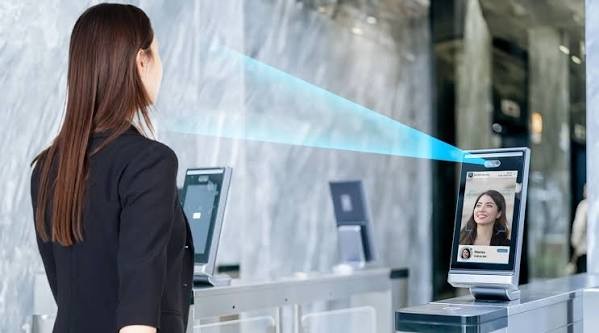
Introduction
Security management in modern commercial buildings is becoming increasingly sophisticated as businesses seek better ways to protect employees, customers, visitors, assets and confidential information. Traditional CCTV cameras provide valuable video footage, but security teams may still need to spend considerable time reviewing recordings, identifying individuals and investigating suspicious activities.
Facial recognition surveillance technology offers an advanced approach to security monitoring by using artificial intelligence (AI) and biometric analysis to identify or compare faces captured by compatible cameras. When properly configured, these systems can support identity verification, access management, security investigations and intelligent monitoring in commercial environments.
In Uganda, where commercial properties include office complexes, shopping centres, hotels, banks, hospitals, educational institutions and industrial facilities, facial recognition technology is becoming an important consideration in discussions about modern building security.
Businesses in Kampala, Wakiso, Entebbe and other commercial areas can explore facial recognition surveillance as part of a wider security strategy that may include CCTV cameras, access control systems, burglar alarms and centralised monitoring.
This guide explains how facial recognition surveillance works, its major applications in modern commercial buildings, its benefits and limitations, and the important factors to consider before installation.
What Is Facial Recognition Surveillance?
Facial recognition surveillance is a technology that uses specialised cameras and software to analyse facial characteristics and compare them with reference images or authorised identity records.
The technology uses computer vision and artificial intelligence to examine facial features and generate a mathematical representation, sometimes called a facial template. The system can then compare this representation with stored templates to determine whether there is a potential match.
Unlike conventional CCTV systems that primarily record video for later viewing, facial recognition surveillance can provide automated identification or comparison capabilities, depending on the equipment and software.
A facial recognition surveillance system may be configured to:
- Compare a captured face with an authorised personnel database.
- Support identity verification at controlled entry points.
- Generate notifications when a configured watchlist match occurs.
- Assist security teams during investigations.
- Monitor designated entry and exit areas.
- Integrate with compatible access control systems.
- Support security management across multiple building entrances.
It is important to distinguish facial detection from facial recognition. Facial detection identifies that a human face appears in an image or video. Facial recognition goes further by analysing facial characteristics and comparing them against reference data.
The two technologies have different purposes and different privacy implications.
How Does Facial Recognition Surveillance Work?
Facial recognition surveillance combines cameras, processing software, databases and security management tools to analyse video images.
Although equipment and software differ between manufacturers, the general process involves several stages.
1. Image Capture
A compatible CCTV camera captures images or video of individuals entering or moving through a monitored area.
Camera placement is important because the system needs suitable facial visibility. Poor lighting, extreme camera angles, motion blur, obstructions and low image quality can affect performance.
2. Face Detection
The software analyses the captured image to determine whether a human face is visible.
This stage identifies the location of a face within the image. It does not automatically establish the person’s identity.
3. Facial Feature Analysis
Where facial recognition is enabled, the software analyses selected facial characteristics and generates a digital representation that can be used for comparison.
The process depends on the recognition technology, camera quality, image conditions and software configuration.
4. Database Comparison
The system compares the captured facial representation with authorised reference records or another approved database.
Depending on the system configuration, it may perform one-to-one verification or one-to-many identification.
- One-to-one verification: Checks whether a person matches a specific claimed identity.
- One-to-many identification: Compares a captured face against multiple records in a database to identify a possible match.
5. Match Evaluation and Notification
If the software identifies a possible match within its configured criteria, it may generate an alert for security personnel.
A match should be treated as an indication requiring appropriate verification, not automatic proof of identity or wrongdoing.
6. Security Response and Record Keeping
Security personnel can review the alert, examine relevant footage and follow established procedures.
Depending on the system, facial recognition events may be stored alongside timestamps, camera information and other relevant security records.
Major Applications of Facial Recognition Surveillance in Commercial Buildings
Facial recognition surveillance can support several security and operational functions. Its suitability depends on the building’s purpose, the risks involved, the applicable privacy requirements and the reliability of the chosen technology.
1. Office Building Security and Identity Verification
Modern office complexes accommodate employees, management teams, contractors, suppliers and visitors. Managing entry into these buildings can become challenging, particularly where multiple companies occupy the same property.
Facial recognition technology can support identity verification at designated entrances and restricted areas.
Potential applications include:
- Verifying enrolled employees at approved entry points.
- Supporting access restrictions for sensitive offices.
- Assisting security teams with identity checks.
- Monitoring designated reception and entrance areas.
- Supporting investigations involving authorised security records.
When integrated with an electronic access control system, facial recognition can form part of a controlled entry process.
However, a facial recognition match should not automatically grant access unless the system has been properly configured and the organisation has established appropriate identity verification and access policies.
2. Shopping Mall and Retail Centre Surveillance
Shopping malls and retail centres experience significant visitor traffic throughout the day. They contain shops, restaurants, entertainment facilities, parking areas and other public-facing spaces.
Facial recognition surveillance may support selected security operations, particularly where there is a justified and properly governed need for identity matching.
Possible applications include:
- Supporting investigations into reported security incidents.
- Generating configured alerts for authorised security watchlists.
- Helping security teams review relevant video events.
- Monitoring designated entrances and restricted operational areas.
- Supporting security coordination between different sections of a property.
Facial recognition should not be treated as a replacement for conventional CCTV coverage, trained security personnel or established incident-response procedures.
Retail operators should carefully assess privacy implications before introducing biometric identification in areas accessible to customers and members of the public.
3. Hotel and Hospitality Security
Hotels accommodate guests, employees, suppliers, contractors and visitors. Their security arrangements must protect people and property while maintaining a welcoming environment.
Facial recognition technology may be considered for specific, justified applications such as identity verification at controlled staff entrances or restricted operational areas.
Potential uses include:
- Supporting staff identity verification.
- Monitoring designated restricted areas.
- Assisting security investigations.
- Supporting access management in approved operational spaces.
- Integrating with compatible security management platforms.
Hotels should be particularly careful about using facial recognition in guest-facing environments. Guests should not be subjected to unnecessary biometric collection, and appropriate transparency, lawful processing and data protection safeguards should be established.
4. Banking and Financial Institution Security
Banks, financial institutions and other organisations handling valuable assets or confidential information require carefully controlled security environments.
Facial recognition may support selected identity verification and surveillance applications when integrated with suitable security procedures.
Possible applications include:
- Supporting identity verification at designated secure entrances.
- Monitoring restricted staff-only areas.
- Assisting investigations involving security incidents.
- Supporting access management in sensitive operational spaces.
- Generating alerts for authorised and properly governed watchlists.
Facial recognition should not independently determine whether a financial transaction is authorised. Financial identity verification requires appropriate authentication controls and procedures beyond simply matching a face captured by a surveillance camera.
5. Hospital and Healthcare Facility Security
Hospitals and healthcare facilities contain sensitive departments, medical equipment, medicines, patient records and restricted operational areas.
Facial recognition surveillance may be considered for specific access-controlled environments where identity verification has a clear security purpose.
Applications may include:
- Supporting staff verification at restricted entrances.
- Monitoring access to sensitive departments.
- Assisting security teams with incident investigations.
- Supporting controlled entry to selected administrative areas.
- Integrating with compatible electronic access control systems.
Healthcare organisations must pay particular attention to patient confidentiality, biometric privacy and the potential consequences of incorrect identification.
6. Industrial Buildings and Warehouses
Factories, warehouses, logistics facilities and industrial buildings often contain expensive equipment, valuable inventory and areas where access must be restricted.
Facial recognition technology can support selected security operations in these environments.
Potential applications include:
- Supporting identity verification at staff entrances.
- Monitoring restricted production areas.
- Assisting investigations involving reported security incidents.
- Supporting controlled access to equipment rooms.
- Integrating with compatible employee access management systems.
For industrial properties, facial recognition should form part of a broader security arrangement that may include CCTV, perimeter intrusion detection, electronic access control, burglar alarms and appropriate physical security measures.
7. Multi-Tenant Commercial Buildings
Large commercial buildings often accommodate multiple organisations, each with different access requirements.
Facial recognition surveillance may help support controlled access where properly implemented.
Potential applications include:
- Supporting identity verification for authorised building users.
- Assisting access management for designated tenant areas.
- Monitoring shared entrances and reception spaces.
- Supporting security investigations.
- Helping administrators review relevant security events.
The building manager must establish clear rules governing which organisations can access security records, who manages enrolment and how biometric information is protected.
8. Parking Facilities and Vehicle Entry Areas
Commercial buildings with underground or multi-level parking facilities need reliable security arrangements for vehicle and pedestrian access.
Facial recognition may support identity verification for authorised personnel at designated pedestrian entrances or security checkpoints.
When combined with compatible vehicle access control systems, CCTV cameras and boom barriers, it can contribute to a more coordinated parking security arrangement.
However, facial recognition does not automatically identify vehicle registration numbers. Vehicle identification requires suitable technologies such as automatic number plate recognition or other vehicle access control solutions.
9. Restricted Rooms and Sensitive Operational Areas
Some commercial buildings contain areas that should only be accessed by authorised personnel.
Examples include:
- Server rooms.
- Data centres.
- Financial records departments.
- Management offices.
- Control rooms.
- Pharmaceutical storage facilities.
- Electrical and technical rooms.
- Security operations centres.
Facial recognition can be considered as one authentication method for selected restricted entrances.
For sensitive locations, organisations may benefit from combining facial recognition with another authentication factor, such as an access card, PIN or additional verification procedure.
This reduces dependence on a single identification method.
Benefits of Facial Recognition Surveillance in Modern Commercial Buildings
When properly selected, configured and governed, facial recognition surveillance can provide several security advantages.
1. Improved Identity Verification
Facial recognition can support automated identity comparisons at designated security checkpoints.
This may reduce reliance on manual visual checks alone, although organisations should maintain appropriate verification procedures for uncertain matches and system failures.
2. Support for Access Control Management
When integrated with compatible electronic access control equipment, facial recognition can form part of an identity-based entry process.
Organisations can establish access permissions according to employee roles, approved areas and operational requirements.
3. Faster Security Investigations
Searching through large volumes of CCTV footage manually can be time-consuming.
Where supported by the software and permitted by applicable policies, facial recognition can help security teams locate footage containing a particular enrolled or reference identity.
This can assist investigations, but results still require human review.
4. Improved Monitoring of Restricted Areas
Commercial buildings often have areas where access should be limited.
Facial recognition can support security teams by helping identify possible matches involving authorised or restricted identity records at designated monitoring points.
5. Integration with Other Security Technologies
Facial recognition can work alongside compatible security systems, including:
- CCTV surveillance cameras.
- Electronic door access control.
- Biometric access systems.
- Intruder alarm systems.
- Video intercom systems.
- Centralised security monitoring platforms.
- Visitor management systems.
The exact level of integration depends on equipment compatibility, software capabilities and configuration.
6. Support for Multi-Location Security Management
Organisations operating several branches or commercial buildings may use centralised security management platforms to coordinate selected security functions.
Depending on system design, authorised administrators may be able to manage approved identity records, review alerts and examine security events across different locations.
Centralised management requires strong access permissions, secure communications and appropriate governance.
7. More Efficient Security Operations
Automated alerts and searchable security records can help security teams focus attention on relevant events rather than continuously reviewing every camera feed.
The technology should support, not replace, trained personnel and established security procedures.
Facial Recognition Surveillance vs Traditional CCTV Systems
Facial recognition surveillance and conventional CCTV perform related but different functions.
| Feature | Traditional CCTV | Facial Recognition Surveillance |
|---|---|---|
| Video recording | Yes, when configured | Yes, when configured |
| General visual monitoring | Yes | Yes |
| Face detection | Model-dependent | Usually supported where configured |
| Facial identity comparison | Not normally included | Supported by recognition software |
| Identity database comparison | Not normally included | Supported where configured |
| Automated identity-related alerts | Limited or model-dependent | Possible |
| Video investigation | Manual or software-assisted | May include facial search tools |
| Privacy considerations | Important | Particularly significant because biometric identification may be involved |
| Equipment and software requirements | Cameras and recording equipment | Compatible cameras, recognition software and appropriate processing infrastructure |
Traditional CCTV remains essential for many commercial properties. Facial recognition is an additional capability that should be introduced only where its benefits justify its cost, operational complexity and privacy implications.
Important Features to Consider When Choosing a Facial Recognition Surveillance System
Choosing a suitable system requires more than selecting cameras with facial recognition advertised on their specifications.
Businesses should evaluate the following features.
1. Recognition Accuracy and Performance
Recognition performance is affected by camera quality, lighting, viewing angles, facial visibility, image resolution, software configuration and the conditions in which the system operates.
Ask suppliers for independent or appropriately documented performance information relevant to the intended application.
2. Camera Image Quality
The cameras must capture images suitable for the intended recognition task.
Important considerations include:
- Image resolution.
- Lens selection.
- Field of view.
- Frame rate.
- Low-light performance.
- Wide dynamic range.
- Installation height.
- Facial capture distance.
A camera positioned too high or at an unsuitable angle may capture images that are inadequate for reliable facial comparison.
3. Suitable Lighting
Lighting has a significant effect on facial image quality.
Commercial entrances with strong sunlight, shadows, reflective glass or poor indoor lighting may require careful camera positioning and suitable lighting arrangements.
4. Database and Enrolment Management
The system should provide secure procedures for enrolling authorised individuals, updating records and removing identities when access is no longer required.
Only authorised personnel should manage biometric reference records.
5. Integration with Access Control
If facial recognition will control entry, confirm that the software can communicate with the selected access control equipment.
Check how the system handles:
- Successful identity verification.
- Failed recognition attempts.
- Unregistered visitors.
- Network interruptions.
- Power failures.
- Emergency exits.
- Manual security overrides.
6. Storage and Processing Capacity
Facial recognition systems may process video locally, through a dedicated server or using cloud-based infrastructure.
The correct option depends on camera numbers, processing requirements, data retention policies, network capacity and privacy considerations.
7. Cybersecurity
Biometric systems must be protected against unauthorised access and misuse.
Important security measures include strong administrator passwords, access restrictions, software updates, secure communications, appropriate encryption and audit logs.
Where available, multi-factor authentication should be considered for privileged administrator accounts.
8. Privacy and Data Protection Controls
A suitable system should support responsible biometric data management.
Businesses should consider data minimisation, retention periods, access permissions, transparency, secure deletion and procedures for handling data subject requests.
Facial Recognition Surveillance Installation in Commercial Buildings
Successful implementation requires careful planning and professional technical assessment.
Step 1: Conduct a Security Assessment
Begin by identifying the building’s security requirements.
Consider:
- Number of entrances and exits.
- Areas requiring identity verification.
- Restricted rooms and departments.
- Daily visitor traffic.
- Existing CCTV coverage.
- Existing access control equipment.
- Lighting conditions.
- Network and power infrastructure.
The assessment helps determine whether facial recognition is necessary and where it would provide a genuine security benefit.
Step 2: Identify Appropriate Camera Locations
Cameras should be positioned to capture usable facial images.
Common installation points include reception areas, designated staff entrances, controlled corridors and restricted-area access points.
Avoid installing recognition cameras at unsuitable angles or locations where people are frequently obstructed.
Step 3: Select Compatible Hardware and Software
The cameras, recognition software, processing equipment and access control devices must be compatible.
The selection should reflect the property’s size, intended applications, security requirements and available infrastructure.
Step 4: Establish Identity Enrolment Procedures
Before enabling identification, establish how authorised individuals will be enrolled.
The organisation should define who can approve enrolment, what information is necessary, how consent or another appropriate lawful basis is addressed, and how records are updated or deleted.
Step 5: Configure Recognition Rules
The system should be configured according to the intended application.
This includes defining recognition thresholds, alert procedures, access permissions, user roles and the handling of uncertain matches.
Step 6: Integrate with Other Security Systems
Where required, integrate facial recognition with compatible access control systems, CCTV recording equipment, alarm systems and centralised monitoring software.
Do not assume that all devices will automatically communicate with one another.
Step 7: Test the Complete System
Testing should establish whether the cameras capture suitable images, the software performs as expected and the configured alerts reach the correct personnel.
For access-controlled doors, test both normal operation and failure conditions.
Step 8: Train Security Personnel and Administrators
Employees responsible for the system should understand how to review alerts, verify possible matches, manage authorised records and respond to system faults.
Training should also cover privacy, cybersecurity and responsible use.
Privacy, Legal and Ethical Considerations in Uganda
Facial recognition surveillance involves biometric information, making privacy and data protection central considerations.
In Uganda, organisations should consider the Data Protection and Privacy Act, 2019, together with applicable regulations and guidance.
Businesses introducing facial recognition should assess their obligations as data collectors, data controllers or data processors, as applicable.
Important considerations include:
Lawful and Transparent Processing
Organisations should establish an appropriate lawful basis for processing personal data and provide clear information about the surveillance activity.
The use of facial recognition should not be hidden from individuals who may be affected.
Purpose Limitation
Facial information should be collected and used for clearly defined purposes.
An organisation should not automatically reuse biometric information collected for one purpose for unrelated activities.
Data Minimisation
Only information necessary for the stated purpose should be collected and processed.
Businesses should carefully assess whether facial recognition is genuinely necessary or whether ordinary CCTV and less intrusive access control methods would achieve the same objective.
Secure Storage and Access
Biometric templates, reference images and associated records should be protected against unauthorised access, disclosure, alteration and loss.
Access should be limited to appropriately authorised personnel.
Retention and Deletion
Organisations should establish reasonable retention periods and secure deletion procedures.
Biometric records should not be retained indefinitely without an appropriate justification.
Accuracy and Human Review
Facial recognition systems can produce false matches and missed matches.
A possible match should not automatically result in punishment, denial of essential services or an accusation of wrongdoing.
Appropriate human verification and review procedures are important.
Assessing the Impact on Individuals
Before implementation, businesses should evaluate how the technology affects employees, customers, visitors and other individuals.
Where appropriate, they should consider a data protection impact assessment and seek advice from a qualified data protection professional.
Facial recognition should be deployed proportionately, transparently and with appropriate safeguards.
Challenges and Limitations of Facial Recognition Surveillance
Although facial recognition offers useful capabilities, it is not a perfect security solution.
1. False Matches
A system may incorrectly identify two different individuals as a possible match.
This can lead to unnecessary alerts or inappropriate security decisions.
2. Missed Recognition
A system may fail to recognise an enrolled individual because of poor image quality, changes in appearance, obstructions, unsuitable camera positioning or environmental conditions.
3. Lighting and Environmental Conditions
Strong sunlight, shadows, poor illumination and reflective surfaces can affect image capture.
Commercial buildings should assess lighting conditions before selecting camera locations.
4. Installation and Operating Costs
Facial recognition surveillance may require specialised cameras, software licences, servers, network infrastructure, storage and technical support.
Costs depend on the scale and complexity of the installation.
5. Privacy Concerns
Employees, customers and visitors may be concerned about how their biometric information is collected, stored and used.
Clear communication, appropriate safeguards and lawful processing are essential.
6. Cybersecurity Risks
Poorly secured systems can expose sensitive biometric information and surveillance records.
Regular software updates, strong authentication and restricted administrator access help reduce these risks.
7. Dependence on Human Oversight
Automated recognition cannot independently determine whether a person poses a security threat.
Trained security personnel must review relevant alerts and make decisions using appropriate procedures.
Facial Recognition Surveillance vs Other Biometric Security Systems
Facial recognition is one of several biometric technologies used for identity verification.
| Technology | How It Works | Common Applications |
|---|---|---|
| Facial recognition | Compares facial characteristics with reference records | Controlled building entrances and identity verification |
| Fingerprint recognition | Compares fingerprint patterns | Office doors and restricted rooms |
| Iris recognition | Analyses patterns in the iris | High-security identity verification |
| Voice recognition | Analyses distinctive voice characteristics | Selected authentication applications |
The most suitable technology depends on the building’s security requirements, user experience, operating environment, privacy considerations and budget.
For some commercial buildings, card-based access control or fingerprint verification may provide a more practical solution than facial recognition.
Factors That Determine the Cost of Facial Recognition Surveillance in Uganda
The cost of implementing facial recognition surveillance varies according to the property’s requirements and the complexity of the installation.
There is no single price that applies to every commercial building.
Important cost factors include:
1. Number of Cameras
A building with several entrances and restricted areas may require more cameras than a small office.
2. Camera Specifications
Higher-resolution cameras, specialised lenses, improved low-light performance and other advanced features may increase equipment costs.
3. Facial Recognition Software
Some systems require software licences, subscriptions or additional processing capabilities.
4. Server and Storage Requirements
Large installations may require dedicated servers, additional storage and network upgrades.
5. Access Control Integration
Connecting facial recognition to electronic door locks, access controllers, turnstiles or other security devices may add to installation costs.
6. Network and Power Infrastructure
New cabling, network switches, PoE equipment, backup power and other infrastructure may be required.
7. Installation and Configuration
Professional installation, software configuration, system testing and staff training contribute to the total project cost.
8. Maintenance and Technical Support
Ongoing costs may include software updates, camera servicing, equipment repairs, system checks and technical support.
For an accurate estimate, a commercial property should undergo a site assessment to establish the required equipment, coverage and integration needs.
How Facial Recognition Works with Other Commercial Security Systems
Facial recognition is most useful when it supports a properly designed security arrangement rather than operating as an isolated technology.
Integration with CCTV Surveillance
CCTV provides video coverage of entrances, corridors, parking facilities and other important locations.
Facial recognition can add identity comparison capabilities to selected cameras or software platforms.
Integration with Access Control Systems
Compatible access control systems can use facial verification as one part of an electronic entry process.
The system may verify an enrolled individual and communicate with an access controller to permit or deny entry according to configured permissions.
Integration with Burglar Alarm Systems
In a compatible installation, security events from access control and alarm equipment may be coordinated through a central security platform.
The exact integration depends on the equipment and software interfaces.
Integration with Visitor Management Systems
Visitor management systems help register visitors, manage appointments and record authorised entry.
Where appropriate and lawful, facial verification may be considered for selected visitor identity processes.
Integration with Centralised Security Monitoring
Large commercial properties may use centralised monitoring platforms to manage CCTV, access control and selected security alerts from one location.
This can support coordinated monitoring across multiple buildings or departments.
Common Mistakes to Avoid When Installing Facial Recognition Surveillance
Businesses should avoid the following mistakes:
- Choosing equipment based only on price: Low-cost equipment may not meet the property’s image quality, processing or integration requirements.
- Poor camera positioning: Incorrect camera angles and installation heights can reduce recognition performance.
- Ignoring lighting conditions: Cameras need suitable lighting to capture usable facial images.
- Assuming every match is accurate: Possible matches must be reviewed using appropriate verification procedures.
- Ignoring data protection requirements: Biometric information requires careful and responsible handling.
- Using incompatible equipment: Cameras, software and access controllers must support the intended integration.
- Neglecting cybersecurity: Weak passwords and outdated software can expose sensitive systems.
- Failing to train security personnel: Staff must understand how to review alerts and handle system faults.
- Overlooking maintenance: Cameras, networks, storage and software need regular checks.
- Using facial recognition where it is unnecessary: Businesses should assess whether less intrusive security technologies would meet their needs.
Why Choose Professional Security System Planning and Installation?
Facial recognition surveillance involves several interconnected technologies, including cameras, software, network infrastructure, biometric databases and access control equipment.
Poor planning can lead to unreliable recognition, unnecessary costs, privacy problems and security gaps.
Professional security system planning helps businesses:
- Identify suitable camera locations.
- Select compatible hardware and software.
- Design appropriate network and power infrastructure.
- Integrate facial recognition with existing security equipment.
- Configure access permissions and alerts.
- Test system performance.
- Establish suitable maintenance procedures.
- Consider privacy and cybersecurity requirements.
For commercial buildings in Uganda, the system should be designed around the property’s actual security needs rather than simply installing advanced equipment without a clear purpose.
Facial Recognition Surveillance Solutions for Commercial Properties in Uganda
Businesses seeking modern security solutions should consider how facial recognition can complement their existing CCTV and access control arrangements.
Daltrevco provides a point of contact for businesses and property owners exploring security and building technology solutions in Uganda. Organisations interested in facial recognition surveillance, CCTV cameras, electronic access control and integrated security systems can contact Daltrevco to discuss their project requirements and suitable solutions.
Whether securing an office complex, shopping centre, hotel, warehouse, industrial facility or multi-storey commercial building, the right security arrangement should prioritise reliable monitoring, appropriate access management, system compatibility and responsible data protection.
Frequently Asked Questions About Facial Recognition Surveillance
1. What is facial recognition surveillance?
Facial recognition surveillance uses cameras and specialised software to analyse facial characteristics and compare them with reference records. It can support identity verification, security monitoring and investigations.
2. How does facial recognition CCTV work?
A compatible camera captures an image, software detects a face and recognition technology analyses its characteristics. The system then compares the resulting facial representation with authorised reference records and may generate a possible match alert.
3. Where is facial recognition surveillance used?
It may be used in office complexes, shopping centres, hotels, banks, hospitals, warehouses, factories, data centres and other commercial properties where there is a justified security requirement.
4. What is the difference between facial detection and facial recognition?
Facial detection identifies the presence and location of a face in an image. Facial recognition compares facial characteristics against reference records to determine whether there may be a match.
5. Can facial recognition control access to commercial buildings?
Yes. When integrated with compatible electronic access control equipment, facial recognition can support identity verification at designated entrances and restricted areas.
6. Is facial recognition more effective than traditional CCTV?
The technologies serve different purposes. Traditional CCTV provides visual monitoring and recording, while facial recognition adds identity comparison capabilities. The best solution depends on the property’s security requirements.
7. Can facial recognition work with existing CCTV cameras?
Sometimes. Compatibility depends on camera specifications, video quality, software support, network infrastructure and processing requirements. Existing cameras may need upgrading or replacement.
8. Can facial recognition be integrated with fingerprint access control?
Yes, where the selected systems support the required integration. Multiple authentication methods can be combined for additional verification.
9. Is facial recognition suitable for shopping malls?
It may support selected security applications in shopping malls, but operators must carefully assess necessity, privacy implications, legal requirements and the impact on customers and visitors.
10. Can facial recognition identify every person entering a building?
No. Recognition depends on image quality, lighting, viewing angles, software performance and the availability of suitable reference records. Unregistered individuals cannot automatically be identified by comparison against a database that does not contain their information.
11. Can facial recognition systems make mistakes?
Yes. False matches and missed matches can occur. Human verification should be used before taking important security or administrative action.
12. Does facial recognition require internet access?
Not always. Some systems process facial recognition locally using cameras or on-site servers. Cloud-based processing and remote monitoring features generally require suitable internet connectivity.
13. Is facial recognition surveillance secure?
It can be implemented with appropriate safeguards, but security depends on the equipment, software, network configuration, database protection and administrator access controls.
14. Does facial recognition store people’s photographs?
This depends on the system. Some systems store reference images, facial templates or both, while others may process images differently. Businesses should understand exactly what data their chosen system collects and retains.
15. Is facial recognition legal in Uganda?
Its use must be assessed under applicable Ugandan data protection and privacy requirements, including the Data Protection and Privacy Act, 2019. Organisations should establish an appropriate lawful basis, provide transparency and implement suitable safeguards. Qualified legal or data protection advice may be necessary.
16. Can facial recognition replace security guards?
No. It is a supporting technology. Security personnel remain important for verifying alerts, responding to incidents and making appropriate decisions.
17. Can facial recognition work in low-light conditions?
Some cameras and systems support low-light operation or additional illumination. However, performance depends on the equipment and actual environmental conditions.
18. What affects the cost of facial recognition surveillance in Uganda?
The main factors include camera numbers, camera specifications, software licensing, processing equipment, storage, access control integration, cabling, installation and ongoing maintenance.
19. How often should facial recognition systems be maintained?
Maintenance schedules depend on the equipment and operating environment. Regular checks should cover camera image quality, lighting, network connectivity, storage, software updates, access permissions and recognition performance.
20. Can facial recognition be used in multi-storey commercial buildings?
Yes. It may support identity verification at selected entrances and restricted floors when properly integrated with compatible access control and security management systems.
Conclusion
Facial recognition surveillance is an advanced security technology that can support identity verification, intelligent monitoring and access management in modern commercial buildings.
For office complexes, shopping centres, hotels, banks, hospitals, warehouses and industrial facilities, it offers additional capabilities that conventional CCTV systems may not provide on their own.
However, successful implementation depends on suitable cameras, reliable software, appropriate installation, compatible access control equipment, cybersecurity and responsible handling of biometric information.
Businesses in Uganda should carefully assess their security requirements before investing in facial recognition technology. The most effective solution is one that combines appropriate surveillance coverage, controlled access, trained personnel and clear privacy safeguards.
For organisations exploring modern commercial security systems, Daltrevco can be contacted to discuss suitable CCTV, access control and integrated security solutions for their properties.

