
Introduction
Protecting a home requires more than installing a strong gate, fitting security lights or relying on traditional locks. Modern residential properties face different security challenges, including burglary, unauthorised entry, property damage and limited visibility around entrances and outdoor areas. For homeowners, landlords and residential property developers in Uganda, combining different security technologies can provide better control over how a property is monitored and accessed.
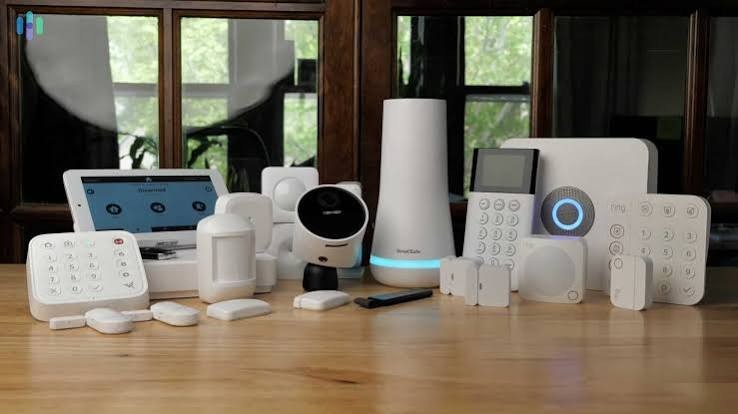
Smart home security systems bring together technologies such as CCTV surveillance cameras, burglar alarms, motion detectors, smart locks, electronic access control and remote monitoring. These technologies allow homeowners to monitor important areas, receive selected security alerts and manage certain security functions through connected devices.
Whether securing a family home in Kampala, a residential estate in Wakiso, an apartment in Entebbe or a property in another part of Uganda, a properly planned smart home security system can help improve visibility, access management and security coordination.
This guide explains how smart home security systems work, the role of CCTV cameras, burglar alarms and automated access control, their benefits, installation considerations and the factors that influence their cost in Uganda.
What Are Smart Home Security Systems?
Smart home security systems are connected security technologies designed to monitor, protect and manage access to residential properties. They use electronic devices, sensors, cameras, controllers and software to provide security functions that may be managed locally or remotely.
Unlike a traditional security arrangement in which locks, alarms and cameras operate independently, an integrated smart security system can allow compatible devices to communicate and coordinate selected functions.
For example, a homeowner may be able to:
- View live CCTV footage from a smartphone.
- Receive an alert when a motion sensor is triggered.
- Check whether a connected door lock is secured.
- Grant or revoke access for authorised users.
- Receive notifications from a configured burglar alarm.
- Review recorded footage following a security incident.
- Manage selected security devices through a central application.
The exact functions depend on the equipment, software, internet connectivity and system configuration.
A smart home security system does not necessarily require every device to be connected to the internet. Some systems can perform essential local functions, such as recording video or triggering an alarm, without an active internet connection, provided they have power and are correctly configured.
Main Components of a Smart Home Security System
A complete residential security solution may include several interconnected technologies. The appropriate combination depends on the property’s size, layout, security risks and budget.
1. Smart CCTV Surveillance Cameras
<AsyncImage query=”modern residential home exterior CCTV security camera installed near front entrance realistic photography” aspectRatio=”16:9″ width=”100%” alt=”CCTV security camera installed outside a modern residential home”/>
CCTV cameras are among the most important components of a smart home security system. They provide visual monitoring of selected areas and can record footage for later review.
Modern CCTV systems may support remote viewing, motion detection, night vision, video analytics and mobile notifications.
Common camera installation locations include:
- Main entrance and front gate.
- Back doors and secondary entrances.
- Driveways and parking areas.
- Perimeter walls and boundary access points.
- Garages and storage facilities.
- Corridors and shared indoor spaces.
- Outdoor areas around the house.
Important CCTV features to consider
- High-resolution video: Helps capture useful visual details.
- Night vision: Supports monitoring in low-light conditions.
- Motion detection: Identifies movement within configured areas.
- Remote viewing: Allows authorised users to view cameras through compatible applications.
- Weather-resistant housing: Helps protect outdoor cameras against rain and dust.
- Video recording: Allows footage to be stored for later review.
- Smart analytics: Some models can distinguish people, vehicles or other objects, depending on their capabilities.
The number and type of cameras should be determined by the property’s layout and the areas requiring surveillance. Installing more cameras does not automatically guarantee better coverage if their positions and viewing angles are poorly planned.
2. Smart Burglar Alarm Systems
<AsyncImage query=”modern residential burglar alarm keypad motion detector security sensor installed in home interior” aspectRatio=”16:9″ width=”100%” alt=”Smart burglar alarm keypad and motion detector in a residential home”/>
A smart burglar alarm system detects selected security events and generates alerts to notify homeowners or designated security personnel.
An alarm system can include several components working together to detect unauthorised entry or movement.
Common components include:
- Motion detectors.
- Door and window magnetic contacts.
- Glass-break detectors.
- Alarm control panels.
- Indoor and outdoor sirens.
- Remote keypads.
- Wireless security sensors.
- Mobile notification features.
For example, a magnetic contact installed on a ground-floor door can detect when the door is opened while the alarm is armed. A motion detector can identify movement within a protected room and trigger an alert according to the configured settings.
Benefits of smart burglar alarms
- Early notification of selected intrusion events.
- Monitoring of doors and windows.
- Protection of designated indoor areas.
- Mobile alerts where supported.
- Integration with compatible CCTV systems.
- Support for security monitoring arrangements.
A burglar alarm detects configured events; it does not physically prevent entry or guarantee that a crime will be stopped. Its effectiveness depends on sensor placement, system configuration, maintenance and the response arrangements in place.
3. Automated Access Control Systems
<AsyncImage query=”modern smart electronic door lock residential front door keypad fingerprint access control” aspectRatio=”16:9″ width=”100%” alt=”Smart electronic door lock with keypad and fingerprint access control on a home entrance”/>
Automated access control systems help homeowners manage who can enter a property and which areas they can access.
Traditional keys can be lost, copied or shared without the homeowner’s knowledge. Electronic access control provides alternative ways to authenticate authorised users.
Common residential access control options include:
Smart electronic locks: Allow doors to be secured and unlocked using supported electronic credentials.
Fingerprint access control: Uses fingerprint verification to authenticate enrolled users.
PIN code access: Allows entry using an authorised numerical code.
RFID card access: Uses compatible cards or tags to grant access.
Mobile-based access: Some systems allow authorised users to manage access through a smartphone application.
Video intercom systems: Allow occupants to communicate with visitors and, on compatible systems, view them before deciding whether to grant entry.
Automated access control can be particularly useful for family homes, rental properties, apartment buildings and residential estates where several people need different access permissions.
4. Smart Doorbells and Video Intercom Systems
<AsyncImage query=”modern video doorbell camera mounted beside residential front door smart home security” aspectRatio=”16:9″ width=”100%” alt=”Smart video doorbell installed at a modern residential entrance”/>
Smart doorbells and video intercom systems help homeowners communicate with visitors before opening a door or gate.
Depending on the equipment, they may provide:
- Live video of visitors.
- Two-way audio communication.
- Visitor notifications.
- Event recording.
- Remote communication through a smartphone.
- Integration with compatible electronic locks or gate access systems.
These features are useful when homeowners are inside the property, working in another room or away from home.
Remote unlocking should only be enabled where appropriate security controls are in place. Users should protect their accounts and verify visitors before granting entry.
5. Motion and Perimeter Sensors
Motion sensors and perimeter detection devices help monitor movement around a residential property.
They can be installed in selected indoor or outdoor locations to detect activity that may require attention.
Common options include:
- Passive infrared motion detectors.
- Outdoor motion sensors.
- Door and window contacts.
- Glass-break detectors.
- Beam sensors.
- Perimeter intrusion detection devices.
The appropriate sensor depends on the location, environmental conditions and type of movement that needs to be detected.
Outdoor sensors require careful positioning to reduce unnecessary alerts caused by pets, vegetation, weather and other environmental activity.
6. Smart Security Lighting
Security lighting can support CCTV surveillance and improve visibility around a property.
Motion-activated lights can illuminate selected areas when movement is detected, depending on the system configuration.
Common installation locations include driveways, pathways, entrances, garages, gardens and perimeter walls.
Lighting should be positioned to improve visibility without creating glare that affects CCTV camera images.
7. Security Management Applications
Many modern security systems include mobile or desktop applications that allow authorised users to manage selected devices.
Depending on the manufacturer and configuration, an application may support:
- Live CCTV viewing.
- Recorded video playback.
- Alarm notifications.
- System arming and disarming.
- Door lock management.
- User access management.
- Device status checks.
- Selected security event reports.
Homeowners should use secure accounts, strong passwords, software updates and multi-factor authentication where available.
How Smart Home Security Systems Work Together
The greatest advantage of an integrated security system is that compatible devices can coordinate their functions.
Consider a residential property with CCTV cameras, a burglar alarm, motion sensors and electronic door access.
A possible security event may work as follows:
- A door sensor detects an unauthorised opening while the alarm is armed.
- The alarm control panel receives the signal.
- The system activates an audible alarm or another configured response.
- The homeowner receives a notification if remote alerts are enabled.
- A compatible CCTV system records the event or provides access to the relevant camera view.
- The homeowner or designated security personnel review the event and follow the established response procedure.
Another example involves a visitor arriving at the main gate:
- The visitor presses the video intercom.
- The homeowner receives a notification or views the visitor on the indoor monitor.
- The homeowner communicates with the visitor.
- The homeowner verifies the visitor before deciding whether to grant access.
- If the system supports remote unlocking, the gate or door can be released through the authorised control interface.
These examples depend on compatible equipment and correct configuration. Not every CCTV camera, alarm panel, smart lock and intercom can automatically communicate with other brands or devices.
Benefits of Smart Home Security Systems for Homeowners in Uganda
Smart security technology offers several practical advantages when selected and installed according to a property’s requirements.
1. Improved Residential Surveillance
CCTV cameras help homeowners monitor important areas of their properties.
Instead of relying only on physical security patrols, authorised users can review live footage or recorded events from compatible systems.
This is particularly useful for properties with several entrances, parking spaces, boundary walls and outdoor facilities.
2. Remote Monitoring from Anywhere
Remote CCTV monitoring allows homeowners to view supported cameras through a smartphone, tablet or computer.
This can be useful when travelling, working away from home or managing rental properties.
Remote access depends on suitable internet connectivity, secure account configuration and compatible equipment.
3. Faster Awareness of Security Events
Smart alarms and sensors can notify homeowners when configured events occur.
For example, an alert may be generated when a protected door opens, motion is detected in a restricted room or an alarm zone is triggered.
Notifications help users become aware of events, although the speed and reliability of alerts depend on the system, communication network and configuration.
4. Better Control Over Property Access
Electronic access control allows homeowners to manage authorised entry without depending entirely on physical keys.
Some systems allow temporary access credentials, individual user permissions and remote changes to access settings.
This can be helpful for households with domestic workers, property managers, contractors or authorised visitors.
5. Improved Protection for Valuable Property
Homes may contain electronics, vehicles, furniture, documents, tools and other valuable belongings.
Combining CCTV, alarms and access control can help improve monitoring and provide useful records when investigating incidents.
No security system can guarantee that burglary or theft will never occur, but properly planned measures can improve detection and security management.
6. Convenient Security Management
A compatible smart home security system may allow several security functions to be managed from one application or control interface.
This can reduce the need to operate completely separate systems, although some equipment may still require its own application.
7. Better Security for Rental and Managed Properties
Landlords and property managers can use electronic access systems, CCTV in appropriate common areas and alarm systems to support residential property management.
Access permissions can be updated when tenants or authorised users change.
CCTV should be positioned and operated responsibly, particularly where tenants have a reasonable expectation of privacy.
8. Support for Family and Property Management
Smart security systems can help households monitor entry points, receive alerts and manage access for authorised users.
The system should be configured according to the household’s actual needs, with appropriate privacy and user access controls.
Smart Home Security Applications for Different Residential Properties
Different properties require different security arrangements.
1. Detached Family Homes
Detached houses often have several potential entry points, including front doors, back doors, windows, garages and perimeter gates.
A suitable system may combine:
- Outdoor CCTV cameras.
- Indoor cameras in appropriate shared areas.
- Door and window sensors.
- Motion detectors.
- A burglar alarm.
- Smart door locks.
- Video intercom systems.
- Outdoor security lighting.
The design should prioritise vulnerable entrances and important areas rather than installing devices without considering coverage.
2. Apartments and Residential Complexes
Apartment buildings require coordinated security arrangements for shared and private spaces.
Common solutions include:
- CCTV in shared entrances and corridors.
- Electronic access control at main entrances.
- Video intercom systems.
- Controlled access to parking areas.
- Security monitoring for shared facilities.
- Appropriate access management for building staff.
The building manager should establish clear responsibilities for system administration and access to surveillance records.
3. Gated Residential Estates
Large residential estates may require more extensive security infrastructure.
A suitable arrangement may include:
- Gate access control.
- Vehicle access management.
- CCTV at designated entrances.
- Perimeter monitoring.
- Visitor management systems.
- Security control rooms.
- Intercom systems.
- Alarm integration.
For large estates, centralised monitoring can help coordinate selected security activities across different areas.
4. Rental Houses and Investment Properties
Landlords can consider electronic locks, selected CCTV installations in permitted shared areas and alarm systems to support property security.
Electronic access credentials may be updated when tenants change, reducing reliance on collecting and replacing physical keys.
Property owners should respect tenant privacy and establish clear rules about surveillance and access.
5. Luxury Homes and High-Value Residential Properties
Properties with extensive outdoor areas, valuable assets or multiple buildings may benefit from a more comprehensive security design.
Possible components include:
- High-resolution CCTV cameras.
- Intelligent video analytics.
- Electronic access control.
- Perimeter intrusion detection.
- Integrated burglar alarms.
- Video intercoms.
- Backup power.
- Centralised security monitoring.
The final system should be based on a professional assessment of the property and its security risks.
Wired vs Wireless Smart Home Security Systems
One of the important decisions when planning residential security is whether to use wired, wireless or hybrid equipment.
| Feature | Wired Systems | Wireless Systems |
|---|---|---|
| Connection | Physical cables | Wireless communication |
| Installation | May require cable routing | Often more flexible to install |
| Power | Depends on device design and wiring | Many devices use batteries or separate power |
| Signal reliability | Can provide stable connections when correctly installed | Depends on signal strength and interference |
| Maintenance | Cable and equipment inspections | Includes battery and wireless connection checks |
| Expansion | May require additional cabling | Often easier where compatible devices are available |
| Suitable applications | New builds and larger installations | Existing homes and locations where cabling is difficult |
Neither option is automatically better for every home.
Wired CCTV can be suitable for properties where reliable cabling routes are available. Wireless sensors and cameras can be useful where installing cables would be difficult.
Hybrid systems combine wired and wireless equipment according to the property’s requirements.
When choosing wireless equipment, homeowners should consider signal coverage, battery life, communication security and the consequences of network interruptions.
Smart Home Security and Internet Connectivity in Uganda
Internet connectivity is an important consideration when installing connected security equipment.
Many homeowners want to view CCTV footage, receive alarm notifications or control electronic locks while away from their properties.
These functions may rely on broadband, fibre, mobile internet or another suitable communication connection.
Before installation, consider the following:
Internet Reliability
Check whether the property has reliable connectivity in the areas where connected security devices will operate.
Upload Bandwidth
Remote CCTV viewing and cloud video services may require sufficient upload bandwidth, especially where several cameras stream high-resolution video.
Local Recording
Where continuous recording is important, consider a system that can record locally to a DVR, NVR or suitable storage device.
A correctly configured local recording system may continue recording without internet access if power and the local equipment remain operational.
Backup Power
Power interruptions can affect cameras, recorders, routers, alarm panels and access control devices.
Consider backup power for the equipment that must remain operational during outages.
The required backup capacity depends on the connected equipment, power consumption and desired operating duration.
Secure Remote Access
Use strong passwords, authorised user accounts, software updates and multi-factor authentication where supported.
Avoid exposing cameras and recorders directly to the public internet through insecure configurations.
How to Choose the Best Smart Home Security System in Uganda
Selecting the right system requires an understanding of the property’s layout, security priorities and available infrastructure.
1. Assess Your Property’s Security Risks
Start by identifying the areas that require protection.
Consider:
- Main entrance.
- Rear entrances.
- Windows.
- Boundary walls.
- Parking spaces.
- Garages.
- Storage rooms.
- Outdoor facilities.
- Restricted indoor areas.
The assessment should also consider lighting, visibility and how people move around the property.
2. Decide Which Security Functions You Need
Not every home requires every available technology.
A smaller home may need a few CCTV cameras and a basic alarm system, while a large residential property may require access control, perimeter detection and centralised monitoring.
Identify the most important security objectives before selecting equipment.
3. Choose Suitable CCTV Cameras
Consider image resolution, night vision, weather resistance, lens type, recording capacity and remote viewing support.
The camera should be appropriate for its intended location and viewing distance.
4. Select an Appropriate Alarm System
Choose sensors according to the property’s doors, windows, rooms and possible entry points.
Confirm how alerts are generated and who will respond when the alarm activates.
5. Evaluate Smart Locks and Access Control
Consider how household members and authorised visitors will enter the property.
Review credential management, emergency access, backup entry methods and what happens during power or network failure.
Electronic locks must preserve safe emergency egress and comply with applicable building and fire-safety requirements.
6. Check System Compatibility
If you want CCTV, alarms, access control and intercoms to operate together, confirm that the selected products support the intended integration.
Do not assume that devices from different manufacturers will automatically work as one system.
7. Consider Maintenance and Technical Support
Security equipment needs periodic inspection and maintenance.
Before selecting a system, understand how updates, repairs, battery replacements and technical support will be handled.
8. Plan for Future Expansion
A well-designed system should allow reasonable expansion where possible.
For example, a homeowner may initially install CCTV cameras and later add smart locks, motion sensors or an intercom system.
Future expansion depends on the capacity and compatibility of the original equipment.
Smart Home Security System Installation Process
Proper installation is essential for reliable operation.
Although installation procedures differ between systems, a typical project follows several stages.
Step 1: Site Assessment
A technical assessment identifies the property’s layout, security priorities, entry points, lighting conditions, power supply and network infrastructure.
Step 2: Security System Design
The proposed design determines camera positions, alarm zones, sensor locations, access control points and the required recording and communication equipment.
Step 3: Equipment Selection
Suitable cameras, alarm devices, access controllers, smart locks, network equipment and other components are selected according to the design.
Step 4: Cabling and Infrastructure Preparation
Where necessary, technicians install power cables, data cables, conduits, network switches and other supporting infrastructure.
Step 5: Device Installation
Cameras, sensors, alarm panels, electronic locks and other devices are installed in their designated positions.
Step 6: Configuration and Integration
The equipment is configured, user accounts are created and compatible devices are integrated.
Step 7: Testing and Commissioning
The system is tested to verify camera views, recording, sensor operation, alarm notifications, access permissions and remote functions.
Failure conditions should also be tested, including power interruptions and network disconnection where relevant.
Step 8: User Training and Handover
Homeowners or property managers should learn how to operate the system, manage authorised users, review recordings and respond to alerts.
How Much Does a Smart Home Security System Cost in Uganda?
The cost of a smart home security system depends on the property’s size, selected equipment and installation requirements.
A small residential property may need a relatively simple system, while a large home or residential estate may require several interconnected technologies.
The following factors influence the total project cost.
1. Number and Type of CCTV Cameras
Camera quantity, resolution, lens specifications, night vision, analytics and weather protection affect equipment costs.
2. Alarm System Components
The number of sensors, alarm zones, control panels, sirens and communication features influence the overall cost.
3. Smart Locks and Access Control
The cost depends on the number of controlled doors, lock type, authentication methods and access management requirements.
4. Recording and Storage Equipment
DVRs, NVRs, hard drives and other storage options affect the cost of CCTV installation.
Storage requirements depend on camera resolution, recording settings, camera numbers and the required retention period.
5. Network Infrastructure
Some installations require network switches, routers, cabling, wireless access points and internet upgrades.
6. Backup Power
Backup batteries or other suitable power solutions may be needed to support essential security equipment during power interruptions.
7. Installation Complexity
The property layout, cable routes, building structure, equipment mounting requirements and system integration all influence labour and installation costs.
8. Maintenance and Support
Ongoing expenses may include software updates, equipment servicing, replacement batteries, repairs and technical assistance.
For an accurate quotation, homeowners should request a site assessment and an itemised proposal showing the equipment, installation work and any recurring costs.
Common Smart Home Security Installation Mistakes
Even advanced security equipment may perform poorly if the installation is not properly planned.
Avoid these common mistakes:
- Installing cameras without a coverage plan: This can leave important entrances and outdoor areas unmonitored.
- Ignoring night-time visibility: Poor lighting can reduce the usefulness of CCTV footage.
- Using weak passwords: Unsecured accounts can expose cameras and connected devices.
- Choosing incompatible equipment: Different devices may not support the intended integration.
- Ignoring backup power: Security equipment may stop operating during an electricity interruption.
- Overlooking internet requirements: Remote monitoring may fail when connectivity is inadequate.
- Installing sensors in unsuitable locations: Poor positioning can cause missed detections or unnecessary alarms.
- Failing to maintain the system: Dirty lenses, weak batteries and outdated software can affect performance.
- Giving too many people administrator access: User permissions should be restricted according to individual responsibilities.
- Ignoring privacy: Cameras should not unnecessarily monitor private areas or neighbouring properties.
Smart Home Security Maintenance and Best Practices
Regular maintenance helps keep residential security systems functional.
Homeowners should establish a maintenance routine covering all important devices.
CCTV Maintenance
- Clean camera lenses carefully.
- Check image quality during the day and at night.
- Confirm that cameras are recording.
- Review storage capacity and recording retention.
- Inspect cables, mounts and power connections.
- Test remote viewing where used.
- Install relevant firmware and software updates.
Alarm System Maintenance
- Test motion detectors and door contacts.
- Inspect alarm control panels.
- Check battery condition.
- Test sirens and configured notifications.
- Review alarm zones and user permissions.
- Investigate repeated false alarms.
Access Control Maintenance
- Test electronic locks and access readers.
- Review authorised user credentials.
- Remove access for individuals who no longer require it.
- Check door alignment and locking mechanisms.
- Test backup entry methods.
- Verify safe emergency egress.
Network and Application Maintenance
- Update routers and connected devices.
- Use strong passwords.
- Review administrator accounts.
- Check internet and network connectivity.
- Confirm that notifications are being received.
- Review remote access permissions.
A qualified technician should inspect complex or malfunctioning equipment rather than homeowners attempting repairs that could compromise the system.
Privacy and Cybersecurity Considerations for Smart Home Security
Smart security systems collect and process information about activities within and around a property. This may include video footage, access logs, visitor records and, in some systems, biometric information.
Homeowners should take reasonable steps to protect this information.
Important practices include:
- Use unique, strong passwords.
- Enable multi-factor authentication where available.
- Restrict access to authorised users.
- Keep device software updated.
- Secure home Wi-Fi networks.
- Use secure remote access methods.
- Set appropriate video retention periods.
- Avoid unnecessary camera coverage of private spaces.
- Protect stored recordings against unauthorised access.
- Review who can view footage and manage devices.
For landlords, residential estates and organisations, CCTV and access records may involve personal data. In Uganda, the Data Protection and Privacy Act, 2019, and applicable regulations should be considered when collecting and processing personal information.
Cameras should be positioned responsibly, with appropriate transparency and respect for the privacy of residents, visitors, workers and neighbours.
Why Professional Smart Home Security Installation Matters
Smart home security systems combine multiple technologies that must work together reliably.
A poorly designed installation may result in blind spots, unreliable alerts, access control failures, weak network security and unnecessary expenditure.
Professional planning and installation can help homeowners:
- Identify vulnerable areas of the property.
- Select appropriate cameras and sensors.
- Position equipment for effective coverage.
- Plan reliable network and power infrastructure.
- Integrate compatible CCTV, alarms and access control.
- Configure secure user accounts and access permissions.
- Test system performance.
- Establish suitable maintenance procedures.
The most effective system is not necessarily the one with the greatest number of devices. It is the one designed around the property’s actual security requirements.
Smart Home Security Solutions from Daltrevco
Homeowners and property developers looking to improve residential security should consider a coordinated approach that combines surveillance, intrusion detection and controlled access.
Daltrevco provides a point of contact for property owners exploring security and building technology solutions in Uganda. If you are considering CCTV surveillance, burglar alarm systems, electronic access control or integrated security technologies, contact Daltrevco to discuss your property’s requirements and suitable options.
Whether you are securing a family home, apartment building, rental property or residential estate, a properly planned security arrangement can help improve visibility, access management and the coordination of different security devices.
Frequently Asked Questions About Smart Home Security Systems
1. What is a smart home security system?
A smart home security system combines connected technologies such as CCTV cameras, burglar alarms, motion sensors, electronic locks and access control to monitor and manage residential security.
2. What are the main components of a smart home security system?
Common components include CCTV cameras, alarm control panels, motion detectors, door and window sensors, smart locks, access readers, video intercoms, network equipment and security management applications.
3. Can I monitor my home security system using my phone?
Yes. Many modern systems support mobile applications that allow authorised users to view CCTV footage, receive alerts and manage selected security functions remotely.
4. Do smart home security systems require internet access?
Not all functions require internet access. Local CCTV recording, some alarm functions and certain access control operations may continue without internet if the equipment is powered and correctly configured. Remote viewing and cloud-based functions generally require connectivity.
5. Are wireless home security systems reliable?
Wireless systems can be reliable when properly selected and installed. Their performance depends on signal coverage, interference, battery condition, communication security and the operating environment.
6. Which is better: wired or wireless home security?
Neither is universally better. Wired systems can suit properties with suitable cabling infrastructure, while wireless systems can be useful where cable installation is difficult. Hybrid solutions are also available.
7. Can CCTV cameras work with burglar alarm systems?
Yes, where compatible equipment and software support the required integration. For example, an alarm event may be linked to a camera view or recording marker, depending on the system.
8. Can I control my home door remotely?
Some smart locks and access control systems support remote locking or unlocking through authorised applications. This depends on the equipment, communication infrastructure and security configuration.
9. Are smart locks safe for residential properties?
Smart locks can provide convenient access management when properly selected and secured. Homeowners should consider mechanical backup access, emergency egress, battery condition, cybersecurity and the quality of the locking mechanism.
10. Can a smart security system protect a large residential estate?
Yes. Larger estates can use coordinated CCTV, gate access control, perimeter detection, alarm systems and centralised monitoring. The design depends on the number of buildings, entrances and areas requiring protection.
11. How many CCTV cameras does a home need?
The required number depends on the property’s size, layout, entrances, outdoor areas and desired coverage. A site assessment helps identify suitable camera positions and avoid unnecessary equipment.
12. Can smart security systems detect intruders?
CCTV analytics and alarm sensors can detect configured movement or intrusion-related events. However, detection performance depends on device capabilities, positioning and environmental conditions.
13. Do smart home security systems work during power outages?
Some systems can continue operating for a limited period when connected to suitable backup power. The duration depends on battery capacity, equipment load and system configuration.
14. Can I add more cameras to my existing home security system?
Often, yes. Expansion depends on the recording equipment’s channel capacity, network infrastructure, storage, software compatibility and power requirements.
15. What is the difference between CCTV and a burglar alarm?
CCTV provides visual monitoring and recording, while burglar alarms use sensors to detect configured security events and generate alerts. Both technologies can complement each other.
16. Are smart home security systems suitable for rental properties?
Yes. Electronic access control, appropriately positioned CCTV in permitted shared areas and alarm systems can support rental property management. Landlords must respect tenant privacy and applicable data protection requirements.
17. How often should a home security system be maintained?
Maintenance frequency depends on the equipment and operating conditions. Regular checks should cover cameras, recordings, alarm sensors, batteries, locks, network connections and software updates.
18. Can smart home security systems work with video intercoms?
Yes, where compatible systems support integration. Video intercoms can help occupants communicate with visitors and, on supported equipment, manage controlled entry.
19. How much does a smart home security system cost in Uganda?
The cost depends on camera numbers, alarm components, smart locks, storage, network infrastructure, backup power, installation complexity and integration requirements. A site assessment is the best way to obtain an accurate quotation.
20. What is the best smart home security system for a house in Uganda?
The best system depends on the property’s size, layout, security risks, internet connectivity, power supply and budget. A combination of suitable CCTV cameras, burglar alarms and access control may provide a practical starting point.
Conclusion
Smart home security systems are changing how homeowners monitor and manage residential properties. By combining CCTV surveillance, burglar alarms, automated access control, motion sensors and video intercoms, property owners can build a coordinated approach to residential security.
For homes, apartments, rental properties and residential estates in Uganda, the right combination of technologies can improve visibility, support intrusion detection, simplify access management and make selected security functions available remotely.
However, successful implementation depends on proper planning, equipment compatibility, reliable power and network infrastructure, cybersecurity and regular maintenance.
Rather than choosing devices individually without considering how they work together, homeowners should assess their security needs and select a system designed for their property.
For suitable CCTV, alarm and automated access control solutions, contact Daltrevco to discuss the security requirements of your home or residential development.

