
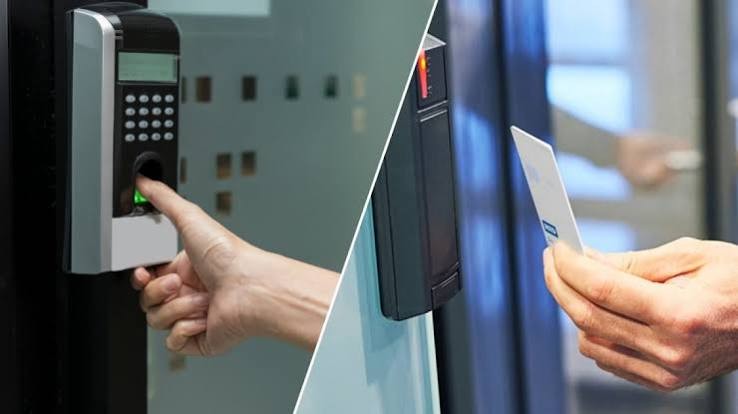
Controlling who enters your premises is one of the most important aspects of modern building security. Whether you manage an office, school, hospital, hotel, warehouse, factory, apartment complex or commercial property, the right access control system can help prevent unauthorised entry, improve accountability and make it easier to manage employees, visitors and other building users.
Two widely used options are biometric access control systems and card-based access control systems. Both allow property owners to control access through electronic devices rather than relying entirely on traditional keys. However, they use different identification methods and offer different advantages, costs and management requirements.
Biometric systems verify a person’s identity using unique physical characteristics such as fingerprints or facial features. Card-based systems use electronic credentials, including RFID cards and proximity cards, to grant or deny access.
So, which is better for your building in Uganda?
The answer depends on your security requirements, number of users, budget, building layout and the level of access control you need. This guide explains the differences between biometric and card-based access control, compares their security and operating costs, examines their applications and helps you choose the most suitable solution.
What Is a Biometric Access Control System?
A biometric access control system is an electronic security solution that identifies or verifies individuals using their unique physical or behavioural characteristics before allowing them to enter a restricted area.
Instead of depending on a key, PIN or access card alone, the system uses a biometric reader to check whether a person’s biometric information matches an authorised record.
Common biometric identification methods include:
- Fingerprint recognition: Scans a person’s fingerprint to verify their identity.
- Facial recognition: Uses facial features to identify or verify an authorised person.
- Iris recognition: Examines distinctive patterns in the iris of the eye.
- Palm or vein recognition: Uses features of the hand or underlying vein patterns in supported systems.
Fingerprint and facial recognition are among the most familiar biometric options for offices, institutions and commercial properties.
How Does Biometric Access Control Work?
A typical biometric access control system follows a series of steps:
- User enrolment: An administrator registers authorised users and captures the required biometric information.
- Identity verification: The user presents a fingerprint, face or another supported biometric characteristic to the reader.
- Data comparison: The reader or connected controller compares the presented biometric information with the authorised reference data.
- Access decision: The system grants or denies entry based on the configured permissions.
- Record keeping: Depending on the system, the access event is recorded for security monitoring and reporting.
For example, an office in Kampala may use fingerprint access control to restrict entry to its finance department. Only employees whose fingerprints have been enrolled and authorised for that area can unlock the controlled door.
Some biometric systems support additional authentication methods, such as a PIN or access card. This can provide an extra layer of verification for sensitive areas.
What Is a Card-Based Access Control System?
A card-based access control system uses electronic cards or credentials to control entry into a building or restricted area.
Instead of scanning a fingerprint or face, an authorised person presents an access card to a reader installed near a door. The reader communicates with an access control controller, which checks whether the card is authorised to unlock that particular entrance.
Card-based systems commonly use:
- RFID access cards
- Proximity cards
- Smart cards
- Contactless credentials
- Secure encrypted access credentials
The technology used by the card and reader determines how securely the system identifies credentials.
How Does Card-Based Access Control Work?
A typical card-based system operates as follows:
- Card registration: The administrator assigns an electronic card or credential to an authorised user.
- Card presentation: The user holds or presents the card near the access reader.
- Credential verification: The reader communicates the card’s credential information to the access control system.
- Permission checking: The controller checks whether the credential has permission to access the door at that time.
- Door operation: If authorised, the electronic locking mechanism releases the door.
- Access logging: The system can record the entry event, including the credential used and the time of access.
For example, a hotel can issue access cards to employees and assign different permissions to reception staff, housekeeping teams, management and maintenance personnel.
If an employee leaves the organisation, the administrator can deactivate that person’s card without replacing the entire door locking system.
Biometric vs Card-Based Access Control: Key Differences
Although both systems control entry electronically, they differ in how they identify users, manage credentials and respond to security risks.
| Comparison factor | Biometric access control | Card-based access control |
|---|---|---|
| Identification method | Fingerprint, face or another biometric characteristic | Electronic access card or credential |
| User verification | Linked to a person’s biometric information | Linked to an assigned credential |
| Lost credential risk | No physical access card to lose | Cards can be lost, stolen or shared |
| Administration | Requires biometric enrolment and user management | Requires issuing, assigning and managing credentials |
| Entry speed | Depends on reader quality and user conditions | Usually quick with compatible contactless cards |
| Replacement | May require re-enrolment or updating user records | Lost cards can usually be deactivated and replaced |
| Privacy considerations | Involves handling biometric information | Involves handling credential and access records |
| Suitable applications | Restricted offices, sensitive rooms and controlled facilities | Offices, hotels, schools and buildings with many users |
| Potential limitations | Reader performance, enrolment and privacy considerations | Lost, borrowed or duplicated credentials, depending on technology |
Neither system is automatically the best in every situation. The right choice depends on how the building operates and what level of security is required.
1. Security: Which System Provides Better Protection?
Security is often the most important consideration when choosing between biometric and card-based access control.
Both technologies can provide effective protection when properly selected, installed and managed. However, they address different security challenges.
Security Advantages of Biometric Access Control
Biometric systems link access permissions to a person’s physical characteristics. This can make unauthorised credential sharing more difficult than with a conventional access card.
For example, an employee cannot simply hand their fingerprint to another person in the same way they might hand over an access card.
Biometric access control is particularly useful where management needs stronger identity verification.
Important security features to consider include:
- Reliable fingerprint or facial recognition technology.
- Liveness detection to help identify presentation attacks.
- Secure storage and protection of biometric templates.
- Encrypted communication between system components.
- Configurable access permissions.
- Event logging and reporting.
- Additional authentication for sensitive areas.
However, biometric technology is not impossible to deceive. Its security depends on the quality of the reader, anti-spoofing features, system configuration and protection of stored information.
Security Advantages of Card-Based Access Control
Card-based systems provide controlled access through authorised electronic credentials.
Modern secure card technologies can offer strong protection, particularly when they use encrypted communication and appropriate credential authentication.
Their security advantages include:
- Controlled access permissions.
- Easy cancellation of lost or stolen cards.
- Time-based access restrictions.
- Detailed access records.
- Integration with CCTV and alarm systems.
- Convenient management of large numbers of users.
However, basic or older card technologies may be vulnerable to copying or unauthorised credential use. Organisations should avoid assuming that every RFID or proximity card offers the same level of security.
Which is better for security?
Biometric access control can be more suitable when verifying the identity of the person entering is a priority. Secure card-based systems can also provide strong access protection when appropriate credentials and controls are used.
For highly restricted areas, organisations can consider combining a biometric reader with a secure access card or PIN.
2. Installation Costs and Long-Term Expenses in Uganda
The cost of installing an access control system in Uganda depends on more than the price of the reader. Property owners should consider the equipment, number of doors, installation work, software, power requirements and future maintenance.
Cost Factors for Biometric Access Control
Biometric access control installation costs may depend on:
- Type of biometric reader.
- Fingerprint or facial recognition technology.
- Number of controlled entrances.
- Number of users to be enrolled.
- Electronic locks and door hardware.
- Access control controllers.
- Power supply and backup arrangements.
- Network connectivity and software.
- Integration with CCTV or other security systems.
- Installation complexity and configuration.
Some advanced biometric systems may require higher initial investment because of their specialised readers and software requirements.
Cost Factors for Card-Based Access Control
Card-based access control costs may depend on:
- Type and security level of the card reader.
- Number of cards required.
- Number of doors being controlled.
- Access control panels and controllers.
- Electronic locking devices.
- Card management software.
- Wiring and installation requirements.
- Power backup.
- Integration with existing security equipment.
Although the reader may be relatively affordable, organisations should include the cost of issuing and replacing cards when estimating long-term expenses.
Which System Is More Affordable?
Card-based access control may be a cost-effective option for organisations with many employees or visitors because cards are relatively straightforward to issue and manage.
Biometric systems may be worth the additional investment where identity verification is important, particularly in restricted departments and sensitive facilities.
The most economical option is not necessarily the one with the lowest purchase price. Property owners should compare the full cost of installation, operation, administration, maintenance and future expansion.
Daltrevco can help you assess the access control requirements of your property and discuss a suitable system based on your building’s layout and security objectives.
3. Convenience and Ease of Use
A security system should provide effective protection without unnecessarily disrupting daily operations.
Both biometric and card-based access control can make building entry more convenient than managing traditional keys.
Convenience of Biometric Systems
Biometric access control allows authorised users to enter without carrying a physical access card.
This can be useful in workplaces where employees frequently enter and leave restricted areas.
Advantages include:
- Reduced dependence on physical access cards.
- Convenient fingerprint or facial verification.
- User-specific access permissions.
- Less routine card distribution.
- Support for attendance and access management in compatible systems.
However, biometric readers may experience difficulties when fingerprints are worn, dirty, wet or damaged. Facial recognition performance may also be affected by lighting, positioning, environmental conditions and device quality.
Convenience of Card-Based Systems
Card-based access control is familiar and straightforward for many users.
Employees and visitors can simply present their cards to the reader to gain authorised access.
Advantages include:
- Fast contactless entry.
- Simple card issuance.
- Convenient replacement of lost credentials.
- Easy assignment of access permissions.
- Suitable management of large user groups.
- Less need to enrol biometric information.
The main inconvenience is that users must carry their cards. A forgotten, damaged or lost card can prevent access until an alternative credential is provided.
Which is more convenient?
Card-based systems are often convenient for organisations with many users, frequent visitors or temporary access requirements. Biometric systems can be convenient for regular employees who need reliable access without carrying a card.
4. User Management and Access Administration
Managing employees, contractors, visitors and other authorised users is a major part of building security.
The best access control system should allow administrators to create users, assign permissions, change access rights and deactivate credentials when necessary.
Managing Users in Biometric Systems
Biometric systems require authorised users to be enrolled before they can use the system.
An administrator may need to:
- Register each employee.
- Capture the required biometric information.
- Assign access permissions.
- Set permitted access times.
- Remove or deactivate former employees.
- Review access records.
- Maintain secure biometric data.
For a large organisation, enrolment procedures should be properly planned to avoid delays when introducing the system.
Managing Users in Card-Based Systems
Card-based systems allow administrators to issue individual cards or credentials to authorised users.
An organisation can assign different permissions to different departments and staff members.
For example:
- Reception employees may access the main entrance and reception area.
- Finance staff may access the finance department.
- Warehouse employees may access designated storage areas.
- Managers may access additional authorised offices.
- Maintenance personnel may receive limited access during approved working hours.
If a card is lost or an employee leaves, the administrator can deactivate the credential and issue a replacement where necessary.
Which is easier to manage?
Card-based systems can be easier to administer in environments with high employee turnover, temporary workers and frequent visitors. Biometric systems are useful where access must be closely associated with an enrolled individual.
5. Hygiene, Privacy and Data Protection
Privacy should be considered before installing any access control system, especially when collecting information that can identify individuals.
Privacy Considerations for Biometric Systems
Biometric access control involves collecting and processing personal information such as fingerprint or facial data.
Organisations should consider:
- Informing users about the purpose of biometric collection.
- Establishing an appropriate lawful basis for processing.
- Limiting collection to what is necessary.
- Protecting biometric templates and related records.
- Restricting access to stored information.
- Establishing appropriate retention and deletion procedures.
- Providing suitable alternatives where required.
In Uganda, organisations should consider their obligations under the Data Protection and Privacy Act, 2019, and applicable regulations.
It is important to understand how a proposed biometric system stores and protects information. Some devices store biometric templates rather than ordinary photographs of fingerprints or faces, but storage methods vary between products.
Privacy Considerations for Card-Based Systems
Card-based systems generally avoid collecting fingerprint or facial information. However, they still generate access records that can reveal when individuals enter or leave particular locations.
Organisations should therefore protect access logs, limit administrator permissions and establish appropriate retention procedures.
Which is better for privacy?
Card-based systems may involve less sensitive identification data because they do not normally require biometric enrolment. Nevertheless, both systems must be managed responsibly and in accordance with applicable data protection requirements.
6. Maintenance and Reliability
An access control system must remain dependable after installation. Poor maintenance, unstable power and damaged door hardware can affect security and interrupt daily activities.
Maintaining Biometric Access Control Systems
Biometric equipment should be inspected and maintained according to the manufacturer’s recommendations.
Important maintenance activities include:
- Cleaning fingerprint and facial recognition sensors appropriately.
- Checking reader performance.
- Inspecting wiring and power connections.
- Testing electronic locks.
- Updating supported firmware and software.
- Reviewing access permissions.
- Checking backup power arrangements.
- Confirming that access logs and system backups work correctly.
Fingerprint readers should be installed in suitable locations where users can access them comfortably and where the equipment is protected from unnecessary environmental exposure.
Maintaining Card-Based Access Control Systems
Card-based systems also require routine inspection.
Maintenance may include:
- Testing card readers.
- Checking electronic locks and door strikes.
- Inspecting access cards for damage.
- Replacing faulty cards.
- Checking controllers and power supplies.
- Inspecting cables and network connections.
- Updating system software.
- Reviewing user permissions and access records.
Reliability in Ugandan Buildings
Buildings in Uganda may experience power interruptions, dust, humidity and varying environmental conditions. These factors should be considered when selecting and installing access control equipment.
A reliable installation should include suitable power backup where necessary, appropriate equipment placement, secure wiring and compatible door hardware.
Property owners should also ask whether the system can continue authenticating users during an internet outage. Some systems support local authentication without internet access, while cloud-dependent features may require connectivity.
7. Integration with CCTV and Other Security Systems
Access control becomes more useful when it works alongside other building security solutions.
For example, a business may want to monitor who enters a restricted area while recording activity through CCTV cameras.
Integrating Biometric Access Control with CCTV
A compatible biometric access control system can be integrated with CCTV to help security personnel investigate access events.
Depending on the equipment and software, the organisation may be able to:
- Review video associated with an access event.
- Investigate denied access attempts.
- Monitor restricted entrances.
- Identify unusual entry patterns.
- Support security incident investigations.
Integrating Card-Based Access Control with CCTV
Card-based systems can also work with CCTV platforms to improve security monitoring.
For example, a warehouse may use card readers to control staff entry and CCTV cameras to monitor loading bays, storage areas and other restricted sections.
Integration can also extend to alarm systems, intercoms, visitor management platforms and building management systems.
Compatibility should be confirmed before purchasing equipment because integration may depend on software, communication protocols, licensing and the specific devices involved.
8. Where Are Biometric Access Control Systems Best Used?
Biometric access control is particularly useful in buildings where management wants to associate entry permissions with individual users.
Common applications include:
Corporate Offices
Businesses can use fingerprint or facial recognition systems to control access to executive offices, finance departments, server rooms and other restricted areas.
Banks and Financial Institutions
Biometric authentication can support access restrictions in selected sensitive areas, subject to the institution’s security policies and regulatory requirements.
Hospitals and Healthcare Facilities
Hospitals can use biometric systems to restrict entry to selected areas, including medicine storage rooms, records departments and staff-only facilities.
Factories and Industrial Facilities
Manufacturing facilities can use biometric readers to manage access to selected production areas, control rooms and equipment rooms.
Government and Institutional Buildings
Biometric systems may be suitable for controlled facilities where individual identity verification is a key requirement.
9. Where Are Card-Based Access Control Systems Best Used?
Card-based systems are especially useful in buildings where access must be managed for many users.
Common applications include:
Hotels and Resorts
Hotels can issue electronic access cards to guests and employees. Different credentials can be configured for guest rooms, staff areas and restricted facilities.
Schools and Universities
Educational institutions can use access cards to manage entry into administration offices, laboratories, libraries, staff rooms and selected buildings.
Commercial Office Buildings
Property managers can issue cards to tenants, employees, cleaners and authorised contractors while assigning permissions according to their roles.
Warehouses and Storage Facilities
Card-based systems can control access to storage areas, loading zones, inventory rooms and other operational sections.
Apartment Complexes
Residential developments can use electronic access cards to manage entry through shared doors, gates and selected common areas.
10. Biometric vs Card-Based Access Control for Different Buildings in Uganda
The right solution may differ depending on the property and how it is used.
| Building type | Recommended approach | Reason |
|---|---|---|
| Small office | Card-based or fingerprint | Depends on staff numbers and security needs |
| Large corporate office | Hybrid system | Supports different security levels across departments |
| Hotel | Card-based | Convenient for guests and staff |
| School or university | Card-based or hybrid | Easier management of large user groups |
| Hospital | Hybrid system | Different access requirements for staff and restricted areas |
| Warehouse | Card-based or hybrid | Suitable for managing employees and operational zones |
| Factory | Hybrid system | Supports controlled access to sensitive production areas |
| Financial institution | Biometric or hybrid | Can provide additional identity verification in restricted areas |
| Apartment complex | Card-based | Convenient for residents and authorised personnel |
These are general recommendations, not fixed rules. A site assessment should determine the most appropriate equipment and access arrangements.
11. Should You Choose a Hybrid Biometric and Card-Based Access Control System?
For some organisations, the best solution is not choosing one technology over the other. It is combining both.
A hybrid access control system uses biometric authentication and electronic credentials to provide different levels of access protection.
For example, a commercial building may use:
- Card readers at the main entrance.
- Fingerprint readers at finance department entrances.
- Facial recognition at selected restricted areas.
- Additional authentication for server rooms.
- Visitor credentials for approved temporary access.
A hybrid system can offer flexibility while allowing the organisation to apply stronger verification to areas that require it.
However, it may involve higher installation and management costs. The additional technology should be justified by the building’s actual security requirements.
12. Factors to Consider Before Choosing an Access Control System
Before investing in biometric or card-based access control, property owners and facility managers should assess several important factors.
1. Your Building’s Security Requirements
Identify which entrances need controlled access and which areas require stronger protection.
A main reception entrance may have different requirements from a server room, medicine store or financial records department.
2. Number of Users
Consider the number of employees, residents, visitors and contractors who will need access.
A building with hundreds of users may require a system that makes enrolment, credential issuance and administration straightforward.
3. Number of Doors
The number of controlled doors affects the equipment, wiring, controllers and installation work required.
A multi-storey office building may need a centralised system that manages access across several floors.
4. Door and Lock Compatibility
Not every electronic lock is suitable for every door.
Consider the door material, frame, opening direction, existing locking hardware and required emergency exit arrangements.
5. Power Supply and Backup
Access control equipment needs a dependable power arrangement.
Ask whether the system includes suitable backup power and what happens during a power failure.
6. Internet and Network Requirements
Determine whether the system relies on a local controller, cloud platform or a combination of both.
Ask whether authorised users can still enter when the internet connection is unavailable.
7. User Privacy and Data Protection
If the system collects biometric information or records individual access activity, establish how that information will be protected and managed.
8. Future Expansion
Choose a solution that can accommodate additional doors, departments and users if the building expands.
9. Maintenance and Technical Support
Consider how the equipment will be inspected, updated and repaired when problems arise.
10. Integration with Existing Security Systems
If your property already has CCTV cameras, alarms or intercoms, confirm whether the proposed access control system can integrate with them.
13. Access Control System Installation: What Does the Process Involve?
Professional installation is essential because access control involves more than mounting a reader beside a door.
A properly designed system should work with the building’s door hardware, power supply, network infrastructure and security requirements.
A typical installation process involves the following stages.
Step 1: Site assessment
The building is assessed to identify entrances, restricted areas, door types, user requirements and existing security equipment.
Step 2: System selection
The appropriate biometric, card-based or hybrid technology is selected based on the building’s operational and security requirements.
Step 3: Equipment planning
The required readers, controllers, electronic locks, power supplies, access software and related equipment are identified.
Step 4: Wiring and hardware installation
Readers, controllers, locks and other components are installed in suitable locations. The installation must account for the door structure and safe exit requirements.
Step 5: System configuration
User credentials, access levels, schedules and administrator permissions are configured.
Step 6: Testing and commissioning
The system is tested to confirm that authorised users can enter, unauthorised credentials are rejected and doors operate correctly.
Step 7: User training and handover
Administrators and relevant staff are shown how to manage users, issue credentials, review records and respond to common problems.
14. Common Mistakes to Avoid When Choosing Access Control Systems
Choosing the wrong system can create unnecessary expenses, inconvenience and security weaknesses.
Avoid these common mistakes:
- Choosing based on price alone: Low-cost equipment may not meet the property’s actual security requirements.
- Ignoring the quality of credentials: Basic RFID cards may not provide the protection required for sensitive areas.
- Overlooking privacy requirements: Biometric information and access records must be managed responsibly.
- Installing incompatible locks: Readers and controllers must work with the selected electronic locking hardware.
- Ignoring emergency exits: Access control must not obstruct safe evacuation or compromise applicable fire and building safety requirements.
- Failing to plan for power interruptions: Consider backup power and the behaviour of the system during outages.
- Ignoring future expansion: A system that cannot accommodate additional doors and users may become expensive to replace.
- Failing to train administrators: Poor user management can lead to outdated permissions and security gaps.
- Neglecting maintenance: Regular testing helps identify faults before they disrupt building operations.
15. Why Choose Daltrevco for Access Control Solutions in Uganda?
Selecting an access control system requires a clear understanding of the building, its users and the security challenges it faces.
Daltrevco provides a point of contact for organisations and property owners exploring modern building security and access control solutions in Uganda.
Whether you are considering fingerprint access, facial recognition, RFID card readers or a combination of technologies, the starting point should be identifying the right solution for your property.
When planning an access control project, consider:
- The number of entrances that require controlled access.
- The number and categories of users.
- Areas that need restricted entry.
- The appropriate biometric or card technology.
- Electronic locking and door hardware requirements.
- Power backup and network arrangements.
- Integration with CCTV and other security equipment.
- Future expansion and maintenance requirements.
Daltrevco can help you discuss suitable access control options for your building, whether it is an office, school, hospital, hotel, warehouse, factory or residential development.
Looking for biometric or card-based access control installation in Uganda? Contact Daltrevco to discuss your building security requirements and identify a suitable access control solution.
Frequently Asked Questions About Biometric vs Card-Based Access Control
1. What is the difference between biometric and card-based access control?
Biometric access control verifies users through physical characteristics such as fingerprints or facial features. Card-based access control uses electronic credentials such as RFID cards or proximity cards to grant or deny entry.
2. Is biometric access control more secure than card access control?
Biometric access control can provide stronger identity verification because access is linked to a person’s biometric information. However, modern secure card technologies can also provide effective protection. The overall security depends on equipment quality, configuration and management.
3. Which access control system is cheaper in Uganda?
The cost depends on the number of doors, users, readers, electronic locks, software and installation requirements. Card-based systems may be economical for buildings with many users, while biometric systems may offer additional value where identity verification is important.
4. Can biometric access control work without internet?
Some biometric access control systems can authenticate users locally without an internet connection. However, cloud management and remote monitoring features may require internet access. Confirm the offline capabilities of the proposed equipment before installation.
5. Can RFID access cards be copied?
The risk depends on the card technology and security features. Some older or basic RFID credentials may be easier to duplicate than modern encrypted credentials. Organisations should select secure card technologies appropriate to their security requirements.
6. Can a biometric access control system be integrated with CCTV?
Yes. Compatible systems can be integrated with CCTV to help security personnel review video associated with access events, investigate denied entries and monitor restricted entrances. The available features depend on the equipment and software.
7. Can one access control system manage multiple doors?
Yes. Many access control systems can manage multiple doors through connected controllers and centralised software. The number of supported doors depends on the system’s design and capacity.
8. Are biometric access control systems suitable for schools?
Yes. They can be used to restrict access to selected administrative offices, staff areas and other controlled sections. However, the school should consider user privacy, enrolment procedures, visitor management and emergency access requirements.
9. What happens when an employee loses an access card?
The administrator can deactivate the lost card and issue a replacement credential. This prevents the old card from continuing to grant access once it has been disabled in the system.
10. Can biometric and card-based access control be used together?
Yes. A hybrid system can use cards at general entrances and biometric authentication in sensitive areas. Some systems can also require multiple credentials for additional verification.
11. Do access control systems work during power outages?
Their behaviour depends on the power supply, backup arrangements, lock type and system configuration. A suitable design should consider backup power and safe emergency exit operation.
12. How much does access control installation cost in Uganda?
There is no single installation price for every building. Costs depend on the technology, number of doors, readers, electronic locks, wiring, software, power backup, integration and installation complexity. A site assessment is the best way to establish the project requirements.
Conclusion: Which Access Control System Should You Choose?
The choice between biometric and card-based access control depends on the level of security, convenience and administrative flexibility your building requires.
Biometric access control is a strong option when verifying individual identity is important. Fingerprint and facial recognition can help organisations manage entry into sensitive offices, restricted departments and controlled facilities.
Card-based access control is a practical choice for buildings with many employees, visitors, residents or temporary users. It allows administrators to issue, replace and deactivate credentials without requiring biometric enrolment.
For organisations that need different security levels across their premises, a hybrid system combining biometric and card-based technologies may provide the most appropriate solution.
Before making a decision, assess your building’s entrances, users, security risks, budget, door hardware and future requirements.
Daltrevco can help you explore suitable biometric, RFID and card-based access control solutions in Uganda. Contact Daltrevco to discuss your project and improve how access to your property is managed.

