
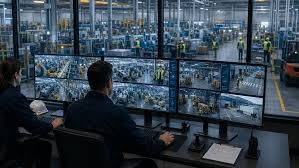
Large commercial buildings require more than individual security cameras, burglar alarms and access control devices to maintain effective security. Shopping malls, office complexes, hotels, hospitals, warehouses, industrial facilities and multi-storey buildings often have numerous entrances, restricted areas, parking facilities and high-traffic spaces that need continuous supervision.
Managing these security components independently can make it difficult to identify incidents quickly, coordinate responses and maintain a clear overview of what is happening across an entire property. This is where centralised security monitoring systems become important.
A centralised security monitoring system connects different security technologies to a central control point, allowing authorised security personnel and facility managers to monitor activities, receive alerts and coordinate security operations from one location.
For businesses and institutions in Uganda, centralised security monitoring can improve visibility, support faster incident assessment and make security management more organised. It is particularly valuable for large commercial properties in Kampala, Wakiso, Entebbe and other growing business and industrial areas.
This guide explains how centralised security monitoring systems work, their main components, benefits, installation requirements, applications and the factors to consider when choosing a solution for a large commercial building.
What Is a Centralised Security Monitoring System?
A centralised security monitoring system is an integrated security arrangement that brings multiple security technologies together through a central monitoring platform or control room.
Instead of requiring security personnel to operate separate systems independently, the solution provides a coordinated view of selected security activities across a property.
Depending on the equipment and software used, a centralised system can bring together:
- CCTV surveillance cameras.
- Digital video recorders and network video recorders.
- Access control systems.
- Intruder and burglar alarm systems.
- Motion and perimeter detection sensors.
- Intercom and video door phone systems.
- Vehicle access control equipment.
- Visitor management systems.
- Security event management software.
- Central monitoring workstations and displays.
For example, a large office complex may have CCTV cameras at its entrances, access control readers on restricted floors, alarm sensors in sensitive rooms and vehicle barriers at the parking entrance.
A centralised monitoring platform can allow authorised operators to view relevant camera feeds, receive access-related alerts and assess alarm events through a coordinated interface, provided the different devices and software are compatible.
The purpose is to improve security visibility, simplify supervision and support informed decision-making.
How Do Centralised Security Monitoring Systems Work?
Centralised security monitoring systems work by collecting information from connected security devices and presenting relevant events through a central monitoring environment.
The system is designed around communication between cameras, sensors, access control equipment, recording devices, network infrastructure and management software.
A typical arrangement follows several stages.
1. Security devices collect information
CCTV cameras capture video footage, access control readers record credential activity, and alarm sensors detect events such as unauthorised door openings or movement in protected areas.
Each device performs its assigned security function.
2. Information is transmitted through the network
Connected devices communicate with recorders, controllers, servers or other approved equipment through the property’s network infrastructure.
Depending on the system design, communication may use Ethernet cabling, wireless connections, dedicated security networks or other supported interfaces.
3. Central monitoring software processes security events
Compatible monitoring software receives information from connected systems and presents it to authorised operators.
Depending on the platform, this may include live video, recorded footage, access events, alarm notifications, system faults and equipment status.
4. Security personnel assess alerts
When an event occurs, operators can review the available information to understand what is happening.
For example, an alarm triggered near a restricted storage area may prompt an operator to check the relevant CCTV camera and review access records.
The ability to link these events depends on the integration capabilities of the equipment and software.
5. Appropriate action is coordinated
After assessing an incident, authorised personnel can follow the property’s security procedures. These may include contacting on-site guards, notifying facility management, restricting access where appropriate or escalating the incident through established response arrangements.
A centralised system supports decision-making, but it does not automatically guarantee that every incident will be prevented or that emergency services will respond.
Main Components of a Centralised Security Monitoring System
An effective centralised security monitoring solution combines several technologies. The exact configuration depends on the building’s size, security risks, operating requirements and available infrastructure.
1. CCTV Surveillance Systems
CCTV cameras are among the most important components of centralised security monitoring.
They provide visual coverage of selected areas, allowing authorised operators to observe activities and review recorded footage when investigating incidents.
For large commercial buildings, cameras may be installed in:
- Main entrances and exits.
- Reception areas and lobbies.
- Corridors and stairwell entrances.
- Parking areas.
- Loading and unloading zones.
- Warehouses and storage rooms.
- Building perimeters.
- Restricted operational areas.
Different camera types serve different purposes. Dome cameras are commonly used indoors, bullet cameras can be suitable for selected outdoor positions, and PTZ cameras can provide remote directional control where supported.
The camera resolution, lens, lighting performance, weather protection and recording configuration should match the intended surveillance purpose.
2. Central Video Management System
A Video Management System (VMS) is software used to manage compatible network video surveillance devices.
In a centralised security environment, it can allow operators to view multiple camera feeds, search recordings, manage camera layouts and review video events from one interface.
Depending on the software, additional capabilities may include:
- Multi-camera monitoring.
- Video playback and event searches.
- User permission management.
- Camera health monitoring.
- Motion or analytics notifications.
- Alarm-linked video display.
- Remote viewing for authorised users.
Not every VMS supports every camera, recorder or integration. Compatibility should be confirmed before purchasing or installing equipment.
3. Access Control Systems
Access control systems regulate who can enter specific areas of a commercial building.
They are especially important in properties with multiple departments, tenants, employees, visitors and restricted operational spaces.
Common access control technologies include:
- RFID card readers.
- Biometric fingerprint readers.
- Facial recognition terminals.
- PIN-based access devices.
- Electronic door locks.
- Turnstiles.
- Automatic gate access systems.
- Vehicle access control equipment.
When connected to a suitable central management platform, access control systems can provide a central view of selected entry events and access permissions.
For example, a facility manager may be able to review access activity for a restricted server room without visiting the room physically.
Access permissions should be assigned according to job responsibilities and reviewed when employees, tenants or contractors change roles.
4. Intruder and Burglar Alarm Systems
Burglar alarm systems detect unauthorised entry or suspicious activity in protected areas.
They typically use sensors connected to an alarm control panel.
Common devices include:
- Motion detectors.
- Door and window magnetic contacts.
- Glass break detectors.
- Panic buttons.
- Vibration sensors.
- Perimeter intrusion detectors.
- Internal and external sirens.
When integrated with a compatible central monitoring platform, alarm events can be displayed alongside other security information.
For example, an alarm activation in a warehouse may be accompanied by a relevant camera view, helping an operator assess the situation.
5. Security Control Room
The security control room is the central operational area where authorised personnel supervise the building’s security systems.
It may contain:
- Monitoring computers.
- CCTV display screens.
- Video management workstations.
- Access control management terminals.
- Alarm monitoring interfaces.
- Network equipment.
- Communication devices.
- Backup power equipment.
- Incident reporting facilities.
A well-planned control room should provide comfortable working conditions, clear visibility of monitoring displays, controlled access and sufficient space for authorised operators.
The room should also have appropriate environmental control, cable management and power protection to support reliable operation.
6. Network Infrastructure
Network infrastructure connects the different security devices and enables communication with central monitoring software.
Large commercial buildings may require:
- Network switches.
- Structured cabling.
- Fibre-optic links.
- Network routers.
- Servers.
- Network video recorders.
- Wireless access points where appropriate.
- Network cabinets and equipment racks.
For larger properties, network segmentation can help separate security devices from ordinary office systems.
Network design should account for camera bandwidth, recording requirements, device quantities, future expansion and cybersecurity.
7. Backup Power Systems
Security monitoring equipment requires a reliable power supply.
Power interruptions can affect cameras, network switches, recorders, access control controllers and monitoring workstations.
Depending on the system design, backup power may include:
- Uninterruptible Power Supply (UPS) units.
- Backup batteries.
- Standby generators.
- Power protection devices.
- Redundant power supplies for critical equipment.
Backup capacity should be calculated according to the total electrical load and the required operating period.
It is also important to distinguish between equipment that needs continuous power and devices that can continue operating temporarily through local battery backup.
Benefits of Centralised Security Monitoring for Large Commercial Buildings
Centralised security monitoring offers several advantages for property owners, developers, facility managers and security teams.
1. Improved Security Visibility
One of the main benefits is the ability to supervise multiple security systems through a central monitoring environment.
Rather than moving between different equipment rooms or monitoring separate applications, authorised personnel can access relevant security information from a central location.
This is useful for large buildings with several floors, entrances, departments and operational areas.
2. Faster Incident Assessment
Centralised monitoring can help security personnel assess events more efficiently.
For example, when an access control system records an attempted entry into a restricted area, the operator may be able to review the associated camera footage if the systems are integrated.
This helps personnel establish whether the event requires further attention.
3. Better Coordination Between Security Systems
Independent security devices can provide useful information, but integration can make that information more valuable.
For example, a compatible system may connect an alarm event to a relevant camera view or display access activity alongside video footage.
This improves the operator’s ability to understand the context of a security event.
4. More Efficient Security Management
Large commercial properties may have several security teams, departments or operating zones.
Centralised monitoring provides a common operational environment for supervising selected security activities.
It can also make it easier for authorised managers to review incidents, check equipment status and coordinate security procedures.
5. Improved Protection of Restricted Areas
Commercial buildings often contain sensitive areas such as server rooms, financial offices, records departments, equipment rooms and storage facilities.
By combining access control, CCTV and alarm technologies, property managers can create additional layers of protection around these locations.
For example, an access control system may restrict entry to authorised employees while CCTV provides visual monitoring of the entrance.
6. Better Incident Documentation
Centralised monitoring platforms can help organisations maintain records of security events.
Depending on the equipment and software, records may include:
- CCTV recordings.
- Access control logs.
- Alarm activation histories.
- Operator activity records.
- Incident reports.
- Equipment fault notifications.
These records can support internal investigations, management reviews and security assessments.
Retention periods and access permissions should be established according to operational needs and applicable privacy requirements.
7. Easier Management of Large Properties
A centralised platform can be particularly useful where a building has multiple security zones.
For example, a shopping complex may have separate monitoring requirements for its retail areas, parking facilities, loading bays, offices and service corridors.
A suitable platform can help authorised personnel manage these different areas through one coordinated system.
8. Support for Future Expansion
A properly designed system can accommodate additional cameras, access points, alarm devices and monitoring workstations as the building grows.
However, scalability depends on the capacity of the network, servers, software licences, recording equipment and other system components.
Planning for future expansion during the initial installation can help avoid expensive redesigns.
Applications of Centralised Security Monitoring Systems
Centralised security monitoring is suitable for different types of large commercial and institutional properties.
Office Complexes and Corporate Buildings
Large office buildings may have multiple departments, floors, meeting rooms, reception areas and restricted administrative spaces.
Centralised monitoring can help facility managers supervise entrances, monitor common areas and manage access permissions.
It can also support coordination between CCTV surveillance and electronic door access systems.
Shopping Malls and Retail Centres
Shopping malls have complex security requirements because of their size, visitor numbers, retail units, parking facilities and service areas.
Centralised monitoring can help supervise:
- Main entrances.
- Shopping corridors.
- Escalator and lift lobby areas.
- Parking facilities.
- Loading bays.
- Cash-handling areas.
- Restricted staff sections.
The monitoring platform should be designed to handle the building’s camera volume and operating requirements.
Hotels and Hospitality Facilities
Hotels require a balance between security, guest privacy and convenient access.
Centralised security monitoring can help authorised personnel supervise public entrances, reception areas, parking facilities, service corridors and restricted operational zones.
Camera placement must respect guest privacy. Cameras should not be installed in private spaces such as bedrooms and bathrooms.
Hospitals and Healthcare Facilities
Hospitals may contain emergency departments, pharmacies, laboratories, equipment rooms, administrative offices and public waiting areas.
Centralised security monitoring can support the supervision of entrances and selected restricted areas.
Access control can help limit entry to sensitive rooms, while CCTV can assist with monitoring appropriate public and operational spaces.
Healthcare facilities should apply particularly careful controls to video footage, access records and other personal information.
Warehouses and Distribution Centres
Warehouses often cover large areas and contain valuable stock, machinery and loading facilities.
Centralised security monitoring can help supervise storage areas, perimeter access, vehicle entrances, dispatch sections and staff-only spaces.
The system can also help security teams investigate incidents involving unauthorised entry or stock movement.
Industrial and Manufacturing Facilities
Factories and industrial buildings may contain production lines, equipment rooms, chemical storage areas, warehouses and vehicle movement zones.
Centralised monitoring can combine CCTV, perimeter detection, access control and alarm information to support security management.
The design should account for dust, vibration, heat, moisture and other environmental conditions that may affect equipment.
Educational Institutions
Universities, colleges and large schools may have several buildings, administrative offices, laboratories, libraries and student facilities.
Centralised monitoring can help security teams supervise selected access points and common areas across the campus.
Multi-Tenant Commercial Developments
Large commercial developments may contain different businesses, offices, shops and service providers within one property.
Centralised security monitoring can help property managers coordinate common-area security while maintaining appropriate access permissions for individual tenants.
Centralised Security Monitoring vs Independent Security Systems
Understanding the difference between centralised and independent security arrangements can help property owners make better investment decisions.
| Feature | Independent systems | Centralised monitoring |
|---|---|---|
| Monitoring | Separate interfaces | Shared monitoring environment where supported |
| CCTV management | Operated independently | Managed through compatible central software |
| Access control | Separate management | Centralised permissions and event visibility where supported |
| Alarm monitoring | Independent alarm interface | Integrated event display where compatible |
| Incident assessment | Information may be spread across systems | Related information can be reviewed together |
| Reporting | Separate records | Coordinated reporting where supported |
| Expansion | May require separate upgrades | Can be planned around a scalable architecture |
| Management | Multiple operating processes | More coordinated security supervision |
Centralised monitoring is not automatically the best choice for every property. Smaller buildings may operate effectively with simpler arrangements.
For large commercial properties with several security technologies and operating zones, however, a well-designed centralised solution can offer significant management advantages.
Important Features to Look for in a Centralised Security Monitoring System
When selecting a centralised monitoring solution, commercial property owners should evaluate its functionality, reliability, compatibility and long-term operating requirements.
1. Multi-System Integration
The platform should support the security technologies that the property intends to connect.
Confirm compatibility between CCTV cameras, recorders, access control controllers, alarm panels and management software.
Do not assume that devices from different manufacturers will automatically communicate.
2. Real-Time Event Notifications
The system should provide timely notifications for relevant security events.
Examples may include:
- Unauthorised access attempts.
- Alarm activations.
- Door-forced-open events.
- Camera disconnections.
- Recording failures.
- Network equipment faults.
The notification process should be tested to confirm that alerts reach the intended personnel.
3. Centralised User Management
The platform should allow administrators to manage user accounts and permissions.
Different roles may require different levels of access.
For example, a CCTV operator may need to view cameras but should not necessarily have permission to change access control settings or delete recordings.
4. Video Recording and Playback
The system should provide suitable recording and playback capabilities.
Important considerations include:
- Camera resolution.
- Frame rate.
- Video compression.
- Storage capacity.
- Retention period.
- Recording schedules.
- Playback performance.
- Evidence export procedures.
Storage should be calculated using the actual camera configuration and expected recording requirements.
5. Remote Monitoring Capabilities
Some platforms allow authorised managers or security personnel to access selected monitoring functions remotely.
This can be useful for organisations with multiple sites or management teams that need visibility outside the control room.
Remote access should be secured using strong authentication, encrypted connections where supported and appropriately restricted user permissions.
6. System Health Monitoring
A reliable monitoring platform should make it possible to identify technical problems affecting security equipment.
Depending on the system, this may include camera failures, network disconnections, storage problems, power faults and communication failures.
7. Scalability
A centralised monitoring solution should be designed with future requirements in mind.
Consider whether it can accommodate additional cameras, access control doors, alarm zones, monitoring stations and buildings without major infrastructure changes.
8. Audit Trails and Reporting
Security records can help organisations understand what happened during an incident.
Look for appropriate event logs, operator activity records, access reports and video export functions.
Access to these records should be restricted to authorised personnel.
How to Plan a Centralised Security Monitoring System for a Large Commercial Building
Successful installation starts with careful planning.
A centralised monitoring system should be designed around the building’s layout, operational requirements and security risks rather than simply installing as many devices as possible.
Step 1: Conduct a Security Risk Assessment
The first step is to identify the security risks affecting the property.
This involves examining:
- Building entrances and exits.
- Emergency exits.
- Parking areas.
- Public access zones.
- Restricted departments.
- Storage facilities.
- Loading and delivery areas.
- Perimeter boundaries.
- High-value equipment locations.
The assessment helps establish where surveillance, alarms and access control are required.
Step 2: Develop a Security System Layout
After identifying the risks, prepare a detailed layout showing the proposed locations of cameras, access control readers, alarm sensors and other devices.
The design should minimise blind spots and avoid unnecessary duplication.
It should also account for lighting, environmental conditions, cable routes and maintenance access.
Step 3: Select Compatible Security Technologies
Choose equipment that meets the property’s operational requirements.
This may involve selecting suitable CCTV cameras, video recorders, alarm panels, access control devices, servers and central management software.
Compatibility should be verified before equipment is purchased.
Step 4: Design the Network Infrastructure
Large commercial properties may require a dedicated security network.
The network design should consider:
- Total camera bandwidth.
- Number of connected devices.
- Network switch capacity.
- Fibre-optic links between floors or buildings.
- Network segmentation.
- Server requirements.
- Cybersecurity controls.
- Future expansion.
Network performance is particularly important where numerous high-resolution cameras transmit video continuously.
Step 5: Establish the Central Monitoring Room
The control room should be positioned in a secure and operationally appropriate location.
It should have sufficient space for monitoring workstations, displays, communication equipment and authorised personnel.
Power protection, cooling, network connectivity and restricted physical access should also be considered.
Step 6: Install and Configure the Equipment
Qualified installers should install the selected security devices according to the approved design.
This may involve mounting cameras, installing access control readers, connecting alarm sensors, laying network cables, configuring recorders and setting up monitoring software.
Equipment should be labelled and documented to simplify future maintenance.
Step 7: Integrate Compatible Systems
The next stage involves connecting supported security technologies to the central monitoring platform.
For example, a compatible alarm panel may be configured to display an alert within the video management environment.
Access control events may also be presented through the same interface if the required integration is supported.
Each integration should be tested individually.
Step 8: Test the Complete System
Testing should confirm that:
- CCTV cameras provide the intended coverage.
- Recording and playback function correctly.
- Access permissions work as configured.
- Alarm sensors trigger the appropriate events.
- Monitoring notifications reach the correct operators.
- Remote access works securely where required.
- Backup power supports the intended equipment.
- Network failures and recovery procedures are understood.
Step 9: Train Security Personnel
Security operators should understand how to use the monitoring platform, review incidents, acknowledge alerts, export footage and report technical faults.
They should also receive clear instructions on incident escalation and emergency procedures.
Step 10: Establish Maintenance Procedures
A maintenance plan should cover cameras, recorders, servers, network equipment, access control devices, alarm sensors and backup power systems.
Regular checks help identify faults before they affect security operations.
Centralised Security Monitoring for Multi-Storey Commercial Buildings
Multi-storey commercial buildings present particular security challenges because different floors may have separate tenants, entrances, departments and restricted areas.
A suitable centralised monitoring system should provide visibility across the building while allowing access permissions to be managed according to individual requirements.
For example, a multi-storey office complex may require:
- CCTV monitoring at the main entrance.
- Access control for selected floors.
- Restricted access to server and equipment rooms.
- Visitor management at reception.
- Parking access control.
- Alarm monitoring for selected departments.
- Monitoring of loading and service areas.
A centralised platform can help authorised personnel supervise these functions from one location.
Where the building has lifts, access control integration must be designed carefully to preserve emergency operation, firefighter controls, accessibility and safe evacuation procedures.
Centralised Security Monitoring for Buildings with Multiple Locations
Some organisations operate several commercial properties, warehouses, offices or industrial facilities.
A centralised monitoring architecture may allow authorised personnel to supervise selected security systems across different locations.
For example, a business operating facilities in Kampala, Entebbe and Wakiso may want to view security events from its different sites through a coordinated management platform.
This requires suitable network connectivity, compatible equipment, secure remote communication and sufficient server or cloud capacity.
The system should also provide appropriate separation of user permissions so that personnel at one location cannot automatically access sensitive information from another.
Where connectivity is unreliable, local recording and alarm operation should be planned to continue where the equipment supports it.
Factors That Determine the Cost of Centralised Security Monitoring Systems in Uganda
The cost of installing a centralised security monitoring system depends on the size and complexity of the property.
A small commercial building with a limited number of cameras and access-controlled doors will generally require a different configuration from a multi-storey office complex or shopping mall.
Important cost factors include:
1. Size of the Building
The number of floors, entrances, corridors, parking areas and restricted sections affects the quantity of equipment required.
Larger buildings often need more cameras, sensors, access control devices and network infrastructure.
2. Number and Type of CCTV Cameras
Camera costs depend on resolution, lens type, night-time performance, analytics capabilities, weather protection and manufacturer.
PTZ cameras and specialised cameras may have different costs from standard fixed cameras.
3. Access Control Requirements
The number of controlled doors, readers, electronic locks, turnstiles and vehicle access points affects the overall project cost.
Biometric systems may also have different hardware and software requirements from basic card-based systems.
4. Alarm and Intrusion Detection Equipment
The number of alarm zones and sensors required influences the installation budget.
Additional perimeter detection and specialised sensors may increase project complexity.
5. Central Monitoring Software
The cost of management software depends on the platform, number of connected devices, user requirements, integration functions and licensing model.
Some platforms may require recurring licence or subscription fees.
6. Network Infrastructure
Large commercial buildings may require structured cabling, fibre-optic connections, network switches, servers, racks and dedicated security network equipment.
Existing infrastructure may reduce some installation requirements if it is suitable and properly configured.
7. Control Room Equipment
Monitoring displays, computers, workstations, communication equipment, furniture and environmental control contribute to the overall budget.
8. Backup Power Requirements
UPS equipment, batteries and generators may be required to support critical security components during power interruptions.
9. Installation and Configuration
Labour costs depend on the complexity of cable routes, mounting positions, building structure, integration requirements and commissioning procedures.
10. Maintenance and Future Expansion
Property owners should also consider software updates, equipment replacement, technical support, storage expansion and routine maintenance.
For an accurate centralised security monitoring installation quotation in Uganda, the building should undergo a site assessment. This allows the required devices, infrastructure, integration functions and monitoring arrangements to be established before a final system design is prepared.
Common Mistakes to Avoid When Installing Centralised Security Monitoring Systems
Even high-quality security equipment can deliver poor results when the system is not properly designed.
Property owners should avoid the following mistakes.
1. Choosing Incompatible Equipment
Not every CCTV camera, alarm panel and access control system can integrate with the same monitoring software.
Confirm compatibility before purchasing equipment.
2. Ignoring Network Capacity
Large numbers of cameras can create significant network traffic.
Insufficient bandwidth, poorly configured switches and inadequate network design can affect video performance and system reliability.
3. Installing Cameras Without Proper Coverage Planning
Poor camera positioning can create blind spots, obstructed views and low-quality footage.
Camera locations should be selected according to the areas that need monitoring and the level of detail required.
4. Neglecting Cybersecurity
Centralised security systems are connected to important building infrastructure.
Weak passwords, outdated software, excessive user permissions and insecure remote access can expose systems to unauthorised access.
5. Failing to Provide Backup Power
A security system that loses power during an outage may fail to provide the required monitoring coverage.
Critical equipment should have appropriately sized backup power.
6. Ignoring Staff Training
Operators who do not understand the monitoring software may overlook alerts, misinterpret events or delay escalation.
Training should be part of the installation and handover process.
7. Overlooking Maintenance
Cameras, sensors, storage equipment and network devices require periodic inspection.
Without maintenance, faults may remain undetected until an incident occurs.
8. Failing to Plan for Future Expansion
A system designed only for immediate requirements may become difficult to expand.
Allow for additional devices, network capacity, storage and software requirements during the initial design.
Cybersecurity and Data Protection Considerations
Centralised security monitoring systems collect and process sensitive information, including video footage, access records, alarm events and operator activity logs.
For commercial properties in Uganda, appropriate data protection and cybersecurity practices are essential.
The following measures should be considered:
- Use strong, unique passwords for security devices and management accounts.
- Enable multi-factor authentication where supported.
- Restrict access according to staff responsibilities.
- Keep cameras, recorders, servers and software updated.
- Secure remote connections using appropriate encrypted methods.
- Avoid exposing recorder and camera management interfaces directly to the public internet.
- Separate security network traffic from ordinary office traffic where practical.
- Maintain appropriate backup and recovery procedures.
- Establish clear video retention and deletion policies.
- Restrict the export and sharing of surveillance footage.
- Maintain records of authorised access to sensitive security information.
Organisations should also consider the Uganda Data Protection and Privacy Act, 2019 and applicable regulations when collecting, storing, accessing or sharing personal data.
Camera placement should respect privacy, and surveillance notices and internal procedures should be appropriate to the property and its operations.
How to Choose the Right Centralised Security Monitoring Solution
Selecting the right solution requires an understanding of the building’s security risks, operational requirements and available infrastructure.
Before making a decision, consider the following:
- Building size: Determine the number of floors, entrances, departments and security zones.
- Security priorities: Identify the areas requiring surveillance, restricted access and intrusion detection.
- System compatibility: Confirm that the selected cameras, alarms, access control devices and software can work together.
- Monitoring requirements: Establish whether the building needs one control room, multiple operator workstations or multi-site supervision.
- Recording requirements: Determine the required video quality, retention period and storage capacity.
- Network infrastructure: Assess existing cabling, internet connectivity, switches and server capacity.
- Power reliability: Plan suitable backup arrangements for critical equipment.
- Cybersecurity: Review authentication, network security, software updates and user permissions.
- Scalability: Consider future building extensions and additional security devices.
- Technical support: Establish how equipment faults, software problems and maintenance requirements will be handled.
A properly planned system should address the building’s current security requirements while allowing for future operational changes.
Why Professional Installation Matters
Centralised security monitoring involves multiple interconnected technologies. Installing each device without considering the complete system can result in compatibility problems, network limitations and gaps in monitoring coverage.
Professional system planning and installation help ensure that equipment is selected, positioned, connected and configured according to the building’s requirements.
An experienced installation team should consider the property’s layout, security risks, power supply, network infrastructure, integration requirements and future expansion plans.
Daltrevco can be contacted to discuss suitable CCTV, access control, alarm and integrated security solutions for commercial properties in Uganda.
Centralised Security Monitoring Systems by Daltrevco
Daltrevco recognises the importance of organised and reliable security infrastructure for modern commercial properties.
Large office buildings, shopping centres, warehouses, hotels, industrial facilities and multi-storey developments require security arrangements that provide appropriate visibility and control across their premises.
Centralised security monitoring brings together technologies such as CCTV surveillance, access control, burglar alarms and intrusion detection to support coordinated security management.
Whether you are planning a new commercial building, upgrading an existing security installation or considering the integration of different security technologies, the first step is to understand your property’s specific requirements.
Contact Daltrevco through www.daltrevco.com to discuss suitable security monitoring solutions for your commercial building in Uganda.
Frequently Asked Questions About Centralised Security Monitoring Systems
1. What is a centralised security monitoring system?
A centralised security monitoring system connects multiple security technologies to a central platform or control room. It allows authorised personnel to monitor CCTV cameras, access control systems, burglar alarms and other connected devices from one location.
2. How does centralised security monitoring work?
The system collects information from connected security devices and displays relevant events through central monitoring software. Operators can review alerts, view camera footage, check access records and coordinate appropriate responses.
3. What components are required for a centralised security monitoring system?
Common components include CCTV cameras, video recorders, access control devices, burglar alarm systems, network infrastructure, management software, monitoring workstations and backup power equipment.
4. Is centralised security monitoring suitable for large commercial buildings?
Yes. It is particularly useful for large properties with multiple floors, entrances, departments, parking facilities and restricted areas that require coordinated security supervision.
5. Can CCTV cameras and access control systems work together?
Yes, compatible CCTV and access control systems can be integrated through suitable management software. This can allow operators to review camera footage alongside access events, depending on the equipment and integration capabilities.
6. Can burglar alarms be connected to a central security monitoring system?
Yes. Compatible burglar alarm panels can be connected to central monitoring platforms to display alarm events and support coordinated incident assessment.
7. What is a security control room?
A security control room is a dedicated area where authorised personnel supervise security equipment and respond to monitoring events. It commonly contains CCTV displays, monitoring computers, alarm interfaces and communication equipment.
8. Can one central monitoring room manage multiple buildings?
Yes. Some security management platforms support monitoring multiple buildings or sites from one location. This requires suitable software, compatible equipment, network connectivity and appropriate user permissions.
9. Does a centralised security system require internet access?
Not every function requires internet access. Local CCTV recording, access control and alarm functions may continue over local networks if correctly configured and powered. Remote monitoring and cloud-based functions generally require internet or another communication connection.
10. What is the difference between centralised and integrated security systems?
Centralised security monitoring refers to managing security information through a central monitoring environment. Integrated security systems refer to connecting different security technologies so that they can exchange information or coordinate functions. A solution can be both centralised and integrated.
11. Can centralised security monitoring systems provide remote access?
Yes. Some platforms support secure remote access for authorised users through computers or mobile devices. Available functions depend on the software, equipment and configuration.
12. Are centralised security monitoring systems suitable for shopping malls?
Yes. They can help security teams supervise entrances, corridors, parking facilities, loading areas and other selected spaces within large retail developments.
13. Can centralised security monitoring be used in warehouses?
Yes. It can bring together CCTV, access control, alarm systems and perimeter detection to support security management across warehouse and distribution facilities.
14. What are the benefits of centralised CCTV monitoring?
Centralised CCTV monitoring allows authorised operators to manage multiple camera feeds from one location. It can simplify surveillance, recording management, event review and coordination with other compatible security technologies.
15. How many CCTV cameras are needed for a large commercial building?
The required number depends on the building’s layout, size, risk areas, entrances, lighting conditions and surveillance objectives. A site assessment and camera coverage plan help determine the appropriate quantity and positioning.
16. Can centralised monitoring systems be expanded?
Yes, many platforms support expansion through additional cameras, access control devices, alarm zones and monitoring workstations. However, the existing network, software licences, servers and recording equipment must have sufficient capacity.
17. What happens when the internet connection fails?
Remote monitoring and cloud-based functions may become unavailable during an internet outage. Local recording and other local security functions may continue if the equipment, power supply and configuration support offline operation.
18. How can centralised security monitoring systems be protected from hacking?
Use strong passwords, multi-factor authentication where available, restricted user permissions, secure remote access, network segmentation and regular software updates. Avoid exposing security equipment directly to the public internet.
19. Do centralised security monitoring systems require regular maintenance?
Yes. Cameras, recorders, servers, network devices, alarm sensors and access control equipment should be inspected periodically to identify faults, maintain performance and confirm that the system operates as intended.
20. How much does a centralised security monitoring system cost in Uganda?
The cost depends on building size, camera quantity, access control requirements, alarm devices, network infrastructure, software licences, control room equipment, backup power and installation complexity. A site assessment is recommended for an accurate quotation.
21. Can a centralised monitoring system manage employee access?
Yes. When integrated with a suitable access control platform, it can help administrators manage employee credentials, access permissions and selected entry records.
22. Is centralised security monitoring suitable for multi-storey office buildings?
Yes. It can help facility managers supervise security activities across multiple floors, entrances and restricted areas through a central management environment.
23. Can centralised security monitoring improve building management?
It can support security-related building operations by providing a coordinated view of selected security events, equipment status and access activity. It should not be confused with a complete building management system, which may also control HVAC, lighting and other building services.
24. How do I choose a centralised security monitoring installer in Uganda?
Look for a provider that can assess the building, prepare a suitable system design, verify equipment compatibility, plan the network, install and configure the equipment, test the complete solution and explain ongoing maintenance requirements.
Conclusion
Centralised security monitoring systems provide a practical way to manage security technologies across large commercial buildings. By bringing compatible CCTV cameras, access control systems, burglar alarms, intrusion detection devices and monitoring software into a coordinated environment, organisations can improve security visibility and simplify incident assessment.
For large office complexes, shopping malls, hotels, warehouses, hospitals and industrial facilities in Uganda, the right system should be designed around the property’s layout, security risks, operational requirements and future expansion plans.
Successful implementation depends on proper planning, compatible equipment, reliable network infrastructure, secure configuration, trained operators and regular maintenance.
If you are planning to install or upgrade a centralised security monitoring system, contact Daltrevco to discuss suitable security solutions for your commercial property.

