
Property security is becoming increasingly important for homeowners, businesses, institutions and commercial property managers in Uganda. As residential estates expand, commercial buildings become more sophisticated and businesses handle valuable equipment and information, traditional security arrangements are increasingly being supplemented by modern electronic security technology.
Today, smart security systems in Uganda allow property owners to monitor their premises, receive security notifications, control selected entry points and manage different security devices through connected technology.
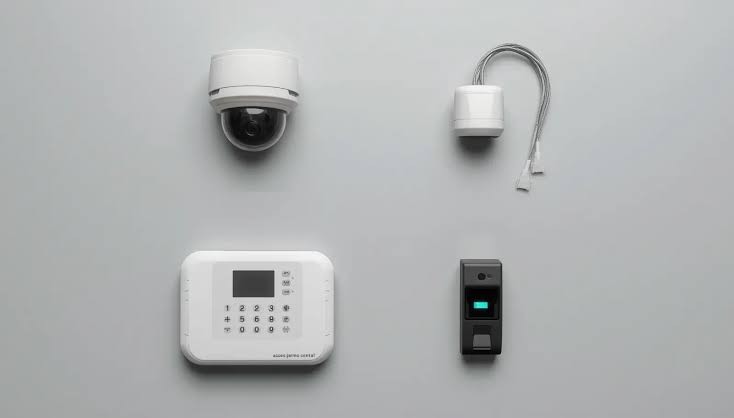
Instead of relying only on conventional locks, security guards or standalone alarm systems, smart security solutions can combine CCTV cameras, motion detectors, electronic door locks, biometric access control, burglar alarms, intercoms and remote monitoring platforms.
These technologies can make property security more convenient, responsive and easier to manage. However, choosing the right system requires understanding how the different devices work, which features are necessary and how to ensure reliable installation.
Whether you own a home in Kampala, manage an apartment building in Wakiso, operate a warehouse in an industrial area or supervise a commercial property in Entebbe, this guide explains everything you need to know about smart security systems in Uganda.
What Are Smart Security Systems?
Smart security systems are electronic security solutions that use connected devices, sensors, software and communication technologies to monitor properties and manage selected security functions.
They may allow authorised users to:
- View live CCTV footage using smartphones or computers.
- Receive notifications when an alarm or sensor is triggered.
- Lock or unlock compatible electronic doors remotely.
- Monitor movement around buildings and restricted areas.
- Control access using cards, PIN codes or biometric credentials.
- Review recorded surveillance footage.
- Receive alerts about selected system faults.
- Manage compatible security devices through a central platform.
Some smart security installations operate through a single integrated management platform, while others use separate applications for different devices.
The level of automation and remote control depends on the equipment, software, network infrastructure and installation configuration.
Smart security systems can be installed in residential properties, offices, hotels, schools, shopping centres, warehouses, factories and other facilities.
How Do Smart Security Systems Work?
A smart security system operates by combining devices that detect, monitor, control or report security-related events.
Although configurations differ, most systems use several important components.
1. Smart Security Sensors
Sensors detect specific activities or changes in the surrounding environment.
Examples include:
- Motion detectors that identify movement within monitored areas.
- Magnetic door and window contacts that detect opening.
- Glass-break detectors that identify certain types of glass breakage.
- Outdoor sensors designed to detect movement around property boundaries.
- Environmental sensors that detect conditions such as smoke, heat or water leaks where supported.
When a sensor detects an event, it sends information to an alarm panel, controller or connected management platform.
2. CCTV Cameras
<AsyncImage query=”modern smart CCTV security camera system installed on contemporary commercial building exterior” aspectRatio=”16:9″ width=”100%”/>
Smart CCTV cameras provide video surveillance and may offer features such as:
- Live video viewing.
- Motion-based recording.
- Night vision or infrared illumination.
- Person or vehicle detection where supported.
- Mobile notifications.
- Remote playback.
- Two-way audio on compatible models.
- Video analytics on supported platforms.
Property owners can use these features to monitor entrances, parking areas, reception points, storage facilities and other important locations.
However, not every CCTV camera supports all smart features. Capabilities depend on the camera model, recorder, software and network configuration.
3. Smart Alarm Systems
Smart alarm systems detect potential security events and notify designated users or monitoring services according to their configuration.
For example, when a monitored door opens unexpectedly, the system may activate an alarm and send a notification to authorised users.
Some systems support smartphone control, remote arming and disarming, event history and integration with compatible CCTV equipment.
4. Smart Access Control
<AsyncImage query=”modern biometric fingerprint smart access control reader electronic door lock office entrance” aspectRatio=”16:9″ width=”100%”/>
Smart access control systems manage who can enter particular buildings, rooms or restricted areas.
They may use:
- Fingerprint recognition.
- Facial recognition.
- RFID access cards.
- PIN keypads.
- Mobile credentials.
- Electronic door locks.
- Smart gate controllers.
Authorised administrators can manage access permissions, issue or revoke credentials and review available access records.
This technology is useful for offices, apartment buildings, hotels, institutions and commercial facilities.
5. Smart Intercom Systems
Smart intercoms and video door phones allow occupants or security personnel to communicate with visitors before granting access.
Depending on the model, they may support:
- Two-way audio communication.
- Video identification of visitors.
- Indoor monitoring stations.
- Smartphone notifications.
- Remote door release.
- Integration with electronic locks or access control.
Remote unlocking should only be used with compatible equipment and appropriate access permissions.
6. Central Security Management Software
Some smart security systems use a central platform to manage multiple devices.
Depending on compatibility, the software may allow users to monitor CCTV cameras, receive alarm notifications, manage access credentials and review security events from one interface.
This can be particularly useful for commercial buildings and organisations operating several security devices across different areas.
Types of Smart Security Systems Available for Properties in Uganda
Smart security technology is not limited to one device or installation method. Property owners can choose individual solutions or combine several technologies into a coordinated security arrangement.
1. Smart CCTV Surveillance Systems
Smart CCTV systems allow property owners to monitor their premises using network-connected cameras and compatible recording or management platforms.
They may support remote viewing, motion alerts, video analytics and other advanced functions.
Suitable applications include:
- Residential homes.
- Apartment complexes.
- Office buildings.
- Shopping centres.
- Hotels.
- Warehouses.
- Factories.
- Parking facilities.
For properties with multiple cameras, a suitable network video recorder or management platform can help organise recording and surveillance.
2. Smart Burglar Alarm Systems
Smart burglar alarms use connected sensors and alarm controllers to detect possible intrusions.
They may send notifications to authorised smartphones or communicate with an external monitoring service where configured.
Typical components include motion detectors, magnetic door contacts, glass-break detectors, sirens and communication modules.
These systems are useful for properties that need intrusion detection when occupants are away or outside normal operating hours.
3. Smart Door Locks and Electronic Access Systems
Smart door locks provide electronic control over entry points.
Depending on the equipment, users may unlock doors using fingerprint readers, access cards, PIN codes, mobile credentials or other authorised methods.
They are suitable for:
- Residential entrances.
- Office doors.
- Hotel rooms.
- Apartment buildings.
- Restricted commercial areas.
- Server and equipment rooms.
The system should be selected according to door construction, security requirements, power arrangements and emergency exit needs.
4. Biometric Access Control Systems
Biometric systems identify users using physical or behavioural characteristics.
Common options include fingerprint and facial recognition devices.
They can help organisations manage employee access, restrict sensitive areas and maintain electronic entry records.
However, biometric systems are not automatically more secure in every situation. Performance depends on device quality, configuration, credential management and available anti-spoofing or liveness-detection features.
5. Smart Electric Fence Systems
Smart electric fence installations may combine an electric fence energiser with monitoring and alarm functions.
Depending on the system, property owners or security personnel may receive notifications about detected fence faults or tampering.
These installations are particularly relevant to residential estates, warehouses, factories and properties with extensive boundaries.
6. Smart Intercom and Video Door Phone Systems
Video door phones help occupants identify visitors before opening a door or gate.
Some models provide mobile notifications and remote communication, while more advanced installations can connect to electronic access control.
They are useful for homes, apartment buildings, offices and gated communities.
7. Smart Security Lighting and Motion Detection
Motion-activated lighting can improve visibility around selected areas when movement is detected.
When appropriately positioned, it can support other security measures by illuminating entrances, walkways, parking areas and outdoor spaces.
Lighting should be treated as a supporting security feature rather than a replacement for CCTV, alarms or physical access controls.
Benefits of Installing Smart Security Systems in Uganda
Smart security technology provides several benefits for property owners when properly selected, installed and maintained.
1. Remote Property Monitoring
One of the biggest advantages of smart security systems is the ability to monitor selected property activities remotely.
A property owner may view live CCTV footage, review recordings or receive alerts using an authorised smartphone or computer.
This is useful for business owners who travel, homeowners who spend time away from their properties and managers responsible for multiple premises.
Remote monitoring depends on compatible equipment, suitable network connectivity, secure configuration and functioning communication services.
2. Faster Awareness of Security Events
Connected alarm systems and sensors can notify authorised users when configured events occur.
For example, an alert may be generated when a monitored door opens, an alarm zone is triggered or a supported camera detects movement.
These notifications can help users become aware of possible incidents without being physically present at the property.
However, receiving an alert does not automatically mean that an incident has been verified or that an emergency response has been dispatched.
3. Improved Access Management
Smart access control systems allow property managers to manage entry permissions more systematically.
Instead of relying entirely on physical keys, organisations can issue individual credentials and revoke them when access is no longer required.
This is useful for businesses with employees, contractors, visitors and restricted operational areas.
4. Better Security Visibility
CCTV cameras, alarm sensors and access control records can provide information about activities around a property.
When these systems are appropriately configured, property owners can review recorded events and investigate reported incidents more efficiently.
5. Convenient Property Management
Smart systems can reduce the need to operate every security device manually.
For example, compatible electronic locks may support remote access management, while connected CCTV platforms may allow authorised users to view several cameras from one interface.
This convenience can be valuable for busy homeowners, property managers and business operators.
6. Improved Protection of Business Assets
Commercial properties often contain valuable equipment, inventory, documents and other assets.
Smart CCTV surveillance, intrusion alarms and access control can support efforts to monitor these assets and restrict access to sensitive areas.
For example, a warehouse can use CCTV to monitor loading areas while access control restricts entry to authorised employees.
7. Better Visitor and Employee Management
Access control systems can help businesses manage employee entry and visitor access.
Where supported, visitor management platforms can record visitor details, issue temporary credentials and provide information about access activity.
These functions are useful for office complexes, hotels, schools and institutions.
8. Scalable Security Solutions
Smart security systems can be designed to accommodate future expansion.
A property owner may begin with CCTV cameras and alarm sensors, then add access control, intercoms or additional monitoring devices as requirements change.
Expansion depends on the capacity of the existing network, controllers, software and other equipment.
9. Integration of Security Technologies
Some smart security installations allow different devices to communicate.
For example, an alarm event may trigger a compatible CCTV camera view, while an access control event may be associated with relevant video footage.
This can help security personnel understand what is happening across a property.
However, integration is not automatic. Devices must support compatible communication methods, interfaces and software functions.
10. Better Long-Term Security Planning
Connected devices and maintenance records can help property owners understand how their security systems are performing.
By reviewing recurring faults, equipment condition and security events, managers can make better decisions about repairs, maintenance and future upgrades.
Smart Security Systems for Different Property Types
The best smart security arrangement depends on the size, design, use and security requirements of the property.
Smart Security Systems for Homes
<AsyncImage query=”modern residential home with smart CCTV cameras video doorbell and electronic gate access security” aspectRatio=”16:9″ width=”100%”/>
Homeowners can use smart security systems to monitor entrances, gates, gardens, garages and other important areas.
A residential installation may include:
- Smart CCTV cameras.
- Motion detectors.
- Door and window sensors.
- Smart door locks.
- Video door phones.
- Burglar alarm panels.
- Mobile security notifications.
- Electric fence monitoring where installed.
For a home in Kampala or Wakiso, the system should be planned around the property’s entrances, boundary, building layout and available power and internet services.
Smart Security Systems for Offices
Offices may require a combination of CCTV surveillance, biometric access control, alarm systems and visitor management.
These systems can help organisations monitor reception areas, restrict access to sensitive rooms and manage employee entry.
A suitable office installation should consider staff movement, visitor access, meeting rooms, server rooms and other restricted spaces.
Smart Security Systems for Apartments and Residential Estates
Apartment buildings and residential estates often have several entrances and shared facilities.
A smart security arrangement may include:
- CCTV surveillance across common areas.
- Electronic gate access.
- Video intercoms.
- Visitor management systems.
- Perimeter intrusion detection.
- Access control for selected shared facilities.
- Centralised monitoring where appropriate.
Property managers should ensure that residents, visitors and authorised service providers can access the premises conveniently while maintaining appropriate security controls.
Smart Security Systems for Warehouses and Factories
Warehouses and industrial facilities may require extensive surveillance and perimeter protection.
A suitable installation can include:
- High-quality CCTV cameras.
- Network video recording systems.
- Intruder alarm sensors.
- Vehicle access control.
- Electric fence monitoring.
- Restricted-area biometric readers.
- Centralised security monitoring.
Camera placement should consider loading bays, storage areas, entrances, vehicle routes and other operationally important locations.
Smart Security Systems for Hotels
Hotels need to balance security, guest convenience and privacy.
Smart access control can manage room or restricted-area entry, while CCTV may be used in appropriate public and operational areas.
Video door phones, electronic locks and controlled staff access can also support hotel security operations.
Security cameras should not be installed in areas where people reasonably expect privacy, such as guest bedrooms and bathrooms.
Smart Security Systems for Schools and Institutions
Schools, universities and other institutions can use smart security technology to manage access, monitor common areas and protect selected facilities.
Possible components include CCTV, gate access control, visitor management, alarm systems and perimeter protection.
System design should consider student safety, staff access, visitor procedures and appropriate protection of personal information.
Wired vs Wireless Smart Security Systems: Which Is Better?
Smart security systems can use wired, wireless or hybrid connections.
Each option has advantages and limitations.
| Feature | Wired systems | Wireless systems |
|---|---|---|
| Connection | Physical cables | Radio or wireless communication |
| Installation | May require more cabling | Can be easier in suitable locations |
| Power | May use dedicated wiring or local power | Often requires batteries or local power |
| Interference | Less affected by radio interference | Can be affected by signal interference |
| Expansion | May require additional cabling | Can be convenient where compatible |
| Maintenance | Cable and connection inspections | Battery and wireless signal checks |
| Best suited for | Planned installations and larger projects | Suitable smaller installations and selected retrofit projects |
When Should You Choose a Wired System?
Wired systems may be appropriate for new buildings, large commercial installations and properties where cables can be installed neatly during construction or renovation.
They can provide stable communication and may reduce reliance on wireless signals.
When Should You Choose a Wireless System?
Wireless equipment may be suitable where running cables is difficult, where installation disruption should be minimised or where flexible device placement is important.
However, wireless systems require suitable signal coverage, secure configuration and regular battery checks where battery-powered devices are used.
Can Wired and Wireless Systems Work Together?
Yes. Hybrid installations can combine wired cameras, wireless sensors and network-connected access devices.
The equipment must be compatible and properly configured to ensure reliable operation.
There is no single connection method that is best for every property. The right choice depends on the building layout, security requirements, installation budget and operating conditions.
Important Features to Consider When Choosing a Smart Security System
Before purchasing or installing smart security equipment, property owners should consider the following features.
1. Remote Mobile Access
Check whether the system supports remote viewing or control through a mobile application.
Confirm which functions are available remotely and whether they require an active internet connection.
2. Real-Time Notifications
Some systems can send notifications when supported sensors or cameras detect selected events.
Consider whether the alerts are configurable and whether users can distinguish important notifications from routine activity.
3. Video Recording and Storage
CCTV systems may store footage on local recorders, network storage or supported cloud platforms.
Before selecting a system, consider:
- Number of cameras.
- Video resolution.
- Recording quality.
- Retention period.
- Storage capacity.
- Recording schedule.
- Backup arrangements.
- Footage retrieval requirements.
Cloud storage may involve recurring service charges and depends on suitable internet connectivity.
4. System Integration
If you want CCTV, alarms and access control to work together, confirm that the equipment supports the required integration.
Do not assume that devices from different manufacturers will automatically communicate.
5. Backup Power
Security equipment should be assessed for operation during electricity interruptions.
Depending on the installation, backup arrangements may include UPS units, batteries or other suitable power solutions.
The backup system should be sized for the equipment it is expected to support and the required operating duration.
6. Cybersecurity Features
Smart security devices connect to networks and may store sensitive information.
Look for equipment and software that support:
- Strong password configuration.
- Individual user accounts.
- Appropriate access permissions.
- Secure communication.
- Supported firmware updates.
- Multi-factor authentication where available.
- Secure remote access.
Avoid exposing security devices directly to the public internet through insecure configurations.
7. Expandability
Choose a system that can accommodate future security requirements where possible.
For example, a business may later need additional CCTV cameras, more access control points or additional alarm zones.
Check the capacity of the recorder, controller, network and management software before expanding.
8. Ease of Use
The system should be practical for the people expected to operate it.
A complicated system may be difficult to manage if staff and property managers do not understand its controls.
Training and clear user procedures are important.
How Much Do Smart Security Systems Cost in Uganda?
The cost of installing smart security systems in Uganda varies depending on the size of the property, equipment specifications, installation complexity and features required.
A small home installation will generally have different requirements from a commercial building with multiple floors, several access points and centralised monitoring.
The following factors influence the total project cost.
1. Type and Number of Devices
The number of CCTV cameras, alarm sensors, access control readers, smart locks and other devices affects the total equipment and installation requirements.
2. Equipment Quality and Features
Basic devices may offer essential security functions, while advanced equipment may support video analytics, biometric recognition, remote management and integration.
Higher specifications may increase the initial investment.
3. Property Size and Layout
Large properties may require additional cables, network equipment, power supplies, mounting accessories and installation labour.
Buildings with multiple floors or extensive boundaries may require more complex planning.
4. Network Infrastructure
Smart systems may require suitable routers, network switches, structured cabling and reliable internet connectivity.
Some installations may need network improvements before the security devices can operate effectively.
5. Storage Requirements
CCTV storage costs depend on the number of cameras, recording resolution, frame rate, recording schedule and required footage retention period.
6. Backup Power Requirements
UPS units, batteries and other backup power solutions may add to the project cost.
The required capacity depends on which devices need backup and how long they should remain operational during an outage.
7. Integration and Software
Some smart security installations require specialised software, licences, subscriptions or integration services.
These expenses should be considered before purchasing equipment.
8. Installation and Configuration
Professional installation may include mounting devices, running cables, configuring networks, programming alarm zones, setting access permissions and testing system functions.
The complexity of these activities affects the overall project cost.
9. Maintenance and Technical Support
Property owners should also consider ongoing maintenance, software support, replacement batteries and future repairs.
For an accurate quotation, the property should be assessed to determine the equipment and installation work required.
Smart Security System Installation Process
Proper installation is essential for achieving the expected performance of smart security equipment.
Although procedures vary by project, a professional installation generally involves the following stages.
Step 1: Property Security Assessment
The installation process begins with an assessment of the property.
Important considerations include:
- Property size and layout.
- Number of entrances and exits.
- Existing physical security arrangements.
- Areas requiring CCTV coverage.
- Restricted-access locations.
- Perimeter conditions.
- Available electrical infrastructure.
- Existing network and internet facilities.
- Operational requirements.
This assessment helps determine the most suitable security arrangement.
Step 2: Security System Design
The next stage involves planning the equipment, device locations and system configuration.
The design should consider camera coverage, sensor placement, access control points, cable routes, power supplies and network connectivity.
For integrated installations, compatibility should be confirmed before equipment is purchased.
Step 3: Equipment Selection
Suitable devices are selected according to the security requirements and approved design.
The selection may include CCTV cameras, recorders, alarm panels, sensors, access controllers, electronic locks, intercoms and networking equipment.
Step 4: Cabling and Infrastructure Preparation
Where required, technicians install cables, network connections, power supplies and mounting accessories.
Cable routes should be planned to reduce exposure to damage and interference.
Wireless devices should be checked for reliable signal coverage.
Step 5: Device Installation
Security devices are installed in their planned locations.
Cameras should provide suitable coverage, sensors should be positioned according to their detection requirements and access control equipment should be installed with appropriate door hardware.
Step 6: Software Configuration
Smart devices and management platforms are configured.
This may involve creating authorised user accounts, setting alarm zones, configuring notifications, programming access permissions and establishing remote viewing.
Step 7: System Integration
Where supported, compatible devices are connected to the intended management platform.
For example, a CCTV platform may be configured to display relevant video when a supported alarm event occurs.
All integrated functions should be tested individually and as part of the overall system.
Step 8: Testing and Handover
The completed installation should be tested to confirm that the required functions operate correctly.
Testing may include:
- CCTV live viewing and recording.
- Playback and footage retrieval.
- Alarm sensor activation.
- Notification delivery.
- Access card and biometric recognition.
- Electronic lock operation.
- Intercom communication.
- Backup power operation.
- Remote access.
- Supported system integration.
The property owner or designated users should receive appropriate operating instructions and understand basic system management.
Smart Security Systems and Internet Connectivity in Uganda
Internet connectivity is an important consideration when selecting smart security equipment.
Many connected systems use internet access for remote viewing, mobile notifications, cloud storage and remote management.
In Uganda, property owners may use fibre connections, fixed wireless services or mobile internet depending on availability at their premises.
However, smart security devices do not all depend on the internet for every function.
For example, a properly configured CCTV system with local recording may continue recording when internet connectivity is unavailable, provided the cameras, recorder and supporting network remain powered and operational.
Similarly, some alarm and access control systems can continue performing local functions without internet access.
Remote viewing, cloud services and internet-based notifications may be interrupted when communication services are unavailable.
Before installation, consider:
- Internet reliability.
- Available upload bandwidth.
- Router and network capacity.
- Backup power.
- Local recording options.
- Remote access requirements.
- Alternative communication methods where needed.
For properties that depend on continuous security monitoring, internet and power arrangements should be planned together.
Common Mistakes to Avoid When Installing Smart Security Systems
Choosing unsuitable equipment or installing it incorrectly can reduce the effectiveness of smart security technology.
Property owners should avoid these common mistakes.
1. Buying Equipment Without Assessing the Property
Security requirements differ from one building to another.
Buying cameras, sensors or access control devices without a proper assessment may result in poor coverage or unnecessary equipment.
2. Choosing Cameras Only Based on Resolution
Higher resolution does not automatically guarantee useful surveillance footage.
Camera positioning, lens selection, lighting, image quality, recording settings and storage capacity all matter.
3. Ignoring Internet and Network Requirements
Some smart features depend on reliable network connectivity.
Installing connected equipment without considering network capacity can lead to delayed notifications, interrupted remote viewing and unreliable communication.
4. Failing to Secure User Accounts
Weak passwords and shared administrator accounts can expose security equipment to unauthorised access.
Use strong credentials, individual accounts where possible and appropriate access permissions.
5. Ignoring Backup Power
A system may become unavailable during a power interruption if no suitable backup arrangement is installed.
Identify the devices that must remain operational and size backup power accordingly.
6. Assuming All Devices Can Be Integrated
Not every camera, alarm panel, access controller and smart lock is compatible with every management platform.
Compatibility should be confirmed before purchasing equipment.
7. Installing Cameras in Inappropriate Locations
Poor camera placement can create blind spots or capture unusable footage.
Camera positions should consider entrances, lighting, viewing angles, privacy and the purpose of each device.
8. Neglecting Maintenance
Smart security equipment still requires inspection, cleaning, testing and software maintenance.
Ignoring maintenance can result in unnoticed faults and reduced performance.
Maintaining Smart Security Systems for Long-Term Performance
Regular maintenance helps keep smart security equipment operating as intended.
A maintenance programme should be based on manufacturer recommendations, equipment type, operating environment and the importance of the protected property.
Important maintenance activities include:
- Cleaning CCTV lenses and suitable equipment surfaces.
- Checking camera positioning and image quality.
- Testing alarm sensors and communication functions.
- Inspecting electronic locks and access readers.
- Checking backup batteries.
- Reviewing CCTV recording and storage status.
- Inspecting cables, connectors and power supplies.
- Reviewing network connectivity.
- Installing supported firmware and software updates.
- Reviewing user permissions and removing unnecessary accounts.
- Testing remote access and notifications.
- Documenting faults and completed maintenance.
Outdoor equipment in dusty, wet or exposed environments may require additional attention.
For larger installations, property owners can consider a structured security system maintenance agreement that identifies the equipment covered, inspection frequency, reporting requirements and repair arrangements.
Smart Security Systems and Privacy Considerations in Uganda
Smart security systems can collect and process personal information.
CCTV footage, biometric information, visitor records, access logs and mobile account details may contain information that identifies individuals.
Property owners and organisations should therefore consider privacy and data protection when designing and operating smart security installations.
In Uganda, the Data Protection and Privacy Act, 2019, and applicable regulations provide an important framework for handling personal data.
Practical considerations include:
- Installing CCTV cameras for legitimate security purposes.
- Avoiding unnecessary surveillance of private areas.
- Informing relevant people about surveillance where appropriate.
- Restricting access to recorded footage.
- Using secure passwords and authorised user accounts.
- Keeping recordings only for appropriate periods.
- Protecting biometric and access control information.
- Reviewing who can view or export security records.
- Using secure methods to share footage when required.
Property owners should obtain appropriate guidance on their legal responsibilities, particularly when operating surveillance systems in workplaces, residential estates, schools and other shared environments.
How to Choose the Right Smart Security System for Your Property
The most suitable security system is not necessarily the one with the largest number of devices or the most advanced features.
It is the system that addresses the property’s actual security requirements while remaining practical to operate and maintain.
Consider the following steps before making a decision.
1. Identify Your Main Security Concerns
Determine what you need the system to achieve.
For example, your priorities may include monitoring entrances, detecting unauthorised movement, controlling employee access, protecting a property boundary or monitoring activities remotely.
2. Consider the Type of Property
A home, warehouse, hotel and office building have different security requirements.
The system should reflect the property’s layout, daily activities, number of occupants and security risks.
3. Decide Which Technologies You Need
You may require CCTV cameras, burglar alarms, access control, intercoms, perimeter protection or a combination of these technologies.
Avoid purchasing features that do not provide meaningful value to your security requirements.
4. Check Compatibility
If you want different devices to work together, confirm that the selected products support the necessary integration.
5. Consider Power and Internet Availability
Evaluate whether the property has suitable electrical and network infrastructure.
Plan backup power and alternative operating arrangements where required.
6. Prioritise Security and Privacy
Select devices with appropriate security features and establish clear rules for managing user accounts, recordings and personal information.
7. Consider Maintenance and Future Expansion
Check whether the system can be serviced, whether replacement components are available and whether additional devices can be integrated later.
8. Request a Professional Assessment
A professional assessment can help identify coverage gaps, equipment requirements, installation challenges and realistic project costs.
Why Choose Daltrevco Uganda for Security System Solutions?
Selecting suitable security technology is an important step in protecting homes, businesses and commercial properties.
Property owners need to consider more than the equipment itself. Proper planning, suitable installation, compatibility, configuration and ongoing maintenance all contribute to the performance of an electronic security system.
Daltrevco Uganda provides a point of contact for property owners and businesses exploring building, electrical and security-related solutions.
If you are planning to improve security at your home, office, warehouse, factory or commercial property, contact Daltrevco to discuss your requirements and the available options.
A suitable security solution should be based on your property layout, security priorities, infrastructure and budget rather than a one-size-fits-all package.
Frequently Asked Questions About Smart Security Systems in Uganda
1. What are smart security systems?
Smart security systems are electronic security solutions that use connected cameras, sensors, alarms, access control devices and software to monitor properties and manage selected security functions.
2. How do smart security systems work?
They use cameras, sensors and controllers to detect events, communicate information and perform programmed actions. Depending on the system, users can receive notifications, view footage and control compatible devices remotely.
3. How much do smart security systems cost in Uganda?
The cost depends on the property size, number of devices, equipment quality, installation complexity, storage, network infrastructure and required features. A property assessment is recommended before requesting a quotation.
4. Can I monitor my home security system using my phone?
Yes. Many smart CCTV, alarm and access control platforms support mobile applications. Available features depend on the equipment and configuration, and remote functions generally require suitable communication and internet connectivity.
5. Do smart security systems require internet?
Not all functions require internet access. Some systems can perform local recording, alarm detection and access control without an internet connection. However, remote monitoring, cloud services and internet-based notifications generally depend on connectivity.
6. Are wireless smart security systems reliable?
Wireless systems can be reliable when properly selected and installed. Their performance depends on signal strength, interference, device quality, battery condition and network configuration.
7. Can smart security systems work during power outages?
They can continue operating if suitable backup power is installed and maintained. The operating duration depends on battery capacity, equipment load and the devices supported by the backup system.
8. Can CCTV cameras be connected to smart alarms?
Yes, some CCTV and alarm systems support integration. However, compatibility and available functions depend on the devices, interfaces, software and configuration.
9. Are smart security systems suitable for commercial buildings?
Yes. They can be used in offices, shopping centres, hotels, warehouses, factories and other commercial properties to support surveillance, access control and intrusion detection.
10. Can smart security systems control electronic gates?
Yes. Compatible access control systems can be connected to automated gate operators. The installation should include suitable safety controls and authorised access procedures.
11. What is the difference between smart CCTV and traditional CCTV?
Smart CCTV systems may offer connected features such as remote viewing, mobile notifications, video analytics and network-based management. Traditional CCTV systems may provide basic recording and monitoring without these additional capabilities.
12. Are biometric access control systems part of smart security?
Yes. Fingerprint and facial recognition devices can be integrated into smart access control installations to manage entry permissions and maintain access records.
13. Can I expand my smart security system in the future?
Many systems can be expanded by adding compatible cameras, sensors, readers and other devices. Expansion depends on the capacity of the existing recorder, network, controller and management platform.
14. Do smart security systems require regular maintenance?
Yes. CCTV cameras, alarm sensors, electronic locks, network devices and backup batteries should be inspected and maintained according to manufacturer recommendations and operating conditions.
15. Are smart security systems suitable for apartment buildings?
Yes. They can support shared entrance monitoring, visitor management, electronic gate access, CCTV surveillance and restricted-area access control.
16. Can I receive notifications when someone enters my property?
Some smart CCTV cameras, alarm sensors and access control platforms support notifications for configured events. The type and reliability of notifications depend on the device and communication setup.
17. Are smart security cameras safe from hacking?
No network-connected device is automatically immune to cyber threats. Strong passwords, secure configuration, supported updates, access restrictions and appropriate network security help reduce risks.
18. Can smart security systems operate without internet?
Some local functions can continue without internet if the equipment is properly configured and powered. Remote access and cloud-dependent functions may stop working until connectivity is restored.
19. Are smart security systems suitable for industrial properties?
Yes. They can be used to monitor production areas, warehouses, vehicle entrances, restricted rooms and property boundaries. Equipment should be selected for the environmental conditions of the installation.
20. How do I choose the best smart security system in Uganda?
Start by assessing your property’s security requirements, layout, power and internet availability. Then select compatible equipment with suitable features, professional installation, secure configuration and an appropriate maintenance plan.
Conclusion
Smart security systems are changing how property owners monitor and manage security across residential, commercial and industrial environments.
By combining CCTV cameras, smart alarms, electronic access control, intercoms, perimeter protection and remote monitoring, these solutions can provide greater visibility and more convenient management of property security.
However, the effectiveness of a smart security installation depends on choosing appropriate equipment, planning its placement, ensuring compatibility, securing network access and maintaining the system properly.
For property owners in Uganda, the best approach is to select technology that addresses actual security needs while considering local power conditions, internet connectivity, environmental exposure and long-term maintenance.
Whether you are securing a home, office, apartment complex, warehouse or factory, a professionally planned smart security system can be a valuable part of your overall property protection strategy.
Contact Daltrevco Uganda to discuss suitable security solutions for your property and take the next step towards better-managed security.

