
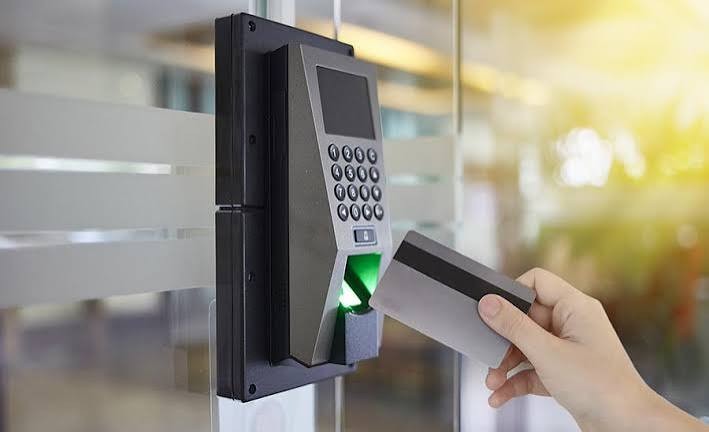
Security is an important consideration for homes, offices, commercial buildings, industrial facilities and institutions across Uganda. As properties become larger and businesses manage more employees, visitors, contractors and customers, controlling who can enter specific areas is increasingly important.
Traditional locks and physical keys can provide basic protection, but they often make access management difficult. Keys can be lost, duplicated or shared without permission, while managing access for large numbers of employees can become complicated.
Access control system installation in Uganda provides a modern approach to managing entry into buildings, rooms and restricted areas. Using technologies such as access cards, PIN codes, biometric readers, mobile credentials and electronic door locks, access control systems allow property owners and organisations to determine who can enter, where they can go and when access is permitted.
These systems are suitable for office buildings, hotels, hospitals, schools, apartments, warehouses, factories, shopping complexes and other properties that require controlled access.
However, choosing the right access control solution involves more than purchasing electronic door readers. A reliable installation requires proper security planning, suitable hardware, appropriate door locking mechanisms, power backup, network configuration and integration with other building security systems.
This comprehensive guide explains how access control systems work, the different technologies available, installation requirements, costs in Uganda, common mistakes and how to choose a suitable access control installation company.
Whether you are securing a residential property, managing an office building or developing a large commercial facility, understanding these systems can help you make informed security decisions.
What Is an Access Control System?
An access control system is an electronic security solution that manages and restricts entry into designated areas of a property.
Instead of relying entirely on conventional keys, the system uses electronic credentials to identify users and determine whether they are authorised to enter.
A typical access control installation may include:
- Access control readers.
- Access cards or key fobs.
- PIN code keypads.
- Biometric scanners.
- Electronic door locks.
- Door controllers.
- Exit buttons.
- Door position sensors.
- Access management software.
- Power supplies and backup batteries.
- Communication and network equipment.
When a person presents an authorised credential, the system checks the access permissions and activates the locking mechanism if access is approved.
For example, an employee may be permitted to enter the main office and staff areas but restricted from accessing the server room, financial records office or management section.
This allows organisations to manage access according to job responsibilities, working schedules and security requirements.
Why Access Control Systems Are Important in Uganda
Businesses and property owners in Uganda face different security challenges depending on the type, size and location of their premises.
A properly designed access control system can help improve security, simplify entry management and provide better oversight of building access.
1. Preventing Unauthorised Entry
One of the main purposes of an access control system is to prevent people without permission from entering protected areas.
Electronic credentials allow organisations to restrict access to offices, equipment rooms, stores, server rooms, staff facilities and other sensitive locations.
When an employee leaves an organisation or a visitor’s access expires, their permissions can be withdrawn without replacing physical locks throughout the property.
2. Improving Employee Access Management
Businesses may have employees working in different departments, shifts and locations.
Access control software can assign permissions according to employee roles and schedules.
For example:
- Reception staff may access reception and administrative areas.
- Finance employees may access designated financial offices.
- IT personnel may access server and network rooms.
- Security personnel may access approved security areas.
- General employees may access common working spaces.
This helps management avoid giving every employee unrestricted access to the entire building.
3. Monitoring Entry and Exit Activities
Many access control systems maintain electronic records of access events.
Depending on the system, these records may include:
- Credential used.
- Date and time of access.
- Door or entry point.
- Access granted or denied.
- Certain door and alarm events.
These records can help authorised administrators review access activity and investigate security incidents.
However, access logs should be interpreted carefully. A record of a credential being used does not necessarily prove the identity of the person physically using it.
4. Reducing Dependence on Physical Keys
Traditional keys can be lost, copied or shared.
Access control systems provide an alternative through electronic cards, PINs, biometrics and mobile credentials.
If an authorised card is lost, administrators can deactivate it without necessarily replacing the entire locking system.
5. Protecting Sensitive Areas
Certain areas require stronger access restrictions than ordinary building entrances.
Examples include:
- Server rooms.
- Financial offices.
- Records storage.
- Pharmaceutical storage.
- Electrical control rooms.
- Management offices.
- Research facilities.
- Equipment storage areas.
Access control allows organisations to apply different security permissions to different locations.
6. Improving Visitor Management
Businesses regularly receive customers, suppliers, consultants, contractors and other visitors.
A suitable access management arrangement can help register visitors, issue temporary credentials and restrict access to approved locations.
Visitors can be required to follow registration and escort procedures, depending on the facility’s security policy.
7. Supporting Multi-Branch Businesses
Organisations with several offices or facilities may need to manage access across different locations.
Networked access control systems can allow authorised administrators to manage credentials and permissions centrally.
This is particularly useful for organisations operating branches in Kampala, Entebbe, Wakiso, Jinja, Mbarara and other parts of Uganda.
How Does an Access Control System Work?
An electronic access control system operates through a combination of credentials, readers, controllers, software and locking devices.
Although system designs vary, most installations follow a similar process.
Step 1: User Presents an Access Credential
A person approaches a controlled door and presents an approved credential.
This may be:
- An access card.
- A key fob.
- A PIN code.
- A fingerprint.
- A facial recognition credential.
- An authorised mobile phone credential.
Step 2: The Reader Captures the Credential
The reader receives the credential information and sends it to the access controller or another authorised decision-making component.
The method of communication depends on the technology and system architecture.
Step 3: The System Checks Access Permissions
The access control system checks whether the credential is valid and whether the user has permission to enter that particular door at that time.
Permissions may depend on the user’s role, access schedule, location and security policy.
Step 4: Access Is Granted or Denied
If the credential is authorised, the controller activates the appropriate electronic locking mechanism.
If access is not authorised, the door remains secured and the system may record a denied-access event.
Step 5: The Event Is Recorded
Many systems record access events for later review.
Depending on the configuration, administrators may also receive alerts for selected events, such as repeated denied access or a door being held open.
Types of Access Control Systems Available in Uganda
Different properties require different access control technologies.
The most suitable system depends on the number of users, level of security required, budget, door design and operational environment.
1. Card-Based Access Control Systems
<AsyncImage query=”RFID proximity card access control reader mounted beside modern office glass door” aspectRatio=”16:9″ width=”100%”/>
Card-based access control systems use electronic cards or key fobs to authorise entry.
Users present their credentials to a compatible reader, which checks whether access is permitted.
Common technologies include proximity and smart-card systems.
Advantages include:
- Convenient daily use.
- Easy credential issuance.
- Straightforward removal of lost credentials.
- Suitable for offices and commercial buildings.
- Support for different user access levels.
- Compatibility with many electronic locking systems.
Card systems are widely suitable for offices, schools, hotels, residential buildings and other properties with multiple users.
For better security, organisations should consider credential technologies that provide appropriate protection against cloning and unauthorised duplication rather than relying solely on basic low-security cards.
2. PIN Code Access Control Systems
<AsyncImage query=”electronic keypad door access control PIN code reader installed on office entrance” aspectRatio=”16:9″ width=”100%”/>
PIN-based access control systems require users to enter a numerical code before a door can be unlocked.
They are often used for small offices, restricted rooms, staff entrances and locations where issuing physical cards is not convenient.
Advantages include:
- No physical card required.
- Simple credential management.
- Suitable for selected restricted areas.
- Can be combined with card readers.
- Convenient for authorised temporary users.
However, PIN codes can be shared or observed by unauthorised people. Organisations should use suitable code management policies and avoid assigning easily guessed codes.
3. Fingerprint Access Control Systems
<AsyncImage query=”biometric fingerprint access control scanner mounted next to commercial office door” aspectRatio=”16:9″ width=”100%”/>
Fingerprint access control systems use biometric recognition to verify a person’s fingerprint against an enrolled template.
They are used in offices, laboratories, restricted departments and other locations where organisations require more individualised access credentials.
Advantages include:
- No need to carry an access card.
- Convenient for registered users.
- Can reduce unauthorised credential sharing.
- Supports individual access permissions.
- May provide access event records.
Fingerprint systems require careful enrolment, suitable device quality and consideration of users whose fingerprints may not be reliably captured.
Biometric information is sensitive personal data, so organisations must also consider applicable data protection requirements, security safeguards and appropriate lawful grounds for processing.
4. Facial Recognition Access Control Systems
<AsyncImage query=”facial recognition biometric access control terminal at modern corporate office entrance” aspectRatio=”16:9″ width=”100%”/>
Facial recognition systems use biometric technology to compare a person’s facial characteristics with authorised reference data.
Depending on the model, these systems may use cameras, infrared imaging, depth sensing or other technologies to support identity verification.
They may be considered for modern office buildings, controlled facilities and organisations seeking contactless access options.
Advantages may include:
- Contactless credential verification.
- Convenient user authentication.
- Integration with other access control technologies.
- Support for controlled entry points.
Facial recognition is not automatically suitable for every property. Accuracy can be affected by lighting, camera positioning, image quality and environmental conditions.
Organisations should carefully assess privacy, consent or other lawful grounds, data security, accuracy, bias and the consequences of incorrect identification before deployment.
5. Mobile Access Control Systems
Mobile access control systems allow authorised users to use compatible smartphones or mobile devices as credentials.
Depending on the technology, communication may use Bluetooth, Near Field Communication (NFC), QR codes or other supported methods.
Advantages include:
- Reduced dependence on physical cards.
- Convenient credential distribution.
- Potential for remote credential management.
- Suitable for modern offices and commercial buildings.
- Integration with compatible access management platforms.
The system should have appropriate device security, credential revocation procedures and alternative entry arrangements for users whose devices are unavailable.
6. Video Intercom Access Control Systems
<AsyncImage query=”modern video door intercom access control panel outside commercial building entrance” aspectRatio=”16:9″ width=”100%”/>
Video intercom systems combine visitor communication with controlled door entry.
A visitor can contact reception or an authorised occupant through an external intercom panel. The person inside can communicate with the visitor and, where the system supports it, remotely release the door.
These systems are suitable for:
- Apartment buildings.
- Office entrances.
- Residential compounds.
- Hotels.
- Gated communities.
- Commercial reception areas.
Video intercoms are especially useful where visitors need to be identified or authorised before entering a property.
7. Vehicle Access Control Systems
Vehicle access control manages the entry and exit of cars, trucks, motorcycles and other vehicles.
Depending on the property, it may use:
- Automatic barriers.
- RFID vehicle tags.
- Long-range credential readers.
- ANPR cameras.
- Gate controllers.
- Vehicle detection sensors.
These systems are suitable for parking facilities, residential estates, shopping centres, office compounds, industrial premises and gated developments.
The design should include appropriate vehicle safety devices, emergency release arrangements and suitable procedures for power failures.
8. Cloud-Based Access Control Systems
Cloud-based access control allows authorised administrators to manage compatible systems through an online platform.
Depending on the provider, administrators may be able to add users, revoke credentials, change access schedules and review events remotely.
Potential benefits include:
- Centralised administration.
- Remote access management.
- Multi-site administration.
- Easier credential management.
- Reduced need for on-site administration.
Before choosing a cloud-based system, assess subscription costs, internet dependency, data hosting, cybersecurity, vendor support and what happens if the service becomes unavailable.
Main Components of an Access Control System
Understanding the main components helps property owners select suitable equipment and plan a reliable installation.
1. Access Control Readers
Readers identify credentials presented by users.
They may support RFID cards, smart cards, PIN codes, fingerprints, facial recognition or mobile credentials.
The reader must be compatible with the selected controller and credential technology.
2. Access Control Cards and Key Fobs
Cards and key fobs provide electronic credentials for authorised users.
Each credential is registered in the system and assigned appropriate access permissions.
Organisations should use secure credential technologies and establish procedures for lost or stolen cards.
3. Access Control Panel or Controller
The controller manages access decisions and communicates with readers and locking devices.
Depending on the system, it may operate independently for each door or as part of a centralised network.
4. Electronic Door Locks
The locking mechanism secures or releases the door when authorised access is granted.
Common options include:
Magnetic locks: Electromagnetic devices that secure a door while powered. Their operation during power failure depends on the system design and applicable life-safety requirements.
Electric strikes: Devices fitted into the door frame that release a compatible mechanical latch when authorised.
Electric bolts: Electrically operated bolts that can secure selected door types.
Electromechanical locks: Locking devices that combine electronic control with mechanical locking components.
The correct lock depends on the door material, frame, door hardware, security requirements and fire or emergency egress arrangements.
5. Exit Buttons and Request-to-Exit Devices
Exit buttons allow authorised people inside a building to release controlled doors.
Some installations use non-contact exit sensors or request-to-exit devices.
The arrangement must be designed to support safe emergency escape and comply with applicable building and fire safety requirements.
6. Door Position Sensors
Door position sensors monitor whether a door is open or closed.
They can help identify events such as a door being held open or opened without an authorised access event.
7. Power Supply and Backup Batteries
Access control equipment requires a suitable power supply.
Backup batteries or UPS equipment can help maintain system operation during power interruptions, depending on the required backup duration and system design.
8. Access Management Software
Access management software allows administrators to configure users, credentials, access levels and schedules.
Larger systems may also provide reporting, alarms, event monitoring and integration with other security platforms.
Where Should Access Control Systems Be Installed?
Access control should be planned around the security requirements of each building.
Not every door needs the same level of protection. High-risk locations may require stronger authentication, while public-facing entrances may need visitor management and intercom facilities.
1. Office Buildings
Offices often contain confidential documents, computers, financial information and business equipment.
Access control can manage entry into:
- Main office entrances.
- Management offices.
- Finance departments.
- Human resources offices.
- Server rooms.
- Records storage.
- Staff-only sections.
Different access permissions can be assigned to employees, managers, visitors and contractors.
2. Commercial Buildings and Shopping Complexes
Commercial buildings may have multiple tenants, shared entrances, management offices and restricted service areas.
Access control can manage entry into tenant offices, plant rooms, service corridors, parking areas and other controlled spaces.
Large properties may benefit from centralised access management.
3. Hotels and Hospitality Facilities
Hotels require convenient and secure access management for guests, employees and service providers.
Suitable systems may include:
- Guest room electronic locks.
- Staff access cards.
- Restricted management areas.
- Back-of-house access control.
- Service entrances.
- Parking access systems.
Guest room locking systems should be selected to support hotel operations, emergency procedures and appropriate credential management.
4. Hospitals and Healthcare Facilities
Healthcare facilities contain sensitive records, medicines, medical equipment and specialised treatment areas.
Access control can help restrict entry into:
- Pharmacy storage.
- Medical records departments.
- Laboratories.
- Operating theatre support areas.
- Staff-only sections.
- Equipment rooms.
- Data and server rooms.
Access policies should be designed so that security restrictions do not obstruct emergency medical care or required patient movement.
5. Schools and Universities
Educational institutions need to manage access for students, teachers, administrative staff, parents, contractors and visitors.
Access control may be installed at:
- Main school entrances.
- Administration offices.
- Laboratories.
- Computer rooms.
- Libraries.
- Boarding facilities.
- Restricted staff areas.
Systems should support safeguarding procedures and avoid creating unsafe barriers to emergency evacuation.
6. Apartments and Residential Estates
Residential developments often require controlled entry for residents, visitors, security personnel and service providers.
Access control options include:
- RFID card readers.
- Video intercoms.
- PIN keypads.
- Biometric readers.
- Automatic gate barriers.
- Vehicle access systems.
These solutions can help property managers coordinate access across shared entrances and common facilities.
7. Warehouses and Industrial Facilities
Warehouses and factories may contain valuable inventory, machinery, tools and restricted production areas.
Access control can restrict entry into:
- Warehouse stores.
- Loading areas.
- Production departments.
- Equipment rooms.
- Electrical control rooms.
- Management offices.
- Restricted inventory sections.
For industrial facilities, the equipment must be appropriate for environmental conditions and any relevant hazardous-area requirements.
Standalone vs Networked Access Control Systems
Two common access control arrangements are standalone systems and networked systems.
| Feature | Standalone system | Networked system |
|---|---|---|
| Management | Individual device or door | Centralised platform |
| Number of doors | Usually suitable for smaller installations | Suitable for multiple doors |
| User management | Managed locally | Managed centrally |
| Reporting | Depends on device capability | Often supports centralised event reporting |
| Expansion | May be limited | Usually more flexible |
| Remote administration | Limited or model-dependent | Available on compatible systems |
| Typical applications | Small offices and individual rooms | Commercial buildings, institutions and multi-site facilities |
A standalone system may be sufficient for a small office with one controlled entrance.
A networked system is generally more suitable for buildings with multiple doors, departments or branches that require centralised administration.
Access Control System Integration with CCTV and Other Security Systems
Access control becomes more useful when it is designed as part of a wider security infrastructure.
1. Integration with CCTV Surveillance Systems
<AsyncImage query=”modern office security control room CCTV screens access control monitoring workstation” aspectRatio=”16:9″ width=”100%”/>
CCTV cameras provide visual monitoring, while access control manages entry permissions.
When compatible systems are integrated, an access event can be associated with footage from the relevant camera.
This may help security personnel investigate:
- Unauthorised entry attempts.
- Doors being forced open.
- Doors being held open.
- Suspicious activity at controlled entrances.
- Access disputes.
CCTV should complement access records rather than be treated as automatic proof of identity.
2. Integration with Intruder Alarm Systems
Access control can be coordinated with intruder alarm systems to support security management.
For example, opening a restricted door without a valid access event may trigger an alarm or notification, depending on the configuration.
3. Integration with Fire Alarm Systems
Fire safety is a critical consideration when installing electronic door locks.
Certain doors must allow safe escape during emergencies. Access control designs should therefore coordinate with the building’s fire detection and alarm arrangements.
Depending on the applicable requirements, designated doors may need automatic release during fire alarms or loss of power.
The correct fail-safe or fail-secure arrangement depends on the door’s purpose, escape route, hardware and applicable safety regulations.
Access control must never prevent occupants from escaping safely during an emergency.
4. Integration with Automatic Gates and Barriers
Access control can be connected to automatic gates, parking barriers and vehicle entry systems.
This allows authorised users to enter controlled parking areas using compatible credentials.
Safety devices such as vehicle detection sensors and emergency release mechanisms should be incorporated into the design.
5. Integration with Building Management Systems
In larger properties, access control may be integrated with a Building Management System (BMS).
Depending on compatibility, this can allow selected security events to be viewed alongside other building management information.
Access Control System Installation Process in Uganda
A professional installation should follow a structured process to ensure that the system meets the property’s security, operational and safety requirements.
Step 1: Site Assessment and Security Evaluation
The installation begins with an inspection of the property.
The assessment should identify:
- Number of doors requiring controlled access.
- Types of doors and frames.
- Entry and exit routes.
- Restricted areas.
- Number of users.
- Visitor management requirements.
- Existing locks and door hardware.
- Power availability.
- Network infrastructure.
- Fire and emergency escape arrangements.
Step 2: Identify the Access Control Requirements
The next step is to determine who should have access to each location and under what conditions.
For example, management staff may need access to several departments, while visitors may only be permitted into reception or designated meeting areas.
Step 3: Select the Appropriate Access Control Technology
Based on the assessment, the installer recommends suitable credentials and readers.
Options may include RFID cards, PIN keypads, fingerprints, facial recognition, mobile credentials or combinations of these technologies.
Step 4: Select Door Locks and Hardware
The locking mechanism must match the door type and the required security arrangement.
This stage should also address emergency egress, fire safety, door closer compatibility and mechanical operation.
Step 5: Install Readers and Controllers
Readers are installed at designated access points, while controllers are fitted in suitable protected locations.
The installation should provide secure wiring, reliable communication and appropriate protection against tampering.
Step 6: Install Power Supply and Backup
Power supplies and backup batteries are installed according to the equipment requirements and desired operating duration.
Step 7: Configure Access Management Software
The system is configured with authorised users, credentials, access levels, schedules and door settings.
User permissions should reflect the organisation’s actual security policy.
Step 8: Integrate Other Security Systems
Where required, the installer configures connections with CCTV, alarms, automatic gates, intercoms and fire alarm systems.
Step 9: Test and Commission the System
The completed system should be tested to verify:
- Correct credential recognition.
- Access permission accuracy.
- Lock operation.
- Exit button operation.
- Door position monitoring.
- Access event recording.
- Alarm functions.
- Power backup.
- Network connectivity.
- Remote management, where applicable.
- Emergency release and safe escape arrangements.
Step 10: User Training and Handover
Administrators and relevant staff should receive instructions on issuing credentials, managing permissions, reviewing access records and responding to system faults.
The installer should also provide appropriate system documentation and handover information.
Access Control System Installation Costs in Uganda
The cost of installing an access control system in Uganda varies according to the number of controlled doors, technology selected, locking hardware and complexity of the project.
A small office requiring one card reader may have very different requirements from a large commercial building with multiple departments and centralised security management.
Factors That Determine Access Control Installation Costs
1. Number of controlled doors
Each controlled entrance may require a reader, locking device, controller capacity, power supply and associated installation materials.
2. Type of access control technology
RFID card readers, biometric scanners, facial recognition terminals, PIN keypads and mobile access systems have different equipment costs.
3. Type of electronic door lock
Magnetic locks, electric strikes, electric bolts and electromechanical locks have different specifications and installation requirements.
4. Door type and condition
Glass doors, metal doors, wooden doors, sliding doors and fire-rated doors may require different hardware and installation methods.
5. Number of users
A system designed for a small office may have different licensing, credential and management requirements from one serving hundreds or thousands of users.
6. Software and licensing
Some systems have one-time software costs, while others require recurring subscriptions or cloud service fees.
7. Cabling and network infrastructure
Long cable routes, network switches, communication devices and protected cable installations may affect project costs.
8. Power backup
UPS equipment and battery backup arrangements add to the overall installation budget.
9. Integration with other systems
Connecting access control to CCTV, alarms, intercoms, automatic gates and BMS platforms may require additional equipment and configuration.
10. Installation complexity
Existing door modifications, difficult mounting conditions, additional civil works and specialised hardware can influence labour and material costs.
How to Get an Accurate Access Control Installation Quotation
Before requesting a quotation, identify the number of doors, types of users, areas requiring restricted access and the preferred credential technology.
A site assessment is important because door construction, lock compatibility and emergency exit requirements can significantly influence the design.
A professional quotation should specify:
- Number and location of controlled doors.
- Reader and credential technology.
- Locking mechanisms.
- Controllers and power supplies.
- Cabling and communication infrastructure.
- Software and licensing.
- Integration requirements.
- Testing and commissioning.
- Training and maintenance arrangements.
Contact Daltrevco to discuss your access control requirements and obtain guidance on planning a suitable system for your property.
Common Access Control Installation Mistakes to Avoid
Poor planning can lead to unreliable door operation, security weaknesses and unnecessary maintenance costs.
The following mistakes should be avoided.
1. Selecting Equipment Without Assessing the Doors
Not every electronic lock is compatible with every door.
Door material, frame construction, opening direction, existing hardware and fire rating must be considered before selecting locking devices.
2. Ignoring Emergency Exit Requirements
An access control system must not trap occupants inside a building.
The design should provide appropriate emergency release arrangements and comply with applicable fire and life-safety requirements.
3. Choosing Insecure Credentials
Basic or poorly protected credentials may be vulnerable to copying, sharing or unauthorised use.
Select suitable credential technology and establish procedures for managing lost cards and compromised credentials.
4. Giving Every User the Same Access Permissions
Employees, contractors, visitors and administrators should not automatically receive identical access rights.
Permissions should be assigned according to actual responsibilities.
5. Ignoring Power Backup
Power failure can affect readers, controllers and electronic locks.
The system should be designed with appropriate backup and clearly defined door behaviour during power interruptions.
6. Failing to Protect the Controller and Network
Controllers and network equipment should be installed in secure locations.
Default passwords should be changed, administrator accounts protected and remote access configured securely.
7. Overlooking Maintenance
Readers, locks, power supplies and door sensors require periodic inspection.
Neglecting maintenance can cause access failures and operational interruptions.
8. Choosing a System That Cannot Be Expanded
A system that meets today’s needs may become unsuitable when the business expands or additional doors are introduced.
Where future expansion is likely, consider controller capacity, software licensing and system compatibility from the beginning.
Access Control System Maintenance and Troubleshooting
Regular maintenance helps keep an access control system dependable.
A maintenance programme should include:
- Inspecting card readers and biometric devices.
- Testing electronic locks.
- Checking door alignment and mechanical operation.
- Inspecting power supplies and backup batteries.
- Testing exit buttons and emergency release devices.
- Checking door position sensors.
- Reviewing access permissions.
- Removing credentials for former employees.
- Checking software and firmware updates.
- Inspecting network connections.
- Reviewing system event logs.
- Testing integration with CCTV and alarms.
Common Access Control Problems
| Problem | Possible cause | Recommended action |
|---|---|---|
| Card is not recognised | Invalid credential or reader fault | Check credential registration and reader operation |
| Door does not unlock | Lock, wiring or controller issue | Inspect power, wiring and lock configuration |
| Door remains unlocked | Lock fault or incorrect configuration | Check the locking device and controller settings |
| Fingerprint is not recognised | Poor enrolment or sensor condition | Clean the sensor and review enrolment |
| System loses communication | Network or power interruption | Inspect network connections and power supply |
| Access records are missing | Software or controller configuration issue | Review event storage and system settings |
| Backup fails | Battery deterioration or incorrect sizing | Test and replace defective backup components |
Electrical and electronic access control faults should be investigated by competent technicians, particularly where they affect emergency exits or fire safety.
Legal and Safety Considerations for Access Control Installation in Uganda
Access control systems must be designed with security, privacy and building safety in mind.
1. Data Protection and Privacy
Access control systems may collect personal information such as employee names, identification details, photographs, fingerprints, facial recognition data and entry records.
Businesses should consider Uganda’s Data Protection and Privacy Act, 2019, and applicable regulations.
Important considerations include:
- Establishing a legitimate and clearly defined purpose.
- Informing users about relevant data collection.
- Restricting access to personal information.
- Protecting records against unauthorised access.
- Establishing appropriate retention periods.
- Managing biometric information responsibly.
- Reviewing the legal basis for processing sensitive personal data.
- Following appropriate procedures when sharing information.
Biometric information requires particular care because it cannot be changed in the same way as a password or access card.
2. Fire Safety and Emergency Escape
Access control must be coordinated with fire protection and emergency evacuation arrangements.
Doors on designated escape routes should allow occupants to exit safely under the required emergency conditions.
The correct locking and release arrangements should be established by competent professionals in accordance with applicable safety requirements.
3. Electrical Safety
Readers, controllers, electronic locks and power supplies should be installed using suitable wiring methods and electrical protection.
Installations should be designed and carried out by competent personnel.
4. Building and Door Compatibility
Some doors require specialised locking hardware or additional modifications.
Fire-rated doors, glass doors and doors forming part of emergency escape routes require particular attention.
How to Choose the Best Access Control Installation Company in Uganda
Choosing a suitable contractor is important because access control combines electronic security, door hardware, software and building safety.
Before appointing an installation company, consider the following factors.
1. Experience with Access Control Systems
Look for a provider familiar with different access technologies and commercial security installations.
2. Ability to Conduct Site Assessments
The company should inspect the property and understand the number of controlled doors, user requirements, door types and security priorities.
3. Knowledge of Electronic Door Locks
The installer should understand the compatibility of magnetic locks, electric strikes, electric bolts and other locking devices.
4. Understanding of Fire and Emergency Requirements
The provider should be able to design appropriate emergency release and safe exit arrangements.
5. Quality of Equipment
Ask for the specifications and compatibility of readers, controllers, locks, software and power supplies.
6. System Integration Capability
If you need CCTV, alarms, intercoms or automatic gate integration, confirm that the proposed system supports the required connections.
7. Testing and Commissioning
The installer should test the complete system and demonstrate that all controlled doors operate correctly.
8. Maintenance and Technical Support
Ask about maintenance arrangements, troubleshooting and future system expansion.
9. Transparent Quotation
The quotation should clearly identify equipment, installation work, software, licensing, cabling and any additional services.
Why Consider Daltrevco for Access Control System Installation in Uganda?
Choosing an access control system requires careful consideration of the property’s layout, security requirements, number of users and type of doors.
Daltrevco is a point of contact for property owners, businesses and developers planning security and building infrastructure projects in Uganda.
For an access control project, it is important to begin with a clear assessment of the entrances and restricted areas that require controlled access.
When planning your installation, consider:
- Number of doors requiring access control.
- Type of property and security requirements.
- Number of employees, visitors and authorised users.
- Card, PIN, biometric or mobile credential options.
- Electronic locking mechanisms.
- Access permissions and schedules.
- Emergency exit and fire safety arrangements.
- CCTV and alarm integration.
- Power backup and network infrastructure.
- Maintenance and future expansion.
Visit Daltrevco to learn more about the company and discuss your project requirements.
Frequently Asked Questions About Access Control System Installation in Uganda
1. What is an access control system?
An access control system is an electronic security solution that manages who can enter a building, room or restricted area. It uses credentials such as access cards, PIN codes, fingerprints, facial recognition or mobile devices to authorise entry.
2. How much does access control system installation cost in Uganda?
The cost depends on the number of doors, reader technology, electronic locks, controllers, software, cabling, power backup and installation complexity. A site assessment is necessary to determine the actual project requirements.
3. What are the different types of access control systems?
Common types include card-based access control, PIN keypad systems, fingerprint recognition, facial recognition, mobile access control, video intercom systems, vehicle access control and cloud-based systems.
4. Which access control system is best for an office in Uganda?
The best system depends on the office size, number of employees, security requirements and budget. Card-based systems are suitable for many offices, while biometric or combined credential systems may be considered for more restricted areas.
5. Can access control systems work with CCTV cameras?
Yes. Compatible systems can be integrated so that access events are associated with relevant CCTV footage. This can support security monitoring and incident investigations.
6. Can access control systems work without internet?
Yes. Many systems can manage access locally without a permanent internet connection. However, remote management and cloud-based features may require internet connectivity.
7. What is the difference between an RFID card system and a biometric access control system?
An RFID system uses an electronic card or key fob as a credential, while biometric systems verify a person’s physical or behavioural characteristics, such as fingerprints or facial features. Both require appropriate security controls.
8. Are fingerprint access control systems secure?
Fingerprint systems can provide convenient individualised authentication, but their security depends on the quality of the device, enrolment process, anti-spoofing features, data protection and system configuration.
9. Can access control systems be installed on glass doors?
Yes. Suitable locking devices, brackets and mounting accessories are available for compatible glass door designs. The exact solution depends on the glass type, frame, door construction and safety requirements.
10. Can access control systems control multiple doors?
Yes. Networked systems can manage multiple doors through compatible controllers and centralised software. This is suitable for offices, commercial buildings, hotels and large institutions.
11. Can access control systems be used in apartments?
Yes. They can manage residential entrances, apartment blocks, shared facilities, parking areas and visitor entry. Video intercoms, RFID readers and mobile credentials are common options.
12. Can access control systems manage employee working hours?
Some systems provide time and attendance features or integrate with compatible attendance software. However, access logs should not automatically be treated as proof of working hours without considering the system’s design and actual workplace procedures.
13. What happens when an employee loses an access card?
An administrator can usually deactivate the lost credential and issue a replacement. This helps reduce the security risks associated with lost or stolen cards.
14. Do access control systems work during power outages?
Their operation depends on the power arrangement and locking hardware. Suitable UPS equipment or backup batteries can maintain operation for a designed period. The system must also have appropriate emergency exit arrangements.
15. What is the difference between a magnetic lock and an electric strike?
A magnetic lock uses electromagnetic force to hold a door closed, while an electric strike releases a compatible mechanical latch when authorised. Their suitability depends on the door and required security and emergency arrangements.
16. Can access control be connected to automatic gates?
Yes. Compatible access control systems can operate automatic gates and parking barriers using approved credentials such as cards, vehicle tags or authorised mobile devices.
17. Can visitors be given temporary access?
Yes. Compatible systems can issue temporary credentials or time-limited permissions for visitors, contractors and service providers.
18. Are biometric access control systems suitable for hospitals?
They may be used in selected restricted areas, but healthcare facilities must consider emergency access, patient movement, hygiene, reliability and biometric data protection requirements.
19. How often should access control systems be maintained?
Maintenance frequency depends on the equipment and operating environment. Regular checks should cover readers, locks, power supplies, backup batteries, door sensors, software and emergency release functions.
20. Who should install access control systems in Uganda?
Choose a competent security installation provider that can assess the property, recommend suitable hardware, install and configure the system, address emergency exit requirements and provide testing and maintenance support.
Conclusion: Professional Access Control System Installation for Better Building Security
Access control systems are becoming an important part of modern building security in Uganda. They help organisations manage entry, protect restricted areas, reduce dependence on physical keys and maintain electronic records of access events.
From small offices and residential buildings to hotels, hospitals, schools, warehouses and industrial facilities, the right access control solution can improve how properties manage security and daily operations.
However, an effective installation requires more than electronic readers and door locks. Proper planning must consider credential security, door compatibility, power backup, software, emergency escape arrangements, data protection and future expansion.
Whether you are installing a new system or upgrading existing security infrastructure, a professional site assessment is the best starting point.
Contact Daltrevco to discuss access control system installation for your home, office, commercial building or industrial facility in Uganda. Choose a solution designed around your property’s security requirements, operational needs and long-term plans.

