
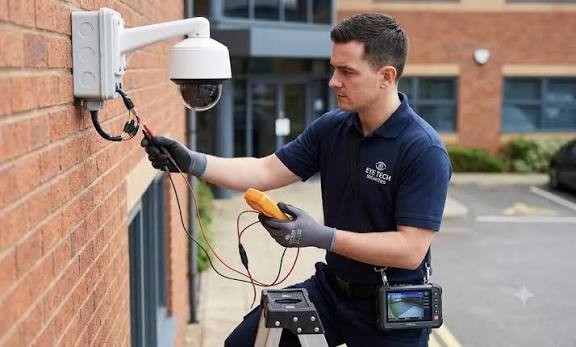
A properly functioning CCTV camera system is an important part of protecting homes, offices, warehouses, factories, retail shops, schools, hotels and other commercial properties. Security cameras help property owners monitor activities, review recorded footage and identify incidents that may require attention. However, like any electronic security equipment, CCTV systems can develop technical problems that affect their performance.
Common CCTV problems include cameras going offline, blurry images, loss of video signal, recording failures, poor night vision, damaged cables, network connectivity issues and hard drive errors. When these problems occur, property owners may lose access to important surveillance footage or discover that their security system is not providing the expected coverage.
Understanding CCTV camera troubleshooting helps property owners identify basic faults, prevent avoidable downtime and determine when professional technical assistance is necessary.
At Daltrevco, we recognise the importance of dependable electronic security solutions for residential, commercial and industrial properties. This guide explains common CCTV camera problems, their possible causes and practical solutions to help keep surveillance systems operating effectively in Uganda.
What Is CCTV Camera Troubleshooting?
CCTV camera troubleshooting is the process of identifying, diagnosing and resolving technical problems affecting a closed-circuit television surveillance system.
It involves examining the cameras, power supplies, cables, network connections, recording equipment, storage devices, software settings and monitoring displays to establish why a system is not working correctly.
CCTV troubleshooting may involve simple checks, such as confirming that a camera has power, or more advanced technical procedures, such as testing network connectivity, checking recorder compatibility, inspecting storage health and diagnosing faulty equipment.
A CCTV system generally consists of several interconnected components:
- Security cameras: Capture video footage from designated areas.
- Power supplies: Provide electrical power to cameras and associated equipment.
- Cabling and connectors: Carry video signals, network data or power, depending on the system design.
- Digital Video Recorder (DVR): Records video from compatible analogue cameras.
- Network Video Recorder (NVR): Receives and records digital video streams from IP cameras.
- Network equipment: Routers, switches and other devices that connect IP cameras and recorders.
- Storage devices: Hard drives or other supported storage media used to retain footage.
- Monitoring displays: Allow users to view live camera feeds and recorded video.
- Software and mobile applications: Provide configuration, playback and remote monitoring features.
A problem with any of these components can affect the entire surveillance system or individual cameras.
15 Common CCTV Camera Problems and Their Solutions
Understanding the symptoms of common surveillance problems makes it easier to identify their likely causes and choose the appropriate corrective action.
1. CCTV Camera Showing No Picture
One of the most common CCTV problems is a camera that powers on but displays no picture, or a completely blank camera channel on the monitoring screen.
This can affect analogue CCTV cameras and IP camera systems.
Possible causes:
- Disconnected or damaged video cables.
- Faulty power supply.
- Loose connectors.
- Incorrect camera channel settings.
- Damaged camera hardware.
- Incorrect network configuration on IP cameras.
- Faulty DVR or NVR input.
- Incorrect camera compatibility.
Possible solutions:
Start by checking whether the affected camera is receiving power. Inspect its power connection and confirm that the power supply is functioning correctly.
For analogue CCTV systems, examine the coaxial cable, connectors and corresponding DVR channel. For IP cameras, check the Ethernet connection, network switch and camera network configuration.
If the camera has power but still produces no picture, testing it with a known-compatible cable, port or recorder can help identify the faulty component.
A camera that remains blank after basic checks may require professional inspection or replacement.
2. CCTV Camera Showing Video Loss or No Signal
A video loss message usually means that the recorder is not receiving a usable video signal from the connected camera.
This is particularly common in systems with damaged cabling, unstable connections or faulty equipment.
Possible causes:
- Broken or disconnected cables.
- Loose BNC or Ethernet connectors.
- Power interruptions.
- Faulty camera hardware.
- Damaged network switches.
- Incorrect IP camera settings.
- Defective DVR or NVR ports.
Solutions:
- Confirm that the camera is powered.
- Inspect the cable connections at both ends.
- Check whether the cable has been damaged during construction, maintenance or other activities.
- Test the camera using a known-working cable or compatible recorder port.
- Restart the affected equipment if it is safe and appropriate to do so.
- Check network connectivity for IP camera systems.
If several cameras display video loss simultaneously, investigate shared equipment such as power supplies, network switches and recorder connections rather than assuming every camera has failed.
3. CCTV Camera Producing Blurry or Unclear Images
Blurry surveillance footage can make it difficult to identify people, vehicles, objects and other important details.
The problem may be caused by dirty lenses, incorrect focus, poor camera positioning or unsuitable image settings.
Possible causes:
- Dust and dirt on the camera lens.
- Fingerprints or watermarks.
- Incorrect lens focus.
- Scratched or damaged lens covers.
- Condensation inside the camera housing.
- Incorrect resolution settings.
- Poor installation positioning.
- Digital zoom reducing image clarity.
Solutions:
Clean the external lens cover carefully using a suitable soft, lint-free cloth. Avoid abrasive materials and harsh cleaning chemicals.
If the camera supports manual focus, check whether the lens requires adjustment. For cameras with fixed-focus lenses, persistent blur may indicate damage or an unsuitable viewing distance.
Also review the camera’s resolution and stream settings. A camera configured to record at a lower resolution may produce less detailed footage than expected.
For outdoor cameras, inspect the protective housing for moisture, dirt or damage.
Where image quality remains poor, a technician can assess whether the camera requires refocusing, repositioning or replacement.
4. CCTV Camera Keeps Going Offline
An IP camera that repeatedly goes offline may disappear from the monitoring screen or become unavailable through the CCTV mobile application.
This can interrupt surveillance and create gaps in monitoring coverage.
Possible causes:
- Unstable network connections.
- Damaged Ethernet cables.
- Insufficient PoE power.
- Network switch problems.
- IP address conflicts.
- Incorrect network settings.
- Unstable power supply.
- Firmware or software problems.
Solutions:
Check whether the camera’s network connection is stable. Inspect Ethernet cables and network ports for damage or loose connections.
For Power over Ethernet (PoE) systems, confirm that the switch or injector supplies sufficient power for the connected cameras. A PoE switch operating beyond its total power budget may cause cameras to restart or disconnect.
Check the camera’s IP address and confirm that it does not conflict with another device on the network.
If the problem affects several cameras connected to the same switch, investigate that switch, its power supply and the network connection feeding it.
Repeated offline problems should be investigated rather than resolved through continuous restarting.
5. CCTV Camera Not Recording Footage
A CCTV camera may display live video while failing to save footage. This is a serious issue because the purpose of a surveillance system includes retaining recordings for later review.
Possible causes:
- Hard drive failure.
- Incorrect recording schedules.
- Disabled recording channels.
- Insufficient storage space.
- Incorrect motion detection settings.
- Faulty DVR or NVR configuration.
- Storage device incompatibility.
- Recording permissions or software problems.
Solutions:
Open the recorder’s recording settings and confirm that the affected camera channel is enabled.
Check the recording schedule to establish whether the system is configured for continuous recording, motion-based recording or a specific timetable.
Inspect the recorder’s storage status and look for hard drive warnings or errors.
If the hard drive is full, review the configured retention and overwrite settings. Do not assume that footage will automatically be overwritten unless this feature is enabled and supported.
If important footage may be needed, preserve the available recordings before attempting storage repairs, formatting or resetting the recorder.
A technician should inspect persistent storage errors and determine whether the hard drive or recorder requires replacement.
6. CCTV Night Vision Not Working Properly
Night vision allows compatible CCTV cameras to capture images in low-light conditions. It is particularly important for properties that require surveillance after business hours.
A camera with faulty night vision may produce completely dark images, poorly illuminated footage or unclear images at night.
Possible causes:
- Faulty infrared (IR) LEDs.
- Incorrect day/night settings.
- Dirty lens or protective cover.
- Reflections from nearby surfaces.
- Excessive distance from the subject.
- Insufficient lighting.
- Damaged infrared filters.
- Incorrect camera configuration.
Solutions:
First, confirm that the camera supports infrared night vision or another low-light imaging technology.
Clean the lens and inspect the surrounding area for reflective surfaces that may interfere with infrared illumination. Walls, windows and nearby objects can reflect infrared light back into the camera.
Review the camera’s day/night settings and confirm that automatic switching is enabled where appropriate.
If the camera remains dark in low-light conditions, its infrared illumination components or internal day/night mechanism may require professional inspection.
For large outdoor areas, additional lighting or cameras designed for longer night-time viewing distances may be necessary.
7. CCTV Camera Showing Flickering Images
A flickering CCTV image may appear as repeated flashes, horizontal disturbances or unstable brightness.
This can make recorded footage difficult to view.
Possible causes:
- Unstable power supply.
- Poor electrical connections.
- Damaged cables.
- Electromagnetic interference.
- Incorrect video settings.
- Incompatible power equipment.
- Lighting frequency interactions.
Solutions:
Inspect the camera’s power supply and cable connections. If the camera shares a power supply with other devices, check whether the supply is rated for the combined electrical load.
For analogue systems, inspect coaxial cables and grounding arrangements. For IP systems, examine the network connection and PoE supply.
Some flickering may result from artificial lighting interacting with the camera’s exposure or anti-flicker settings. Adjust the supported camera settings where necessary.
Do not attempt electrical repairs on live equipment. A qualified technician should investigate suspected wiring or power faults.
8. CCTV Camera Showing Pink, Purple or Unusual Colours
A CCTV camera that displays pink, purple, green or other unusual colours may have an imaging or configuration problem.
This can affect the accuracy and usefulness of surveillance footage.
Possible causes:
- Faulty infrared cut filter.
- Incorrect day/night operation.
- Damaged image sensor.
- Incorrect white balance.
- Firmware problems.
- Water or moisture inside the camera.
Solutions:
Check whether the colour distortion occurs throughout the day or only when the camera switches between day and night modes.
Review the camera’s white balance and day/night settings. Restart the camera if appropriate and check whether a supported firmware update is available.
If the colour distortion continues, the infrared cut filter or image sensor may be faulty.
A technician can determine whether the camera requires repair or replacement.
9. CCTV Recorder Keeps Restarting
A DVR or NVR that repeatedly restarts can interrupt recording, disconnect cameras and affect remote monitoring.
Possible causes:
- Faulty power adapter.
- Unstable electricity supply.
- Overheating.
- Internal hardware failure.
- Defective hard drive.
- Firmware problems.
- Excessive connected-device load.
Solutions:
Check that the recorder is using its correct power supply and that ventilation openings are not blocked.
Ensure that the recorder is installed in a suitable environment away from excessive heat, dust and moisture.
Inspect its status logs for storage or hardware warnings.
If the system is connected to a UPS, check whether the UPS is functioning correctly and has sufficient capacity for the connected equipment.
Repeated restarting should not be treated as normal operation. Persistent problems require technical diagnosis.
10. CCTV Mobile Viewing Not Working
Many property owners in Uganda use smartphones, tablets and computers to monitor CCTV cameras remotely.
However, users may experience situations where live footage cannot be accessed outside the property.
Possible causes:
- Internet connection failure.
- Incorrect application settings.
- Recorder network configuration problems.
- Outdated mobile application.
- Incorrect login credentials.
- Disabled remote access.
- Manufacturer cloud service problems.
- Router or firewall restrictions.
Solutions:
Check whether the CCTV recorder is connected to the property network and whether internet access is available.
Confirm that the correct manufacturer application is installed and that the recorder has been added using the appropriate device details.
Check the login credentials and remote access settings.
For systems using manufacturer cloud services, confirm that the recorder is connected to the supported platform.
Use secure remote access methods and avoid exposing recorder interfaces directly to the public internet without appropriate security controls.
It is also important to understand that local CCTV recording may continue during an internet outage if the recorder remains powered and has been configured correctly. Remote viewing, however, will normally be unavailable until communication is restored.
11. CCTV Footage Has the Wrong Date and Time
Incorrect timestamps can make it difficult to identify when an incident occurred or retrieve relevant recordings.
For example, footage recorded at the correct time but displayed with the wrong date may complicate an investigation.
Possible causes:
- Incorrect time zone.
- Incorrect date and time settings.
- Clock reset after power failure.
- Incorrect network time configuration.
- Faulty internal clock battery on supported equipment.
Solutions:
Access the recorder’s date and time settings and confirm that the correct date and time are configured.
For CCTV installations in Uganda, the relevant time zone is East Africa Time (EAT), UTC+3.
Where supported, configure automatic time synchronisation through a trusted Network Time Protocol (NTP) server.
Check that the recorder retains the correct time after restarting or losing power.
Correct timestamps are important for reliable footage retrieval and incident documentation.
12. CCTV Camera Frequently Disconnecting During Rain
Outdoor CCTV cameras in Uganda may be exposed to heavy rain, humidity, dust, heat and changing weather conditions.
Water entering the camera housing or cable connections can cause intermittent faults and permanent equipment damage.
Possible causes:
- Damaged weatherproof housing.
- Poorly sealed cable entry points.
- Water entering connectors.
- Corroded terminals.
- Incorrect outdoor installation.
- Damaged mounting equipment.
Solutions:
Inspect the external camera housing and cable entry points for visible damage.
Ensure that outdoor connections are protected using suitable weatherproof enclosures and correctly installed cable glands.
Check that the camera is rated for the environmental conditions where it is installed.
If moisture is suspected inside the camera, disconnecting or opening the equipment should be handled by a qualified technician in accordance with manufacturer instructions.
Do not continue operating visibly water-damaged electrical equipment without inspection.
13. CCTV Camera Has Poor Image Quality During the Day
Some cameras produce acceptable images at night but struggle during bright daylight, especially when pointed towards direct sunlight.
Possible causes:
- Incorrect exposure settings.
- Strong backlighting.
- Poor camera positioning.
- Incorrect wide dynamic range settings.
- Dirty protective covers.
- Low-quality imaging equipment.
Solutions:
Review the camera’s exposure and image settings.
Where supported, enable or adjust Wide Dynamic Range (WDR) to improve visibility in scenes containing both bright and dark areas.
Reposition the camera to avoid pointing directly towards strong sunlight where possible.
For entrances, windows and outdoor gates, choose cameras with image features suitable for changing lighting conditions.
14. CCTV Recording System Has a Hard Drive Error
A hard drive error may appear as a storage warning, recording failure or abnormal recorder operation.
The hard drive is one of the most important components of a CCTV recording system because it stores surveillance footage.
Possible causes:
- Hard drive failure.
- Incorrect hard drive installation.
- Loose data or power connections.
- Incompatible storage device.
- Excessive operating temperature.
- Storage corruption.
- End-of-life drive degradation.
Solutions:
Check the recorder’s storage management section for the hard drive status.
If the recorder reports a storage error, preserve any important footage before attempting repairs.
Confirm that the hard drive is compatible with the recorder and suitable for continuous surveillance recording.
Do not immediately format a drive simply because the recorder displays an error. Formatting may destroy footage that has not been backed up.
Where the drive is failing, a compatible replacement may be necessary.
15. CCTV Camera Producing Delayed or Lagging Video
Delayed video can make live monitoring less effective, particularly where security personnel need to observe activity as it happens.
Possible causes:
- Insufficient network bandwidth.
- Overloaded network equipment.
- High camera resolution or bitrate.
- Poor wireless signal.
- Recorder processing limitations.
- Excessive simultaneous remote streams.
- Network congestion.
Solutions:
Check the network connection between cameras, recorders and monitoring devices.
Review the camera’s resolution, frame rate and bitrate settings. These should be balanced against the available network capacity and the required image quality.
For wireless systems, assess signal strength and interference.
Where remote monitoring is affected, check the internet upload capacity at the property and reduce unnecessary network congestion.
A technician can evaluate whether the network infrastructure requires upgrading.
CCTV Troubleshooting Checklist: What to Check First
Before replacing a CCTV camera or recorder, it is useful to follow a structured troubleshooting process.
| Problem | First thing to check | Possible corrective action |
|---|---|---|
| No picture | Camera power and connections | Check power, cable and recorder input |
| Video loss | Cable and signal connection | Repair or replace faulty connection |
| Blurry footage | Lens and focus | Clean lens and adjust focus |
| Camera offline | Network and power | Check Ethernet, PoE and IP settings |
| Not recording | Recording schedule and storage | Correct settings and inspect hard drive |
| Night vision failure | IR illumination and settings | Check day/night configuration |
| Flickering image | Power and cabling | Investigate unstable supply or interference |
| Wrong colours | Day/night filter and sensor | Check image settings and hardware |
| Recorder restarting | Power and ventilation | Check power supply and overheating |
| Mobile viewing failure | Internet and remote access | Check application and network settings |
| Wrong timestamp | Time zone and clock | Set EAT (UTC+3) and time synchronisation |
| Rain-related faults | Weatherproofing | Inspect seals and outdoor connections |
| Hard drive error | Storage health | Preserve footage and inspect drive |
| Lagging video | Network bandwidth | Review bitrate and network capacity |
This checklist helps identify common faults before more detailed technical testing is undertaken.
Step-by-Step CCTV Camera Troubleshooting Process
A systematic approach helps prevent unnecessary equipment replacement and makes it easier to identify the actual cause of a surveillance problem.
Step 1: Identify the Exact Problem
Start by establishing what is happening.
Determine whether the issue affects one camera, several cameras or the entire CCTV system.
For example, a single camera displaying no signal may indicate a camera, cable or individual port problem. If all cameras go offline simultaneously, the cause may be a shared power supply, recorder, network switch or wider infrastructure fault.
Record any error messages displayed on the DVR, NVR or mobile application.
Step 2: Check the Power Supply
Confirm that the camera and associated equipment receive the correct power.
For analogue cameras, inspect the supported power adapter and connections.
For PoE cameras, confirm that the network switch or injector supports the camera’s power requirements.
Never assume that a camera is receiving sufficient power simply because an indicator light is on.
Avoid opening power supplies or handling exposed electrical wiring. Electrical faults should be investigated by a qualified professional.
Step 3: Inspect Cables and Connections
Examine the cable route and accessible connection points for visible damage.
Look for:
- Loose connectors.
- Crushed cables.
- Exposed wiring.
- Corrosion.
- Water damage.
- Poorly terminated connections.
- Unprotected outdoor joints.
Damaged cables should be repaired or replaced using suitable components.
Step 4: Check the DVR or NVR
Access the recorder’s settings and review the camera status, recording configuration, storage information and error logs.
Confirm that the affected camera is recognised and that its recording channel is enabled.
For IP camera systems, also check network settings and camera compatibility.
Step 5: Test the Network Connection
For IP CCTV systems, check the connection between the camera, network switch and recorder.
Confirm that the camera has the correct IP configuration and that the network does not contain address conflicts.
If multiple cameras are affected, inspect shared network equipment.
Step 6: Review Camera Settings
Incorrect settings can affect image quality, recording and remote access.
Review:
- Resolution.
- Frame rate.
- Bitrate.
- Exposure.
- Focus.
- Day/night settings.
- Motion detection.
- Recording schedule.
- Time and date.
- Network configuration.
Change settings carefully and document existing configurations before making significant adjustments.
Step 7: Test the Recording System
Check whether footage is being saved correctly.
Play back recordings from different camera channels and time periods.
If recording is missing, investigate the hard drive, recording schedule, storage configuration and recorder status.
Step 8: Restart Equipment When Appropriate
A controlled restart may resolve temporary software or network faults.
However, restarting should not replace proper diagnosis. Before restarting equipment, consider whether it is recording important footage or supporting critical security operations.
Avoid repeatedly disconnecting and reconnecting equipment without identifying the underlying cause.
Step 9: Seek Professional Technical Assistance
If the issue continues after basic checks, arrange a technical assessment.
Professional troubleshooting may involve testing cables, measuring power, checking network performance, inspecting storage devices, reviewing configuration and determining whether a camera or recorder needs replacement.
CCTV Troubleshooting for Different Types of Surveillance Systems
Different CCTV technologies require different troubleshooting methods. Understanding the type of system installed is important when diagnosing faults.
Analogue CCTV Systems
Analogue CCTV systems commonly use coaxial cables to transmit video from cameras to a DVR.
Typical faults include:
- Video signal loss.
- Damaged coaxial cables.
- Loose BNC connectors.
- Power supply problems.
- Interference.
- Incorrect DVR channel configuration.
Troubleshooting focuses on the camera, power connection, coaxial cable, connectors and DVR input.
Modern high-definition analogue systems can provide detailed footage, but cameras and recorders must support compatible video formats and resolutions.
IP CCTV Systems
IP cameras transmit digital video over network connections.
They may use Ethernet cabling, network switches and PoE equipment.
Typical problems include:
- Camera network disconnections.
- IP address conflicts.
- Incorrect network configuration.
- Insufficient PoE power.
- Network congestion.
- Firmware compatibility issues.
- NVR connection failures.
Troubleshooting requires checking both the camera and the network infrastructure.
Wireless CCTV Systems
Wireless CCTV systems transmit video using wireless network connections.
They can simplify installations where running cables is difficult, but they still require a reliable power source unless designed with an appropriate alternative power arrangement.
Common problems include:
- Weak Wi-Fi signals.
- Wireless interference.
- Network congestion.
- Unstable connections.
- Incorrect wireless credentials.
- Poor camera positioning.
Solutions include improving wireless coverage, reducing interference, repositioning equipment or using a more suitable network arrangement.
Wireless CCTV should not automatically be assumed to be more reliable or easier to maintain than wired systems. The correct choice depends on the property, installation conditions and surveillance requirements.
DVR and NVR Recording Systems
DVR and NVR faults can produce similar symptoms, but their connections and troubleshooting requirements differ.
A DVR generally processes video from compatible analogue cameras connected through video cabling. An NVR receives digital video streams from compatible IP cameras through a network.
When troubleshooting either recorder, examine:
- Power supply.
- Camera compatibility.
- Recording settings.
- Storage health.
- Firmware.
- Network configuration, where applicable.
- Recorder ventilation.
- Video output connections.
Understanding the recording technology helps prevent incorrect replacement decisions.
CCTV Troubleshooting in Uganda: Environmental and Installation Considerations
CCTV systems installed in Uganda may experience environmental and infrastructure conditions that affect their reliability.
Property owners should consider the following factors when planning, maintaining or troubleshooting surveillance equipment.
1. Heavy Rainfall and Moisture
Rainwater can damage poorly protected outdoor cameras, cable connections and junction boxes.
Outdoor installations should use appropriately rated weather-resistant equipment and properly sealed connections.
2. Dust and Construction Activities
Dust can accumulate on camera lenses, ventilation openings and equipment enclosures.
Construction sites, warehouses and industrial facilities may require more frequent cleaning and inspection.
3. Electricity Interruptions
Power interruptions can affect cameras, recorders, network switches and monitoring equipment.
A properly sized UPS or suitable backup power arrangement can help maintain operation during temporary interruptions.
The backup system should be designed around the total load and the required operating duration. It does not provide unlimited protection against power outages.
4. Heat and Equipment Ventilation
CCTV recorders and network devices can generate heat during continuous operation.
Installing equipment in enclosed, poorly ventilated spaces may increase the risk of overheating.
Recorders should be positioned in secure, dry and adequately ventilated locations.
5. Network and Internet Reliability
IP CCTV systems and remote monitoring services may depend on stable local networks and internet connectivity.
Where remote viewing is important, assess the available upload capacity and consider suitable network redundancy.
Local recording can continue during an internet outage if the equipment remains powered and is correctly configured, but remote viewing and cloud uploads may be interrupted.
When Should You Call a Professional CCTV Technician?
Some CCTV issues can be resolved through simple checks, but others require specialised equipment and technical knowledge.
Professional assistance is recommended when:
- Several cameras repeatedly lose their signals.
- A DVR or NVR keeps restarting.
- The system has persistent hard drive errors.
- Cameras continue going offline.
- Water has entered the camera housing.
- Electrical faults are suspected.
- Network configuration problems affect multiple cameras.
- Important footage cannot be accessed.
- The system has been damaged or tampered with.
- Cameras require repositioning or replacement.
- Remote access cannot be restored securely.
A professional technician can inspect the entire installation rather than replacing individual components without confirming the actual fault.
CCTV Maintenance Practices That Help Prevent Common Problems
Regular maintenance can reduce avoidable equipment failures and help preserve surveillance performance.
Property owners should establish a maintenance routine based on the system size, installation environment and operational importance.
Clean Camera Lenses and Housings
Dust, insects, fingerprints and watermarks can affect image clarity.
Clean camera lenses and protective covers using suitable materials and manufacturer-recommended methods.
Inspect Cables and Connectors
Check accessible cable routes, junction boxes and connections for visible damage, corrosion and moisture.
Pay particular attention to outdoor installations and areas exposed to construction activities.
Test Camera Coverage
Review camera angles and confirm that important entrances, gates, parking areas, corridors and other designated locations remain covered.
Construction, landscaping and changes to building layouts can obstruct previously clear views.
Check Recording Performance
Periodically review recorded footage to confirm that the cameras are saving usable video.
Check recording schedules, storage status and retention settings.
Inspect Backup Power
Where a UPS or other backup power arrangement is installed, confirm that it is functioning and can support the connected equipment for the intended period.
Update Software and Firmware
Use official manufacturer updates where appropriate.
Before making major changes, confirm equipment compatibility, back up configurations where supported and ensure that the update process will not unnecessarily interrupt critical surveillance.
Review User Access and Cybersecurity
Change default passwords, use strong unique credentials and enable multi-factor authentication where supported.
Remove access for former employees or users who no longer require it.
Avoid exposing CCTV recorders directly to the internet without appropriate security controls.
Common CCTV Troubleshooting Mistakes to Avoid
Incorrect troubleshooting can worsen an existing problem, destroy important footage or lead to unnecessary equipment replacement.
Avoid these common mistakes:
1. Replacing cameras without testing connections
A camera displaying no picture may have a faulty cable, power supply or recorder port. Test the connections before purchasing replacement equipment.
2. Formatting a hard drive without checking recorded footage
Formatting may permanently erase recordings. Preserve important footage before attempting storage repairs.
3. Ignoring repeated camera disconnections
Repeated offline events may indicate insufficient power, network congestion or faulty cabling. Investigate the underlying problem.
4. Using incompatible power supplies
Incorrect voltage, polarity or insufficient current can damage CCTV equipment. Always follow manufacturer specifications.
5. Installing outdoor cameras without proper weather protection
Poorly protected connectors and cable entry points can allow moisture to damage the system.
6. Resetting equipment without recording existing settings
A factory reset may remove network configurations, user accounts and recording settings. Back up relevant configurations before resetting where possible.
7. Ignoring cybersecurity
Weak passwords and unsecured remote access can expose CCTV systems to unauthorised users.
8. Assuming that live viewing means recording is working
A camera can display live footage while failing to save recordings. Always test playback and storage.
How Much Does CCTV Camera Troubleshooting Cost in Uganda?
The cost of troubleshooting a CCTV system in Uganda depends on the nature of the fault, the number of affected cameras, equipment requirements and the work needed to restore normal operation.
There is no single price that applies to every CCTV repair because installations differ in size, technology and complexity.
Factors that may influence the cost include:
- Number of cameras requiring inspection.
- Type of CCTV system installed.
- Whether the fault involves power, cabling or networking.
- Distance and accessibility of camera locations.
- DVR or NVR repair requirements.
- Hard drive inspection or replacement.
- Camera repair or replacement.
- Network configuration and testing.
- Additional installation materials.
- Labour and site accessibility.
- Whether the property requires urgent technical attention.
For example, resolving a loose connector may require relatively little work compared with diagnosing a complex network failure affecting multiple IP cameras across a large warehouse.
Before approving repairs, property owners should request a clear explanation of the fault, proposed corrective action, required replacement components and applicable costs.
A professional site assessment is often the most reliable way to determine the actual troubleshooting requirements.
How to Choose a Reliable CCTV Troubleshooting and Maintenance Provider in Uganda
Choosing the right technical support provider is important for maintaining the reliability of a surveillance system.
Consider the following factors when selecting a CCTV troubleshooting provider.
Technical Knowledge
Choose a provider with relevant knowledge of the type of CCTV system installed, including analogue cameras, IP cameras, DVRs, NVRs, PoE equipment and network infrastructure.
Proper Fault Diagnosis
A reliable provider should investigate the actual cause of a problem rather than automatically recommending camera replacement.
Compatible Replacement Equipment
Any replacement camera, power supply, recorder or storage device should be compatible with the existing installation.
Attention to Cybersecurity
The provider should understand secure remote access, user permissions, password management and appropriate network configuration.
Clear Communication
You should receive an understandable explanation of the problem, the recommended solution and the expected work involved.
Maintenance Support
Where available, ongoing inspection and maintenance can help identify faults before they affect important surveillance operations.
Why Choose Daltrevco for CCTV and Electronic Security Solutions?
Reliable surveillance depends on more than purchasing cameras. Correct system selection, suitable installation, proper configuration and ongoing technical attention all contribute to effective CCTV operation.
Daltrevco provides a point of contact for property owners, businesses and institutions exploring building and electronic security solutions.
Whether you are planning a new CCTV installation, experiencing surveillance problems or reviewing an existing security arrangement, contact Daltrevco to discuss your requirements and the most appropriate way forward.
A suitable CCTV solution should consider:
- The size and layout of the property.
- The number of cameras required.
- Indoor and outdoor surveillance needs.
- Lighting conditions.
- Recording and storage requirements.
- Network and remote monitoring needs.
- Backup power requirements.
- Future expansion and system integration.
Contact Daltrevco to discuss CCTV and electronic security requirements for your home, office, commercial building, warehouse or industrial property in Uganda.
Frequently Asked Questions About CCTV Camera Troubleshooting
1. Why is my CCTV camera not displaying any picture?
A CCTV camera may fail to display a picture because of a power supply problem, damaged cable, loose connection, faulty camera, incorrect recorder settings or a defective DVR/NVR channel. Check the power and connections before considering replacement.
2. Why does my CCTV camera keep going offline?
Repeated disconnections may result from unstable network connections, damaged Ethernet cables, insufficient PoE power, IP address conflicts, network switch problems or unstable electricity.
3. How do I fix CCTV video loss?
Check the camera’s power supply, video cable, connectors and recorder input. For IP cameras, inspect network connectivity and camera configuration. If several cameras are affected, investigate shared equipment.
4. Why is my CCTV camera showing blurry footage?
Blurry footage may result from a dirty lens, incorrect focus, condensation, a damaged protective cover or unsuitable camera positioning. Clean the lens carefully and review the camera’s focus and image settings.
5. Why is my CCTV camera not recording?
Possible causes include a faulty hard drive, disabled recording channel, incorrect recording schedule, insufficient storage space or recorder configuration problems. Check the storage status and recording settings.
6. Why is my CCTV night vision not working?
Night vision problems may be caused by faulty infrared LEDs, incorrect day/night settings, dirty lenses, reflections or unsuitable viewing distances. Check the camera’s low-light settings and physical condition.
7. Why does my CCTV camera show a pink or purple image?
Unusual colours may indicate an infrared cut filter problem, incorrect white balance, a faulty image sensor or moisture inside the camera. Persistent colour distortion may require professional inspection.
8. Why does my CCTV recorder keep restarting?
A recorder may restart because of an unstable power supply, overheating, faulty hard drive, internal hardware failure or software problems. Check ventilation and power requirements, and arrange technical inspection if the problem continues.
9. Can CCTV cameras work without internet?
Yes. Many CCTV systems can continue recording locally without internet if their cameras, recorder and network equipment remain powered and correctly configured. However, remote viewing and internet-dependent cloud services may stop working.
10. Why can’t I view my CCTV cameras on my phone?
Possible reasons include an internet outage, incorrect application settings, remote access configuration problems, incorrect login details or a recorder connection issue. Check the property network and the manufacturer’s supported remote access method.
11. How do I fix a CCTV camera that stops working when it rains?
Inspect the camera housing, cable entry points and external connectors for moisture damage. Outdoor equipment should have appropriate weather protection. A technician should inspect equipment suspected of water damage.
12. Why does my CCTV camera keep flickering?
Flickering can result from unstable power, poor cable connections, electrical interference or lighting-related exposure settings. Check the power and cabling and review supported image settings.
13. How do I know whether my CCTV hard drive is faulty?
Warning signs include storage error messages, missing recordings, unexpected recording interruptions and unusual recorder behaviour. Check the storage status in the recorder and preserve important footage before attempting repairs.
14. Can I troubleshoot my CCTV system myself?
You can perform basic checks such as inspecting visible cables, confirming power indicators, checking recording schedules and cleaning accessible camera lenses. Electrical repairs, advanced network configuration and internal equipment repairs should be handled by qualified professionals.
15. How often should CCTV cameras be maintained?
Maintenance frequency depends on the installation environment and operational importance. Outdoor cameras, dusty industrial environments and systems operating continuously may require more frequent inspections than cameras installed in controlled indoor environments.
16. What causes CCTV cameras to lose their signal at night?
Possible causes include unstable power, failing infrared components, damaged cables and problems with the camera’s day/night switching mechanism. Check the camera’s power supply and low-light settings.
17. Why is my CCTV footage delayed?
Video delays may result from network congestion, limited bandwidth, high streaming bitrates, weak wireless connections or recorder processing limitations. Reviewing network capacity and stream settings can help identify the problem.
18. Why is the date and time on my CCTV footage incorrect?
The recorder may have an incorrect time zone, disabled time synchronisation or a clock that resets after power interruptions. For installations in Uganda, configure East Africa Time (UTC+3).
19. Should I replace my CCTV camera if it stops working?
Not necessarily. The problem may be caused by the power supply, cable, connector, network switch or recorder. Proper troubleshooting should establish whether the camera itself is faulty before replacement.
20. How can I prevent CCTV camera problems?
Regularly clean camera lenses, inspect cables, test recording, check storage health, maintain backup power, update supported firmware and secure remote access. Professional inspections can also identify developing faults.
21. Can power interruptions damage CCTV systems?
Power interruptions may interrupt recording and, depending on the equipment and electrical conditions, contribute to equipment faults. Suitable power protection and backup arrangements can help reduce these risks.
22. What is the difference between CCTV troubleshooting and CCTV maintenance?
Troubleshooting involves diagnosing and correcting an existing problem. Maintenance involves routine inspections, cleaning, testing and servicing intended to keep the system operating properly and identify potential faults early.
23. Can a CCTV system record if the internet is disconnected?
Yes, if local recording is supported, the equipment remains powered and the system is correctly configured. Internet-dependent remote access and cloud recording may be interrupted.
24. When should I call a professional CCTV technician?
Seek professional assistance when cameras repeatedly disconnect, several channels lose video, the recorder keeps restarting, storage errors persist, electrical faults are suspected or important footage cannot be retrieved.
25. Where can I get CCTV troubleshooting assistance in Uganda?
Property owners and businesses can contact Daltrevco to discuss their CCTV and electronic security requirements and determine suitable next steps for their installations.
Conclusion
CCTV camera troubleshooting is essential for maintaining dependable surveillance in homes, offices, warehouses, factories, schools, hotels and other properties. Problems such as video loss, blurry footage, recording failures, offline cameras, night vision faults and network interruptions can reduce the effectiveness of a security system if they are not properly addressed.
The most effective approach is to identify the exact problem, inspect the relevant connections and equipment, review system settings and test recording performance before replacing components. Regular maintenance, suitable installation practices, reliable power arrangements and secure network configuration can also help prevent recurring faults.
For property owners and businesses in Uganda, investing attention in CCTV system performance is an important part of maintaining effective property security.
Contact Daltrevco to discuss your CCTV and electronic security requirements and explore suitable solutions for your property.

