
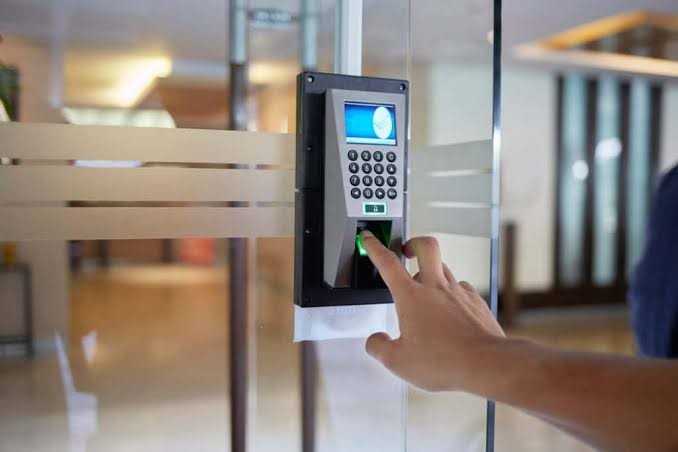
Securing business premises, commercial buildings, offices and residential properties requires reliable access control solutions. Traditional security methods such as physical keys, passwords and access cards can create security challenges when keys are lost, cards are shared or access codes are disclosed. As organisations seek more effective ways to protect their properties, fingerprint door access systems have become an increasingly popular biometric security solution.
A fingerprint door access system uses an individual’s unique fingerprint characteristics to verify identity before allowing entry into a secured room, building or restricted area. Instead of relying on physical keys or access cards, authorised users simply place their fingers on a biometric scanner to gain access.
In Uganda, fingerprint door access systems are suitable for businesses, offices, banks, hospitals, schools, factories, warehouses, hotels and residential developments that require controlled entry and improved security management.
These systems provide convenient authentication, better access monitoring, improved accountability and the ability to manage entry permissions for different users.
At Daltrevco, we understand the importance of reliable security infrastructure in protecting people, property, equipment and business operations. This guide explains how fingerprint door access systems work, their installation process, key benefits, important security features and applications across different sectors in Uganda.
What Is a Fingerprint Door Access System?
A fingerprint door access system is a biometric security solution that uses fingerprint recognition technology to identify authorised individuals and control access to secured entrances.
Every person’s fingerprints contain distinctive ridge patterns and characteristics that can be used for biometric identification. A fingerprint scanner captures these characteristics and compares them with previously registered fingerprint templates stored in the system.
When an individual places their finger on the scanner, the device analyses the fingerprint and checks whether it matches an authorised user profile.
If the fingerprint is successfully verified and the user has permission to enter, the system sends a signal to an electronic locking mechanism to unlock the door.
If the fingerprint is not recognised or the individual does not have access privileges, entry is denied.
A typical fingerprint door access system consists of:
- Fingerprint biometric scanner.
- Access control terminal.
- Electronic door lock or magnetic lock.
- Access control panel.
- Power supply unit.
- Exit button or request-to-exit sensor.
- Door contact sensor.
- Access management software.
- Network and communication connections.
- Backup power supply where required.
These components work together to provide automated identity verification and controlled door access.
How Do Fingerprint Door Access Systems Work?
Fingerprint door access systems use biometric authentication to determine whether an individual is authorised to enter a particular area.
The operation involves several stages.
1. Fingerprint Registration and Enrolment
Before using the system, authorised users must register their fingerprints.
During registration, the individual places their finger on the scanner, which captures the fingerprint’s distinctive characteristics.
The system converts the captured information into a digital biometric template and stores it securely.
Depending on the equipment, users may register more than one finger to provide an alternative authentication option.
2. Fingerprint Scanning
When an authorised individual approaches a secured door, they place their registered finger on the biometric scanner.
The scanner captures the fingerprint characteristics and prepares the information for verification.
Different systems use optical, capacitive or other fingerprint sensing technologies.
3. Biometric Verification
The system compares the newly captured fingerprint template against registered templates in its database.
Most door access applications use one-to-one verification or one-to-many identification, depending on the device and configuration.
If the fingerprint matches an authorised profile, the system checks the person’s assigned access permissions.
4. Door Unlocking
When authentication is successful, the access control system sends an electronic signal to the locking mechanism.
Depending on the installation, this may activate:
- Magnetic door locks.
- Electric strike locks.
- Electromagnetic locking systems.
- Compatible electronic door locks.
The door unlocks, allowing the authorised individual to enter.
5. Access Denial
If the fingerprint does not match an authorised user or the individual does not have permission to access the area, the system denies entry.
Some systems can also trigger an alarm or record repeated unsuccessful authentication attempts.
6. Access Recording and Monitoring
Many fingerprint access control systems automatically record entry activities.
Depending on the software, administrators can review:
- Successful access attempts.
- Rejected authentication attempts.
- User identification details.
- Entry dates and timestamps.
- Employee attendance records.
- Access permissions.
- Door activity reports.
This information helps organisations monitor building access and maintain better security accountability.
Types of Fingerprint Door Access Systems
Different fingerprint technologies are available, depending on the level of security, operational requirements and installation environment.
1. Standalone Fingerprint Door Access Systems
Standalone fingerprint access systems operate independently without requiring a centralised access control server.
They usually contain a fingerprint scanner, user database and access control functions within the same terminal.
They are suitable for:
- Small offices.
- Private offices.
- Residential entrances.
- Small commercial premises.
- Restricted storage rooms.
Their main advantage is relatively straightforward installation and management.
2. Networked Fingerprint Access Control Systems
Networked fingerprint access control systems connect multiple biometric terminals to a central management platform.
Administrators can register users, assign permissions and monitor access activities across several doors or buildings.
These systems are suitable for:
- Large corporate offices.
- Banks.
- Universities.
- Hospitals.
- Factories.
- Multi-storey commercial buildings.
They provide centralised management and are particularly useful for organisations with multiple access points.
3. Fingerprint and RFID Card Access Systems
Some biometric terminals combine fingerprint recognition with RFID card authentication.
Users can authenticate using a registered fingerprint, an access card or a configured combination of both.
These systems offer flexibility and can provide additional authentication options.
For sensitive areas, organisations can configure fingerprint and card authentication together to strengthen identity verification.
4. Fingerprint and PIN-Based Access Systems
These systems combine fingerprint scanning with a personal identification number.
Depending on the configuration, users may be required to provide both credentials before the door unlocks.
This can provide an additional security layer for areas requiring stronger access restrictions.
5. Fingerprint Access Systems with Attendance Management
Some fingerprint terminals combine door access control with employee attendance management.
They can record when employees arrive and leave while controlling access to designated entrances.
They are useful for businesses, factories, institutions and organisations that want to manage physical access and attendance through compatible software.
Key Benefits of Fingerprint Door Access Systems
Fingerprint door access systems offer several advantages over traditional key-based and card-based security arrangements.
1. Improved Building Security
One of the biggest benefits of fingerprint access control is that it uses biometric characteristics to verify an individual’s identity.
Traditional keys can be duplicated, while access cards can be lost, stolen or shared.
Fingerprint authentication reduces dependence on these physical credentials.
Only individuals whose fingerprints are registered and whose access permissions are valid can gain entry.
This makes fingerprint access control particularly useful for businesses protecting valuable equipment, confidential information and restricted departments.
2. Eliminates the Need for Physical Keys
Managing physical keys can become complicated in buildings with many employees and multiple access points.
Keys may be misplaced, duplicated or retained by former employees.
Fingerprint door access systems reduce these challenges by allowing authorised users to enter using their registered biometric credentials.
When an employee leaves an organisation, administrators can simply deactivate the person’s access profile without changing physical locks in every instance.
3. Reduces Unauthorised Access
Fingerprint authentication makes it more difficult for unauthorised individuals to use another person’s access credentials.
Unlike passwords and access cards, fingerprints are directly associated with the individual.
This helps organisations strengthen control over restricted areas such as server rooms, finance departments, records offices and equipment storage facilities.
4. Convenient and Fast Entry
Fingerprint door access systems provide a straightforward authentication process.
Users place their registered fingers on the scanner rather than searching for keys, remembering PIN codes or carrying access cards.
Modern devices can verify fingerprints quickly, helping reduce delays at busy entrances.
5. Improved Employee Attendance Management
Fingerprint access terminals with attendance management capabilities can automatically record employee arrival and departure times.
This reduces dependence on manual attendance registers and supports more organised workforce administration.
Depending on the software, organisations can generate reports covering:
- Employee arrival times.
- Departure times.
- Attendance history.
- Working hours.
- Late arrivals.
- Shift schedules.
- Overtime records.
Attendance functionality should be configured according to the organisation’s operational and employment requirements.
6. Better Control Over Restricted Areas
Fingerprint systems allow administrators to assign access privileges according to employees’ roles and responsibilities.
For example, ordinary employees may access general office areas, while authorised managers can enter administrative offices and restricted departments.
Access permissions can also be configured according to working schedules, departments and specific security requirements.
7. Reduced Access Card Replacement Costs
Businesses using card-based systems may regularly incur expenses replacing lost, damaged or stolen cards.
Fingerprint access control reduces reliance on physical cards, helping minimise some of these recurring costs.
The overall financial benefit depends on the organisation’s size, equipment requirements and system configuration.
8. Accurate Access Records
Many fingerprint door access systems maintain electronic records of access activities.
These records help administrators monitor entry patterns, review rejected access attempts and investigate security incidents.
They also improve accountability by providing documented information about who accessed particular entrances and when.
9. Easy User Management
Modern fingerprint access control software allows administrators to register users, remove former employees and update access permissions.
This simplifies access administration, particularly in organisations where employees frequently join, leave or change departments.
10. Integration with Other Security Technologies
Fingerprint access control systems can be integrated with other security technologies to create a more comprehensive security infrastructure.
Compatible systems may include:
- CCTV surveillance cameras.
- Intruder alarm systems.
- Electronic door locks.
- RFID access control readers.
- Facial recognition terminals.
- Visitor management software.
- Employee attendance platforms.
- Centralised building security systems.
Integration helps improve security monitoring and provides more coordinated management of building access.
Important Security Features of Fingerprint Door Access Systems
When selecting a fingerprint door access system, it is important to consider the security capabilities of the equipment.
Not all biometric terminals provide the same level of protection.
The following are important features to evaluate.
1. Advanced Fingerprint Recognition
A reliable system should have a fingerprint sensor capable of capturing and analysing fingerprint characteristics accurately.
Consider the manufacturer’s specifications, supported fingerprint types, authentication performance and suitability for the expected operating environment.
2. Fingerprint Liveness Detection
Some advanced biometric systems incorporate liveness detection or presentation attack detection.
These features are designed to help distinguish genuine finger presentations from certain artificial fingerprint replicas.
The effectiveness depends on the technology used, so organisations should evaluate the manufacturer’s security specifications.
3. Anti-Tampering Protection
Security terminals should provide appropriate protection against unauthorised physical interference.
Some devices include tamper alarms or alerts when the terminal is opened, removed or interfered with.
This is particularly important in installations involving external entrances and sensitive departments.
4. Multiple Authentication Methods
A system that supports more than one authentication method can provide greater operational flexibility.
Depending on the device, users may authenticate through:
- Fingerprint recognition.
- RFID access cards.
- PIN codes.
- Facial recognition.
- Combined biometric and card authentication.
For high-security environments, multi-factor authentication may be preferable.
5. User Access Permissions
The system should allow administrators to assign different access rights to different individuals.
For example, employees can be restricted to specific departments, while security personnel and managers may receive broader access privileges.
6. Access Logs and Reporting
A good fingerprint access control solution should maintain reliable records of authentication and door activity.
Access logs help organisations investigate incidents, monitor security performance and maintain accountability.
7. Secure Biometric Data Storage
Fingerprint information must be protected against unauthorised access.
Organisations should select systems with appropriate security measures, including:
- Encrypted biometric data where supported.
- Secure administrator authentication.
- Role-based access permissions.
- Secure communication between devices and management platforms.
- Software updates.
- Controlled data retention and deletion.
Biometric data protection is especially important for organisations operating in Uganda because fingerprint information is personal data subject to applicable data protection requirements.
8. Door Status Monitoring
Some systems support door contact sensors that monitor whether a door is open or closed.
When integrated with suitable access control software, administrators can receive alerts when doors are left open or opened unexpectedly.
9. Backup Power Support
Fingerprint access control systems depend on electrical power to operate.
A suitable UPS or backup power arrangement can help maintain functionality during power interruptions.
The backup design should consider the scanner, controller, locking mechanism and associated equipment.
10. Emergency Exit and Safety Features
Access control systems must not compromise safe evacuation during emergencies.
Installations should include appropriate exit buttons, request-to-exit devices, emergency release arrangements and locking configurations that comply with applicable fire and building safety requirements.
Fingerprint Door Access System Installation: Step-by-Step Process
Professional installation is essential for ensuring that a fingerprint door access system operates correctly and provides the intended level of security.
The installation process generally involves the following stages.
Step 1: Conduct a Site Assessment
The first step is evaluating the building and identifying the entrances that require access control.
The assessment should consider:
- Number of doors requiring protection.
- Type and construction of doors.
- Expected number of users.
- Security level of each area.
- Existing electrical infrastructure.
- Network connectivity.
- Suitable fingerprint scanner positions.
- Emergency exit requirements.
This information helps determine the appropriate system design.
Step 2: Select the Appropriate Fingerprint Access Equipment
After the assessment, suitable equipment is selected.
The choice depends on the number of users, authentication requirements, installation environment and integration needs.
Equipment may include fingerprint terminals, access control panels, magnetic locks, electric strikes, power supplies and management software.
Step 3: Prepare the Door and Installation Location
The door and surrounding structure must be prepared for the installation.
This may involve determining the mounting position, preparing cable routes and confirming that the selected locking mechanism is compatible with the door.
Fingerprint terminals should be positioned at a convenient height and in a location that supports reliable scanning.
Step 4: Install the Fingerprint Scanner
The fingerprint terminal is securely mounted at the designated entrance.
The installation should ensure that the device is accessible to authorised users while reducing exposure to damage or tampering.
Step 5: Install the Electronic Door Lock
The selected locking mechanism is installed according to the door type and security requirements.
Common options include:
- Electromagnetic locks.
- Electric strike locks.
- Compatible electronic locks.
The lock should be properly aligned and tested to ensure reliable operation.
Step 6: Connect the Access Control Panel and Power Supply
The fingerprint terminal, controller and electronic locking mechanism are connected according to the manufacturer’s wiring specifications.
Appropriate electrical protection and backup power arrangements should also be considered.
Step 7: Configure the Access Control Software
The system is configured to support the organisation’s security requirements.
This may include:
- Creating administrator accounts.
- Setting up user profiles.
- Establishing access schedules.
- Assigning departmental permissions.
- Configuring access records.
- Setting up attendance management.
- Establishing network communication.
Step 8: Register Authorised Fingerprints
Employees and other authorised users have their fingerprints registered in the system.
Where supported, users should register alternative fingers to reduce inconvenience if one finger cannot be scanned reliably.
Step 9: Test the Complete System
The installation team should test the entire system before commissioning.
Testing should include:
- Fingerprint recognition.
- Successful door unlocking.
- Rejected unauthorised access.
- User permissions.
- Door locking and closing.
- Exit button operation.
- Emergency release.
- Backup power operation.
- Access log recording.
Step 10: Train Users and Administrators
Relevant personnel should receive training on how to operate the system, register users, manage permissions and review access records.
Proper training helps organisations use the equipment effectively and reduces administrative errors.
Applications of Fingerprint Door Access Systems
Fingerprint access control technology is suitable for different types of properties and organisations.
1. Corporate Offices and Commercial Buildings
Businesses can install fingerprint door access systems to secure main entrances, management offices, finance departments, records rooms and server rooms.
They also help manage employee access and support attendance monitoring when integrated with compatible software.
2. Banks and Financial Institutions
Financial institutions require strict control over access to sensitive operational areas.
Fingerprint systems can help protect:
- Cash handling departments.
- Records offices.
- Server rooms.
- Administrative departments.
- Restricted operational areas.
They can also complement CCTV surveillance and other security technologies.
3. Hospitals and Healthcare Facilities
Hospitals can use fingerprint access control to restrict entry into areas that require authorised personnel.
Examples include medical records offices, pharmaceutical storage rooms, laboratories, staff areas and equipment storage facilities.
Healthcare organisations should ensure that biometric access arrangements respect patient and employee privacy.
4. Schools, Colleges and Universities
Educational institutions can use fingerprint access systems to secure administrative offices, staff rooms, laboratories, computer rooms and restricted academic facilities.
Compatible systems may also support staff attendance management.
Any biometric deployment involving students, particularly children, requires careful assessment of lawful processing, consent and safeguarding obligations.
5. Factories and Industrial Facilities
Factories often contain expensive machinery, specialised equipment and potentially hazardous operational areas.
Fingerprint access control can help restrict entry to authorised workers and supervisors.
It is useful for production areas, electrical control rooms, equipment storage and restricted departments.
6. Warehouses and Storage Facilities
Warehouses can use fingerprint systems to control access to inventory storage, dispatch departments, management offices and restricted goods areas.
When combined with CCTV surveillance, they can strengthen overall warehouse security.
7. Hotels and Hospitality Facilities
Hotels can install fingerprint access control at selected staff-only entrances, management offices, equipment storage rooms and restricted service departments.
The systems can help improve internal security without interfering with normal guest access arrangements.
8. Government Offices and Public Institutions
Government institutions can use fingerprint access control to manage entry into administrative offices, records departments, data rooms and other restricted facilities.
9. Residential Apartments and Private Properties
Homeowners, apartment managers and property developers can use fingerprint door access systems to secure selected entrances.
They can be installed at residential gates, apartment entrances, private offices and shared facilities.
10. Data Centres and Server Rooms
Data centres contain critical digital infrastructure and sensitive information.
Fingerprint authentication can provide an additional identity verification layer at restricted entrances.
For particularly sensitive facilities, it can be combined with access cards, PIN codes, CCTV and additional security controls.
Fingerprint Access Control vs Card-Based and PIN-Based Systems
Understanding the differences between access control technologies helps property owners select the most suitable security solution.
| Feature | Fingerprint Access | Card-Based Access | PIN-Based Access |
|---|---|---|---|
| Authentication | Biometric fingerprint | Physical access card | Security code |
| Physical credential required | No | Yes | No |
| Risk of credential sharing | Lower, with suitable safeguards | Higher | Higher |
| Lost credential concerns | No physical card to lose | Cards can be lost | Codes can be forgotten |
| Attendance integration | Available | Available | Available |
| Contactless entry | No, requires finger contact | Usually requires card presentation | Requires keypad interaction |
| Multi-factor authentication | Supported by compatible systems | Supported | Supported |
| Biometric data management | Required | Not required for card-only systems | Not required for PIN-only systems |
Fingerprint systems provide biometric identity verification, while card and PIN systems can offer simpler or more economical alternatives.
The right choice depends on the security requirements, budget, number of users and operating environment.
Factors That Determine Fingerprint Door Access System Installation Costs in Uganda
The cost of installing a fingerprint door access system in Uganda varies depending on the equipment, building layout and complexity of the project.
Important cost factors include:
1. Type of fingerprint scanner: Advanced biometric terminals with enhanced recognition capabilities, liveness detection and additional authentication features may cost more than basic models.
2. Number of doors: Installing access control on several doors requires additional terminals, locks, controllers and installation materials.
3. Number of users: Organisations with large workforces may need higher-capacity devices and more advanced management software.
4. Electronic locking mechanisms: The type of magnetic lock, electric strike or electronic door lock affects the overall installation cost.
5. Software requirements: Advanced user management, attendance monitoring and centralised access control platforms may increase the project cost.
6. Network infrastructure: Networked installations may require additional cabling, network equipment and configuration.
7. Installation complexity: Door construction, building layout, wiring requirements and mounting conditions influence labour costs.
8. Backup power requirements: UPS units, batteries and additional power protection equipment can add to the total investment.
9. Integration with other systems: Connecting fingerprint terminals to CCTV, alarms and attendance software may require additional equipment and configuration.
For an accurate quotation, businesses should arrange a professional site assessment to establish their access control requirements.
Common Problems with Fingerprint Door Access Systems and Their Solutions
Like other electronic security technologies, fingerprint access control systems may occasionally experience operational challenges.
Understanding common problems can help organisations maintain reliable performance.
1. Fingerprints Are Not Recognised
This may happen when a user’s finger is wet, dirty, damaged or incorrectly positioned.
Solution: Clean the scanner, ensure fingers are properly positioned and register alternative fingers where supported.
2. Scanner Does Not Respond
The terminal may fail to respond because of power supply problems, wiring faults or hardware failure.
Solution: Check the power supply, connections and device status. Engage a qualified technician where necessary.
3. Door Fails to Unlock
The problem may be related to the electronic lock, controller, power supply or communication between system components.
Solution: Inspect the locking mechanism, wiring and access control panel.
4. Slow Fingerprint Recognition
Dirty scanner surfaces, poor positioning, unsuitable settings or low-quality equipment can affect recognition speed.
Solution: Clean the sensor, review device settings and ensure that the equipment is suitable for the operating environment.
5. Power Interruptions
Power outages can interrupt access control operation.
Solution: Install an appropriately sized UPS or backup power solution and test the emergency access arrangements regularly.
6. Incorrect Access Permissions
Users may be denied entry because their profiles have expired or their permissions are incorrectly configured.
Solution: Review user profiles, access schedules and permission settings.
Maintenance Tips for Fingerprint Door Access Systems
Regular maintenance helps preserve system performance and reduces the likelihood of unexpected failures.
Property owners and facility managers should consider the following practices:
- Clean fingerprint scanners using manufacturer-approved methods.
- Inspect electronic locks and door alignment regularly.
- Check wiring and power connections.
- Test backup power systems.
- Review user permissions periodically.
- Remove access rights for employees who have left the organisation.
- Install recommended firmware and software updates.
- Review access logs for unusual activity.
- Test exit buttons and emergency release mechanisms.
- Arrange professional inspection and servicing.
Regular maintenance is particularly important in buildings with high daily traffic and multiple controlled entrances.
Data Protection and Privacy Considerations in Uganda
Fingerprint information is biometric personal data and must be handled responsibly.
Businesses installing fingerprint access control systems in Uganda should consider the Data Protection and Privacy Act, 2019, and applicable regulations.
Important considerations include:
- Establishing an appropriate lawful basis for processing biometric information.
- Informing employees and other affected individuals about how their information will be used.
- Collecting only information necessary for the intended purpose.
- Implementing suitable technical and organisational security measures.
- Restricting access to biometric records.
- Establishing appropriate retention and deletion procedures.
- Assessing whether a data protection impact assessment is required.
- Providing suitable alternative access arrangements where appropriate.
Organisations should not assume that biometric processing is automatically lawful simply because the technology is being used for building security.
Why Professional Fingerprint Door Access System Installation Matters
Installing a fingerprint access control system involves more than mounting a biometric scanner on a wall.
The equipment must be properly selected, connected, configured and tested to ensure that all components operate together.
Professional installation helps ensure:
- Correct placement of fingerprint scanners.
- Compatibility between biometric terminals and electronic locks.
- Proper wiring and electrical connections.
- Accurate user registration.
- Correct access permission configuration.
- Reliable communication between system components.
- Integration with CCTV and other security technologies.
- Appropriate emergency exit arrangements.
- Reliable system testing and commissioning.
A professionally installed solution helps reduce operational problems and ensures that the system meets the property’s actual security requirements.
Why Choose Daltrevco for Access Control and Security Solutions in Uganda?
Selecting the right security systems provider is an important part of protecting your building, employees, customers and business assets.
At Daltrevco, we understand that effective building security requires properly planned and integrated systems.
When considering fingerprint door access control, organisations should evaluate their entrances, security priorities, electrical infrastructure, user requirements and future expansion needs.
Daltrevco focuses on practical security and building infrastructure solutions designed around the needs of businesses, institutions and property owners.
Whether you are securing an office, commercial building, factory, warehouse, educational institution or residential development, we can help you explore suitable access control and security system solutions.
Our approach considers:
- Access control requirements and site conditions.
- Suitable biometric security technologies.
- Electronic door locking solutions.
- Electrical and network infrastructure.
- Integration with CCTV surveillance systems.
- User management and operational requirements.
- Long-term system maintenance considerations.
Contact Daltrevco to discuss your building security requirements and explore suitable access control solutions in Uganda.
Frequently Asked Questions About Fingerprint Door Access Systems
1. What is a fingerprint door access system?
A fingerprint door access system is a biometric security solution that uses fingerprint recognition to verify an individual’s identity before allowing entry into a secured building, room or restricted area.
2. How does a fingerprint door lock work?
A fingerprint door lock scans an individual’s fingerprint and compares it with registered biometric information. If the fingerprint is verified and the user has permission, the system activates the electronic lock and allows entry.
3. Are fingerprint door access systems secure?
Yes, fingerprint systems can strengthen building security by reducing dependence on physical keys and shared access codes. Their effectiveness depends on sensor quality, anti-spoofing capabilities, secure biometric storage and correct installation.
4. Can fingerprint access control systems record employee attendance?
Yes. Compatible systems can integrate with attendance management software to record employee arrival and departure times and generate attendance reports.
5. Can fingerprint door access systems work without internet?
Yes. Many standalone fingerprint terminals can authenticate users locally without an internet connection. However, remote monitoring and some centralised management functions may require network connectivity.
6. Can fingerprint access control systems be connected to CCTV?
Yes. Compatible systems can be integrated with CCTV surveillance to improve security monitoring and help administrators review access activities.
7. What happens when the power goes off?
The system may stop operating unless suitable backup power is available. A UPS or other appropriate backup arrangement can help maintain functionality during power interruptions.
8. Can fingerprint access systems control multiple doors?
Yes. Networked access control solutions can manage several doors and biometric terminals through a centralised management platform.
9. What is the difference between a fingerprint scanner and a fingerprint door access system?
A fingerprint scanner captures and analyses biometric information. A complete fingerprint door access system also includes the controller, electronic lock, power supply, access permissions and associated software required to control entry.
10. How much does fingerprint door access installation cost in Uganda?
The price depends on the type of fingerprint terminal, number of doors, locking mechanisms, user capacity, software, wiring and installation complexity. A site assessment is recommended for an accurate quotation.
11. Can fingerprint door access systems be used outdoors?
Yes, provided the selected equipment is designed for the installation environment. Outdoor installations should consider weather protection, temperature, dust and exposure to direct sunlight.
12. Can a fingerprint access system use more than one authentication method?
Yes. Many modern devices support combinations of fingerprint recognition, RFID cards, PIN codes and other authentication methods.
Conclusion: Improve Building Security with Fingerprint Door Access Systems
Fingerprint door access systems provide a modern and convenient approach to controlling entry into business premises, commercial buildings and residential properties.
By using biometric authentication, organisations can reduce dependence on physical keys, improve access monitoring, manage employee permissions and strengthen protection for restricted areas.
From offices and banks to hospitals, schools, factories, warehouses and residential developments, fingerprint access control offers a flexible solution for different security requirements.
However, the success of any installation depends on selecting appropriate equipment, professional system configuration, reliable electronic locking mechanisms, regular maintenance and responsible biometric data management.
For businesses and property owners in Uganda seeking to improve building security, investing in a properly designed fingerprint door access system can be an important step towards safer and more controlled premises.
Contact Daltrevco today to discuss professional access control and security solutions for your business, institution or property in Uganda.

