
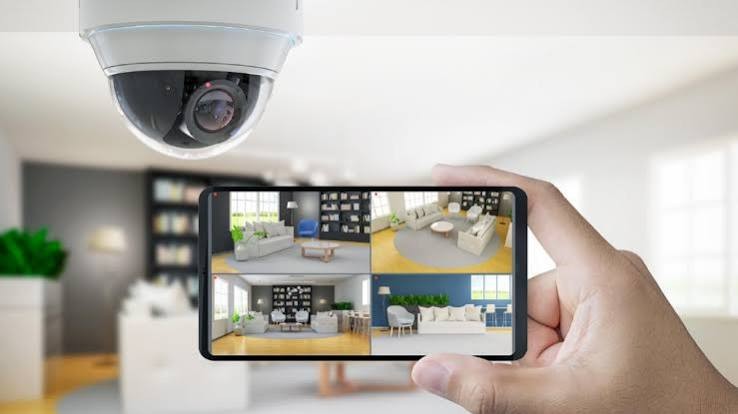
Security is an important concern for homeowners, business owners and property managers, particularly when buildings are unoccupied or located far from where they live or work. Whether you own a home in Kampala, manage an office in Wakiso, operate a warehouse in an industrial area or oversee several commercial properties, keeping track of what happens at your premises can be challenging when you are away.
Traditional CCTV systems allow property owners to record activities around their buildings, but modern surveillance technology offers an additional advantage: remote CCTV monitoring.
Remote CCTV monitoring allows authorised users to access compatible security cameras through smartphones, tablets, laptops or desktop computers from different locations. With an appropriate internet connection and correctly configured equipment, users can view live camera feeds, review recorded footage and receive security notifications without being physically present at the property.
For property owners in Uganda, remote CCTV access provides a convenient way to remain informed about activities at homes, offices, warehouses, factories, shops and other facilities.
However, effective remote monitoring requires more than simply installing cameras and downloading a mobile application. The CCTV equipment, network infrastructure, recording system, remote access configuration and cybersecurity settings must work together correctly.
This guide explains how remote CCTV monitoring works, the equipment required, its benefits, installation process, security considerations and the factors that influence its cost in Uganda.
What Is Remote CCTV Monitoring?
Remote CCTV monitoring is the ability to view and manage a surveillance camera system from a location outside the property where the cameras are installed.
Instead of depending entirely on a monitor connected directly to a CCTV recorder, authorised users can access their camera systems through an internet-connected device.
For example, a business owner travelling outside Uganda may use a smartphone to check live footage from cameras installed at a warehouse in Kampala. A homeowner may review recordings from a residential property while at work, or a facility manager may monitor several buildings from a central location.
Depending on the equipment and software, remote CCTV monitoring can provide access to:
- Live video from connected security cameras.
- Previously recorded surveillance footage.
- Camera playback and event searches.
- Motion detection notifications.
- Camera status and connection information.
- Multiple camera locations.
- Selected camera settings and system functions.
The available features depend on the CCTV camera, Digital Video Recorder (DVR), Network Video Recorder (NVR), mobile application and network configuration.
Remote CCTV monitoring does not necessarily mean that a security company is watching the cameras continuously. It can simply mean that the property owner or an authorised person has remote access to the surveillance system.
How Does Remote CCTV Monitoring Work?
Remote CCTV monitoring works by connecting compatible cameras and recording equipment to a network that allows authorised users to access video footage from another location.
A typical remote CCTV system has five main stages.
1. CCTV Cameras Capture Video
Security cameras are installed at strategic locations around a property.
They capture footage of entrances, corridors, parking areas, storage rooms, production areas and other locations requiring surveillance.
Depending on the camera model, footage may include high-resolution video, infrared night vision, motion detection or other supported features.
2. Video Is Sent to a Recording Device
The cameras transmit video to a DVR or NVR, depending on the CCTV system.
A DVR commonly processes footage from compatible analogue camera systems, while an NVR is commonly used with IP network cameras.
The recording device manages the video streams and stores footage on its installed storage drives or other supported storage arrangements.
3. The Recording System Connects to the Network
The DVR or NVR connects to a suitable network, commonly through a router or network switch.
The network connection enables supported remote communication between the recording system and authorised viewing devices.
A reliable internet connection at the property is important for accessing cameras from outside the local network.
4. The User Opens the CCTV Application or Platform
The authorised user accesses the system using a compatible mobile application, desktop client or web platform.
Depending on the manufacturer and configuration, the user may sign in through an account, device registration or another supported authentication method.
5. Live Footage or Recordings Are Displayed Remotely
After successful authentication and connection, the user can select a camera and view live footage or search available recordings.
Some systems also support notifications when configured events occur, such as motion detection or camera disconnection.
This process allows the user to check the property without being physically present.
Equipment Required for Remote CCTV Monitoring
A reliable remote CCTV monitoring installation requires several components that work together.
1. IP Cameras or Compatible CCTV Cameras
Cameras capture video and transmit it to the recording system.
IP cameras are commonly used in network-based remote surveillance installations because they communicate over compatible data networks.
However, compatible analogue cameras connected to a DVR can also support remote viewing when the recorder provides the required network functionality.
When choosing cameras, consider:
- Video resolution and image clarity.
- Daytime and night-time performance.
- Indoor or outdoor suitability.
- Weather protection for external cameras.
- Field of view and monitoring distance.
- Motion detection capabilities.
- Compatibility with the recording equipment.
2. Network Video Recorder or Digital Video Recorder
The recorder manages video feeds and stores surveillance footage.
An NVR is generally used with IP cameras, while a DVR is commonly used with analogue CCTV cameras.
For remote monitoring, the recorder must support network connectivity and compatible remote access features.
3. Internet Router
The router connects the CCTV recording system to the internet.
It manages network communication between the recorder and authorised remote viewing devices.
The router should be suitable for the number of connected devices, available internet speed and network configuration.
4. Reliable Internet Connection
An internet connection allows authorised users to access CCTV footage from outside the property’s local network.
The connection should have sufficient upload capacity to support the required remote video streams.
The amount of bandwidth required depends on the number of cameras being viewed, video resolution, compression settings, frame rate and simultaneous users.
5. Storage Drives
The recording system requires sufficient storage to retain surveillance footage.
Storage requirements depend on:
- Number of connected cameras.
- Video resolution.
- Frame rate.
- Recording schedule.
- Video compression technology.
- Motion-based or continuous recording.
- Required retention period.
A property requiring several weeks of recordings will generally need more storage than one retaining footage for a shorter period.
6. Smartphone, Tablet or Computer
An authorised user needs a compatible device to access the surveillance system remotely.
Most modern remote CCTV platforms support smartphones and may also provide desktop applications or web access.
7. CCTV Monitoring Software
The software provides the interface through which users view cameras, search recordings and manage supported functions.
Some systems use manufacturer-specific mobile applications, while others use compatible third-party platforms.
Software compatibility should be confirmed before purchasing cameras or recording equipment.
8. Backup Power Equipment
Power interruptions can affect cameras, recorders, routers and internet equipment.
A suitable UPS or backup power arrangement can help keep essential CCTV components operational during outages, subject to its capacity and battery condition.
Benefits of Remote CCTV Monitoring for Homes and Businesses
Remote CCTV monitoring provides several practical advantages for property owners and organisations.
1. Monitor Your Property from Anywhere
One of the main advantages is the ability to view cameras without being physically present.
A homeowner can check their property while travelling, while a business owner can monitor an office or warehouse from another location.
This makes it easier to remain informed about activity around the premises.
2. Improve Security Awareness
Remote camera access allows authorised users to review what is happening around entrances, parking areas, storage rooms and other monitored locations.
When suspicious activity is observed, the user can follow the property’s security response procedures.
3. Monitor Multiple Properties
Businesses operating several branches, warehouses or commercial premises can use compatible CCTV platforms to access cameras from different locations.
This can be particularly useful for organisations managing facilities across Kampala, Wakiso, Entebbe and other parts of Uganda.
The ability to view several locations depends on the platform, network arrangements and user permissions.
4. Review Recorded Footage Remotely
Remote CCTV access is not limited to live viewing.
Users can also search and review available recordings to investigate events that occurred earlier.
This is useful when checking delivery activity, identifying the sequence of an incident or reviewing footage following a reported security problem.
5. Support Faster Incident Assessment
If a property owner receives a security notification, remote camera access may help them assess the situation.
For example, a business owner can view the relevant camera to determine whether movement around a restricted entrance appears to require further investigation.
Remote viewing alone does not guarantee an immediate physical response. Appropriate security personnel and response procedures remain important.
6. Improve Business Supervision
Remote CCTV monitoring can support operational supervision in addition to security.
Authorised managers may review activities in appropriate business areas, including:
- Customer entrances.
- Reception areas.
- Loading and unloading zones.
- Warehouse storage areas.
- Parking facilities.
- Selected production areas.
Camera use should have a legitimate purpose and respect the privacy of employees, customers and visitors.
7. Receive Supported Security Notifications
Some CCTV systems support mobile notifications for configured events.
These may include motion detection, camera disconnection, video loss or other system alerts.
The actual notifications depend on camera capabilities, software settings and network connectivity.
8. Reduce the Need to Be Physically Present for Every Check
Remote monitoring can make routine visual checks more convenient for property owners and facility managers.
However, it does not replace physical inspections, security guards, maintenance or emergency response arrangements.
Remote CCTV Monitoring for Different Properties in Uganda
Remote surveillance can be useful across residential, commercial, industrial and institutional environments.
Remote CCTV Monitoring for Homes
Homeowners can use remote CCTV access to monitor:
- Main entrances and gates.
- Driveways and parking spaces.
- Perimeter walls and compound areas.
- Garages and storage rooms.
- Outdoor entertainment areas.
- Selected internal spaces.
For example, someone travelling away from Kampala may use a mobile application to check the main entrance and compound of their home.
Camera positioning should respect household privacy and avoid unnecessary monitoring of neighbouring properties or private spaces.
Remote CCTV Monitoring for Offices
Office managers can access cameras remotely to review reception areas, entrances, corridors, parking facilities and selected work areas.
This can help with security supervision, after-hours monitoring and investigation of reported incidents.
Remote CCTV Monitoring for Warehouses
Warehouses often contain stock, equipment and valuable materials that require careful monitoring.
Remote access allows authorised managers to view loading bays, storage areas, entrances and external compounds.
It can also support checks on delivery activity and operations outside normal working hours.
Remote CCTV Monitoring for Factories
Manufacturing facilities may have several production buildings, machinery areas, storage facilities and vehicle entrances.
Remote CCTV access can help facility managers monitor selected operational and security areas without travelling between every building.
Remote CCTV Monitoring for Shops and Retail Businesses
Retail businesses can use remote viewing to monitor entrances, checkout areas, display sections and storage rooms.
Business owners managing multiple branches can access compatible camera systems from one authorised device or platform.
Remote CCTV Monitoring for Hotels and Lodges
Hotels and lodges can use CCTV monitoring around appropriate common areas, entrances, reception areas, parking facilities and service zones.
Remote access can help authorised management monitor property security while away.
Cameras should not be installed in private guest areas such as bedrooms and bathrooms.
Remote CCTV Monitoring for Schools and Institutions
Educational institutions can use remote camera access to supervise entrances, selected corridors, parking areas, laboratories and equipment storage locations.
Monitoring arrangements should be appropriate to the institution’s security needs and privacy responsibilities.
Remote CCTV Monitoring for Construction Sites
Construction sites may contain valuable tools, machinery, building materials and fuel.
Remote CCTV monitoring allows authorised project managers to review activity around site entrances, storage areas and other selected locations.
How to Set Up Remote CCTV Monitoring on Your Smartphone
Many modern CCTV systems allow users to view their cameras through a smartphone application.
The exact process varies depending on the manufacturer, recording device and software platform, but a typical setup involves the following steps.
Step 1: Install a Compatible CCTV System
The first requirement is a CCTV installation with a network-enabled DVR, NVR or compatible IP camera system.
Confirm that the equipment supports remote viewing before installation.
Step 2: Connect the Recording Device to the Router
Connect the DVR or NVR to the local network using the supported network connection.
Check that the device receives the correct network configuration and can communicate with the router.
Step 3: Configure Internet Connectivity
Ensure that the property has a functioning internet connection and that the recorder can access the required network services.
Where the system uses manufacturer-provided cloud or peer-to-peer connectivity, follow the manufacturer’s configuration instructions.
Step 4: Install the Manufacturer’s Application
Download the correct application from an official application store or manufacturer source.
Avoid downloading CCTV applications from unknown websites or unverified links.
Step 5: Register or Add the Recording Device
Depending on the system, the recorder may be added using a device identifier, QR code, account registration or another supported method.
Follow the equipment manufacturer’s instructions.
Step 6: Create Secure User Credentials
Set a strong password and enable additional authentication features, such as multi-factor authentication, where supported.
Do not use default passwords or share administrator credentials unnecessarily.
Step 7: Test Live Camera Viewing
Open the application and select the connected cameras.
Check that the images load correctly and that video quality is suitable for the intended monitoring purpose.
Step 8: Test Recorded Footage and Notifications
Confirm that the application can access stored recordings and that configured alerts operate correctly.
Test the system using authorised procedures before relying on it for security monitoring.
Step 9: Configure User Permissions
Where several people need access, create individual accounts with suitable permissions if the platform supports them.
For example, a manager may need access to all cameras, while another authorised employee may only need to view selected areas.
What Internet Speed Is Required for Remote CCTV Monitoring?
Internet speed is an important consideration because CCTV systems send video data from the property to remote viewing devices.
The most relevant factor for remote viewing is usually the available upload bandwidth at the property where the cameras are installed.
The actual bandwidth requirement depends on several variables:
- Number of cameras being viewed simultaneously.
- Video resolution.
- Frame rate.
- Video compression settings.
- Bitrate configured for each camera.
- Number of remote users.
- Whether live viewing or recorded playback is being accessed.
For example, viewing one camera at a lower resolution generally requires less bandwidth than viewing several high-resolution cameras simultaneously.
Many CCTV systems allow a main stream for recording and a lower-bandwidth substream for remote mobile viewing. This can help reduce data usage and improve viewing performance on slower connections.
Property owners should test the actual network performance rather than choosing an internet package based only on advertised download speed.
Can Remote CCTV Monitoring Work Without Internet?
This is one of the most important questions when planning a CCTV installation in Uganda.
The answer depends on the functions being used.
A locally connected CCTV system can often continue recording to its DVR or NVR without internet access, provided that the cameras, recorder and power supply remain operational.
However, remote viewing from outside the property normally requires a functioning communication connection.
Consider the following:
Local CCTV recording: May continue without internet if the local equipment and power remain operational.
Viewing cameras on the same local network: May continue working even when the internet connection is unavailable, depending on the network and equipment.
Remote viewing from another location: Normally requires internet connectivity or another suitable communication link.
Cloud-based recording: Depends on the cloud service and internet connectivity.
Mobile notifications: May stop working if the required internet or communication connection is unavailable.
Where internet interruptions are frequent, consider a suitable backup connection, such as a compatible secondary internet service or mobile network connection.
Backup power is also important because an internet connection alone cannot maintain CCTV operation when the cameras or recording equipment lose electricity.
Remote CCTV Monitoring Security: How to Protect Your Cameras from Unauthorised Access
Remote access makes CCTV systems more convenient, but it also introduces cybersecurity responsibilities.
An improperly secured surveillance system may expose camera feeds, recordings or administrative settings to unauthorised users.
Businesses and homeowners should take the following precautions.
1. Change Default Passwords
Never leave factory-default administrator passwords unchanged.
Use strong, unique passwords for cameras, recorders, routers and remote access accounts.
2. Enable Multi-Factor Authentication
Where supported, enable multi-factor authentication to add another verification step when accessing the CCTV platform.
3. Use Official CCTV Applications
Download software only from the manufacturer’s official website or recognised application stores.
Avoid unofficial applications that may compromise account security.
4. Keep CCTV Firmware Updated
Install security updates provided by the equipment manufacturer.
Updates may correct software vulnerabilities, improve compatibility and address technical problems.
5. Restrict User Permissions
Give each person access only to the cameras and functions they need.
Avoid sharing one administrator account among several employees.
6. Secure the Network Router
Use a strong router password, update its firmware and disable unnecessary services.
Avoid exposing CCTV equipment directly to the public internet through insecure configurations.
7. Use Secure Remote Connections
Use manufacturer-supported secure remote access methods, VPNs or other appropriately configured secure connections.
Avoid unnecessary port forwarding and never expose administrative interfaces without proper security controls.
8. Review Access Logs
Where the system supports access logs, review them periodically for unfamiliar login activity or unexpected configuration changes.
9. Protect Recorded Footage
Restrict access to recordings and use suitable storage security measures.
Establish clear procedures for exporting, sharing and retaining video footage.
Remote CCTV Monitoring vs Professional CCTV Monitoring Services
Remote CCTV access and professional CCTV monitoring are related but different services.
Remote CCTV access generally allows the property owner or an authorised user to view cameras through a mobile application, computer or other platform.
Professional CCTV monitoring involves an assigned monitoring team or service provider observing security feeds or responding to configured events according to an agreed service arrangement.
| Feature | Remote CCTV access | Professional CCTV monitoring |
|---|---|---|
| Main user | Property owner or authorised user | Assigned monitoring personnel |
| Camera viewing | Accessed when required | May involve agreed monitoring arrangements |
| Alerts | Depend on system configuration | Depend on monitoring service agreement |
| Incident response | User arranges investigation or response | Provider follows agreed procedures |
| Cost structure | Equipment, internet and maintenance | May include recurring service charges |
| Availability | Depends on connectivity and system access | Depends on provider arrangements and system availability |
A business may use remote access independently or combine it with a professional monitoring service.
Before subscribing to a monitoring service, confirm what is actually included, including operating hours, alert verification, escalation procedures and response responsibilities.
Common Remote CCTV Monitoring Problems and How to Fix Them
Remote viewing problems can arise from internet connectivity, equipment configuration, software errors and power interruptions.
Understanding common faults helps property owners identify the likely cause.
1. CCTV Cameras Are Offline
This may be caused by power failure, damaged cables, network interruptions or camera faults.
Solution: Check the camera’s power supply, network connection and recorder status. Confirm that the camera is operating locally before troubleshooting remote access.
2. Remote Viewing Is Slow or Buffering
Slow video may result from insufficient upload bandwidth, high camera bitrate, network congestion or weak connectivity.
Solution: Check the available upload speed, reduce the remote viewing stream quality where appropriate and review the network configuration.
3. The CCTV Application Cannot Connect
Incorrect account details, recorder network settings, cloud connectivity problems or software issues may prevent remote access.
Solution: Verify the device registration, internet connection, application version and manufacturer-supported remote access settings.
4. Live Footage Works but Playback Does Not
This may indicate a recording configuration problem, storage issue, incorrect time settings or limited remote playback support.
Solution: Confirm that the recorder is recording locally and check storage health, recording schedules and playback settings.
5. Mobile Notifications Are Not Received
Notifications may be disabled, blocked by phone settings or interrupted by network problems.
Solution: Check the CCTV application permissions, notification configuration, account settings and internet connectivity.
6. CCTV Footage Is Not Clear at Night
Night-time image quality may be affected by insufficient illumination, unsuitable camera positioning, reflections or limitations of the camera’s low-light technology.
Solution: Review camera specifications, installation angle and lighting conditions.
7. Remote Access Stops After a Router Change
Changing internet service providers, routers or network settings may affect the CCTV system’s connectivity.
Solution: Reconfigure the recorder according to the new network settings and verify that the manufacturer’s remote access service is functioning.
How Much Does Remote CCTV Monitoring Cost in Uganda?
The cost of setting up remote CCTV monitoring depends on the equipment, property size, number of cameras and network infrastructure.
A small residential installation may require only a few network-enabled cameras, a compatible recorder and internet connectivity. A large commercial or industrial installation may need dozens of cameras, multiple recording devices, network switches, structured cabling and backup power.
The main factors affecting cost include:
1. Number of cameras: More cameras increase equipment, cabling, recording and installation requirements.
2. Camera specifications: Resolution, night vision, weather protection, intelligent detection and other features influence equipment selection.
3. DVR or NVR capacity: The recorder must support the required number of cameras and their recording specifications.
4. Storage capacity: The required video retention period affects the number and capacity of storage drives.
5. Network infrastructure: Routers, switches, cabling and internet connectivity may add to the installation cost.
6. Internet service: The monthly internet subscription and available upload bandwidth should be considered as ongoing operating expenses.
7. Backup power: UPS equipment, batteries and other backup arrangements may be necessary.
8. Remote access configuration: Equipment compatibility, user setup and software configuration can affect installation requirements.
9. Installation complexity: Large buildings, multiple floors, long cable routes and difficult mounting locations may increase labour requirements.
10. Maintenance and support: Cleaning, inspections, firmware updates, repairs and storage replacement should be considered when budgeting.
For an accurate quotation, arrange a site assessment to determine the number of cameras, recording requirements, network capacity and remote monitoring features needed.
Best Practices for Reliable Remote CCTV Monitoring
A remote CCTV system should be planned to provide dependable video access, secure connections and useful recordings.
Property owners and facility managers should follow these practices:
- Choose cameras appropriate for the areas being monitored.
- Install cameras at suitable heights and angles.
- Use reliable recording equipment.
- Provide sufficient storage for the required retention period.
- Ensure adequate internet upload bandwidth.
- Use backup power for essential equipment.
- Secure CCTV accounts with strong passwords.
- Keep camera and recorder firmware updated.
- Restrict remote access to authorised users.
- Test remote viewing from different networks.
- Confirm that cameras record correctly when the internet is unavailable.
- Review camera coverage and recording quality periodically.
- Maintain an equipment and maintenance record.
For larger businesses, it is also important to establish procedures for who may access recordings, how footage is shared and how security incidents are documented.
Why Consider Daltrevco for Remote CCTV Solutions in Uganda?
Remote CCTV monitoring requires a combination of suitable cameras, recording equipment, network connectivity, secure remote access and correct system configuration.
Choosing equipment without considering how these components work together can lead to poor video quality, unreliable connections and difficulty accessing recordings.
Daltrevco provides a point of contact for property owners and organisations exploring security and building technology solutions in Uganda.
When planning a remote CCTV installation, important considerations include:
- Selecting cameras for the required monitoring locations.
- Choosing a compatible DVR or NVR.
- Planning suitable recording and storage capacity.
- Assessing internet and network requirements.
- Configuring authorised remote viewing.
- Securing user accounts and system access.
- Providing appropriate backup power arrangements.
- Planning routine maintenance and system testing.
Whether you need CCTV monitoring for a residential home, office, retail business, warehouse, factory or commercial property, contact Daltrevco to discuss your requirements and explore suitable solutions.
A properly planned remote surveillance system can help you remain informed about activity at your premises, review security incidents and manage your property’s surveillance from a distance.
Frequently Asked Questions About Remote CCTV Monitoring
1. What is remote CCTV monitoring?
Remote CCTV monitoring is the ability to access compatible security cameras from another location using an internet-connected smartphone, tablet or computer. It allows authorised users to view live footage and, where supported, access recorded video.
2. Can I monitor my CCTV cameras from my phone?
Yes. Many modern CCTV systems support mobile applications that allow authorised users to view live camera feeds, search recordings and receive configured notifications.
3. Can I view my CCTV cameras when I am outside Uganda?
Yes. If the CCTV system supports remote access, the property has a working internet connection and the viewing device can connect to the system, authorised users can access cameras from outside Uganda.
4. Does remote CCTV monitoring require internet?
Remote viewing from another location normally requires internet connectivity or another suitable communication connection. However, local recording may continue without internet if the cameras, recorder and power supply remain operational.
5. Can remote CCTV monitoring work without Wi-Fi?
Yes. Some CCTV systems use wired Ethernet connections to a router, while others may use supported mobile network connections. Wi-Fi is not essential if another suitable network connection is available.
6. Can I watch several CCTV cameras on one phone?
Yes. Many CCTV applications support multiple cameras and split-screen viewing. The number of cameras displayed depends on the application, device performance and available network bandwidth.
7. Can I view recorded CCTV footage remotely?
Yes. Compatible recording systems allow authorised users to search and play back stored recordings through a mobile application or computer platform.
8. How much internet data does remote CCTV monitoring use?
Data usage depends on video resolution, bitrate, frame rate, compression, viewing duration and the number of cameras being accessed. Continuous high-resolution viewing generally uses more data than occasional viewing of lower-bandwidth streams.
9. What happens when the internet connection is interrupted?
Remote viewing and internet-dependent notifications may stop working. Local recording may continue if the CCTV system has power and is configured to record locally.
10. Can I receive alerts when someone enters my property?
Some CCTV systems support motion detection and event notifications. Dedicated burglar alarm sensors can also be integrated with compatible CCTV equipment to provide intrusion alerts and associated video verification.
11. Is remote CCTV monitoring secure?
It can be secure when properly configured. Users should change default passwords, enable multi-factor authentication where supported, use official applications, restrict account permissions and keep equipment updated.
12. Can remote CCTV monitoring be installed in a warehouse?
Yes. It can help warehouse managers monitor entrances, loading bays, storage areas, parking spaces and other important locations from another location.
13. Can I monitor multiple business branches remotely?
Yes. Compatible CCTV platforms can support multiple sites under authorised accounts. The available features depend on the software, recorder capacity and network configuration.
14. What is the difference between remote CCTV monitoring and CCTV installation?
CCTV installation involves selecting and fitting cameras, recorders, cabling and other equipment. Remote CCTV monitoring adds the configuration and connectivity required for authorised users to access the system from another location.
15. Can remote CCTV monitoring work during a power outage?
It can continue for a limited period if cameras, recording equipment, routers and relevant network equipment are supported by adequate backup power. The operating time depends on the capacity of the backup equipment and connected devices.
16. How much does remote CCTV monitoring cost in Uganda?
The cost depends on the number and type of cameras, recorder, storage capacity, internet requirements, installation complexity, backup power and remote access configuration. A site assessment is necessary for an accurate quotation.
17. Does remote CCTV monitoring replace security guards?
No. Remote camera access provides visual information, but it does not physically investigate incidents or guarantee an emergency response. It should complement suitable security personnel and established response procedures.
Conclusion: Monitor Your Property from Anywhere with Remote CCTV Technology
Remote CCTV monitoring provides homeowners, business owners and facility managers with a convenient way to access security cameras from different locations.
By combining compatible cameras, recording equipment, internet connectivity and secure remote access, property owners can view live footage, review recordings and receive supported notifications without being physically present at their premises.
For residential homes, offices, warehouses, factories, retail shops and commercial properties in Uganda, remote surveillance can improve security awareness and make property monitoring more convenient.
However, an effective system requires more than an internet-connected camera. Proper equipment selection, network planning, video storage, cybersecurity, backup power and regular maintenance are all important.
Contact Daltrevco to discuss remote CCTV monitoring solutions in Uganda and explore how you can monitor your property from anywhere while maintaining reliable and secure surveillance.

